Skip to content

Posts from Modding FAQ

5.0 (1 rating)
User Avatar
7 years ago
Auto-translated
the resources of the warehouse can be changed in the GameMechanics/RefTables/TownTypesInfo file, in the ResourceSiloIncome section. Taverns can be manually built in each city using the editor, or, if using a script, it can be done like this: ``` for i, town in GetObjectNamesByType('TOWN') do UpgradeTownBuilding(town, TOWN_BUILDING_TAVERN) end
In reply to Gerter
User Avatar
7 years ago
Auto-translated
Gerter
the resources of the warehouse can be changed in the GameMechanics/RefTables/TownTypesInfo file in the ResourceSiloIncome section.

taverns can be manually built in each city in the editor, or if using a script, it can be done like this:
for i, town in GetObjectNamesByType('TOWN') do
UpgradeTownBuilding(town, TOWN_BUILDING_TAVERN)
end

Thank you very much, kind person :) :smile54: You really saved me from sleepless nights! ))
I tried to increase your "Morale" - the message seems to have been sent and everything worked, but visually nothing has changed :smile44:
7 years ago
Auto-translated
Is there a way to recolor a particle effect when only one texture, glow05, is used?
In reply to Constellar
User Avatar
7 years ago
Auto-translated
Constellar
Is there a way to recolor a particle effect when only one texture, glow05, is used?

The easiest case, where the Particle can receive its color from the texture, is controlled using true/false in the PerParticleFog parameter:

true

followed by replacing it with the desired color specified by the effect's texture!

If everything is bad and the Particle contains "hardcoded" colors, then you can use any 16-bit editor to change the components of the color, i.e., RGB.

Here's how I implemented this for the creature Namtar for the NCF project!
In reply to Constellar
User Avatar
7 years ago
Auto-translated
Constellar
Is there a way to recolor a particle effect when only one texture, glow05, is used?
I usually use in-game textures and simply change the texture paths through the map editor; that's where I can see the result.
In reply to psatkha
7 years ago
Auto-translated
psatkha

If everything looks bleak and the Particle effect contains "embedded" colors, you can use any 16-bit editor to change the color components, i.e., RGB.

And how do you find the right fragment of the hex code for the RGB values? If the effect is small (for example, eyes), there aren't many lines of code, and you can find the color code by trial and error. But there are also large effects, like the smoke from a creature, which you mentioned as an example. You could spend all day trying to find it... How do you deal with that?
fktifzobr@mail.ru
I usually use in-game textures, simply changing the texture paths through the map editor; this also allows you to see the results.

Unfortunately, not all particle effects can be recolored with textures.
In reply to Constellar
User Avatar
7 years ago
Auto-translated
Constellar
How do you find the right fragment of the RGB hex code? If the effect is small (for example, eyes), there aren't many lines, and you can find the color code by trial and error. But there are also large effects, like the smoke of a creature, which you used as an example. You could spend all day trying to find it... How do you deal with that?

You open the necessary particle and visually find the RGB values – I personally check the RGB components using Adobe Photoshop... it's tedious, but there's no other way, and besides, the color range of different parts is almost always in a related range!
User Avatar
7 years ago
Auto-translated
How can I attach the visual effect of the Fire Wave spell to a regular attack? I want to make it so that the Fire Wave spell always triggers as an area-of-effect attack, without any random element (if you eliminate the random element entirely, it provides an inaccurate damage prediction).
In reply to Nargott
User Avatar
7 years ago
Auto-translated
Nargott
How do I attach the visual effect of the Fire Wave to a regular attack? I want to make it so that the Fire Wave always triggers as an area-of-effect attack, without any random chance (if you increase the random chance to infinity, it gives an inaccurate damage prediction).

Do you want it to work like Kha's?
In reply to Nargott
User Avatar
7 years ago
Auto-translated
Nargott
How can I attach the visual effect of the Fire Wave to a regular attack? I want to make it so that the Fire Wave always triggers as an area-of-effect attack, without any random element (if you increase the randomness to infinity, it gives an inaccurate damage prediction).
If you only need the visual effect, you can try adding the ModelInstance and ParticleInstance of the Fire Wave effect to the list of ModelInstance and ParticleInstance effects of the creature's attack animation. If the effect plays in the wrong direction, adjust the Position and Rotation in the copied instances of the Fire Wave effect.
In reply to RedHeavenHero
User Avatar
7 years ago
Auto-translated
RedHeavenHero
If you need a purely visual effect, you can try adding a ModelInstance and ParticleInstance of a fire wave effect to the list of ModelInstance and ParticleInstance effects for the creature's attack animation. If the effect plays in the wrong direction, adjust the Position and Rotation in the copied instances of the wave effect.
Thank you, I'll try it.

As I understand it, specability animations are linked to both activated abilities and randomly triggered ones. I have a Cyclops with a goblin-eating ability and a stun effect that triggers upon a successful stun... and it was eating goblins. Apparently, I'll have to remove the goblin-eating ability if there are no other ways to solve the problem with the shared animation.
7 years ago
Auto-translated
Could you please tell me where the file containing the "Education" skill is located so I can modify it? I would be very grateful.
User Avatar
7 years ago
Auto-translated
HOMM5_A2_Script_Functions_rus
Script functions for the second add-on to Heroes 5, Tribes of the East.

Download the document HOMM5_A2_Script_Functions_rus.docx

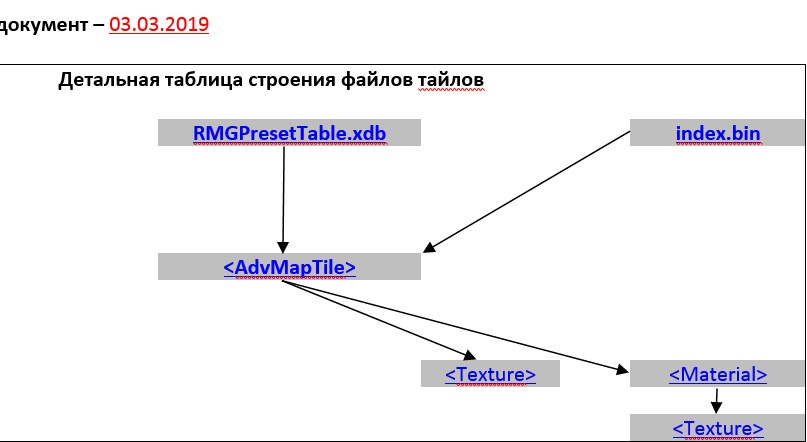
Tile File Structure
In this document, I will describe my knowledge of the structure of the files related to the tiles of the game Heroes of Might and Magic 5. Based on the knowledge in this document, it will be easier for you to understand how it all works and you will be able to modify and add new tiles to the game.

Download the document Tile File Structure.docx
User Avatar
7 years ago
Auto-translated
Guys, can you tell me how to make the movement speed of the Renegade Knights (RedHeavenHero) the same as that of all standard heroes?
In reply to Nagron
7 years ago
Auto-translated
Could you please tell me how to remove the morale penalty/bonus if a hero belongs to a faction with a different alignment or to a faction whose troops he commands? If I set TownType=TOWN_NO_TYPE for each hero, will this solve the problem, or will it break something?

Statistics

Welcome our newest member: recijeb