

Skip to content

Posts from Ask your question here if you can’t find the answer in the FAQ.

3.5 (2 ratings)
Auto-translated
Good day!
A long time ago, I bought the "Gold Edition" disc of the fifth installment of "Heroes of Might and Magic". There were no problems; I successfully installed it, played it, and later deleted it, putting the disc away for a better time.
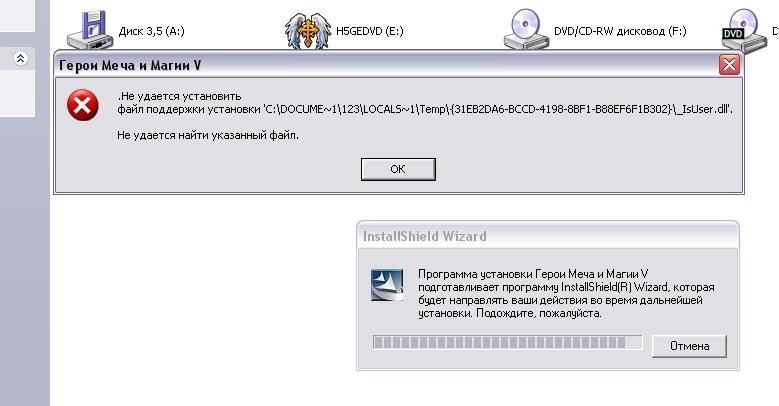
And now, today, when I try to install any of the versions (Original, Hammers of Fate, and Tribes of the East), this message appears, attached below.
After clicking the "OK" button, everything simply closes completely.
Auto-translated
The issue is this: my friend and I bought Heroes 5, and at first, we couldn't figure out how to play online. Then we realized we needed to create accounts on UPLAY, which we did, but [censored] – he can't join my game, and I can't join his. We can't add each other as friends, and we can't view each other's profiles either. I've searched the forums everywhere for this issue, but there's no answer. Some say it's a ping or internet issue, but [censored], everything is fine with that. Please help and explain.
In reply to Help me please
User Avatar
Auto-translated
Help me please
The issue is this: my friend and I bought Heroes 5, and at first, we couldn't figure out how to play online. Then we realized we needed to create accounts on UPLAY, which we did. However, [censored], he can't join my game, and I can't join his. We can't add each other as friends, and we can't view each other's profiles either. I've searched the forums everywhere for this issue, but there's no answer. Some say it's a ping or internet issue, but [censored], everything seems fine with that. Please help and explain.

Install Tunngle, for example (to create a virtual local network), and play peacefully through the local network. The game versions and modifications must be the same.
Кампании для Heroes V 3.1 (Трилогия):

Пробуждение зла
Нашествие из Преисподней
Смена эпох

Скачать все кампании одним архивом: Яндекс.Диск Google.Диск

You can download the set of 3 Campaigns (English version) here


Одиночные сценарии Heroes V 3.1:


Незваные гости
Красный кристалл
Синий кристалл
Закат тьмы

Мультиплеерные карты для Heroes V 3.1:

Легендарная война
Сердце вулкана
Передел мира
User Avatar
Auto-translated
Yes, it's easier through a local network...
If you still need to do it specifically through Ubisoft's servers, please describe the problem in more detail. Where did you try to add them as a friend (on the Ubisoft website or in the game), what did you click on... The more information, the better. Ideally, include screenshots.
 

К А
Стикеры GBF в Telegram
Auto-translated
Hello. I have the following problem. About a week ago, I bought Heroes 5: Tribes of the East on Steam. But I encountered an issue. When I try to play through Ubi – while attempting to create a game or connect to a game – I receive the message "The game server has disconnected." The same thing happens when I try to create a game on a local network. However, on my laptop, I can play on a local network through Hamachi without any problems. The system is Windows 7 Ultimate x64 on both the laptop and the computer, and the same versions of Windows are installed on both from the same disk. I have tried reinstalling the game, and I even reinstalled the operating system on the computer, but it doesn't help.
652461049 - icq
User Avatar
Auto-translated
Which version? The original, 3.0? Have you tried patching it? Are any downloaded mods/maps installed?
The same thing happens when trying to create a game on a local network.
Does it fail to create the game, or are people unable to connect to you?
 

К А
Стикеры GBF в Telegram
In reply to Ment
Auto-translated
Ment
Which version are you using? The base game, version 3.0? Have you tried patching it? Do you have any downloaded mods/maps?

Is it not creating a game, or are others unable to connect to you?

1. Version 3.1 downloaded from Steam. No mods, no maps, just the base Steam version. 2. It's not creating a game.
652461049 - icq
User Avatar
Auto-translated
A. Well, I think it's an antivirus/firewall. More likely the latter; the former is always recommended to be disabled, but in practice, I haven't seen it interfere. However, the firewall often blocks things. You need to add the game to the exceptions list, something like that. Or have you already tried that?
 

К А
Стикеры GBF в Telegram
In reply to Ment
Auto-translated
Ment
A. Well, I think it's an antivirus/firewall. More likely the latter; the former is always recommended to be disabled, but in practice, I haven't seen it interfere. However, the firewall often blocks connections.
You need to add the game to the exceptions list, or something like that. Or have you already tried that?

Yes, I even disabled it. It doesn't help. Sometimes the game is created, but it never connects. And I can't connect to me either; the same error occurs. Sometimes error 0.18.0 popped up, but it hasn't appeared for now.
652461049 - icq
User Avatar
Auto-translated
For now, there are no more ideas. We'll wait for more people to contribute.
 

К А
Стикеры GBF в Telegram
Auto-translated
Hello everyone! Has anyone encountered the following problem: We were playing together in local multiplayer, and we saved the game frequently. At a certain point, when loading the save, the following situation occurred: The second player cannot join the local server; a notification appears: "You are not mentioned in this game's save." In turn, the player who created the server sees a lock in the slot where this player should be, and this lock cannot be changed to anything else (an error message appears: "The player slot is locked"). We did not change the profile names. We tried restarting the game, but it didn't help. Is it possible to fix this by editing the save files? We were playing "Tribes of the East." Version 3.1 I would be grateful for any help or advice!
User Avatar
Auto-translated
The Castle seems to be working fine.
Have you tried loading other save files? Maybe it's just a one-time bug?
 

К А
Стикеры GBF в Telegram
In reply to Ment
Auto-translated
the server doesn't launch any of the three saved multiplayer games.
In reply to VafL
User Avatar
Auto-translated
VafL
Hello everyone!

Has anyone encountered the following problem:
We were playing together in local multiplayer, and we saved the game frequently.
At a certain point, when loading the save, the following situation occurred:
The second player cannot connect to the local server; a notification appears: "You are not mentioned in this game's save."
At the same time, the player who created the server sees a Castle in the slot where the other player should be, and it is also impossible to change it to anything else (the message "player slot is locked" appears).

We didn't change the profile names.
We tried restarting the game, but it didn't help.
Is it possible to fix this by editing the save files?

We were playing "Tribes of the East".
Version 3.1

I would be grateful for any help or advice!

This usually happens when one of the players' game crashes while saving (the internet connection is interrupted, etc.). In this case, the autosave from the previous turn should load.
Another possible scenario is that a player created a new profile in the game and is trying to log in with it (this happened to me).

It will not be possible to fix the save.
Кампании для Heroes V 3.1 (Трилогия):

Пробуждение зла
Нашествие из Преисподней
Смена эпох

Скачать все кампании одним архивом: Яндекс.Диск Google.Диск

You can download the set of 3 Campaigns (English version) here


Одиночные сценарии Heroes V 3.1:


Незваные гости
Красный кристалл
Синий кристалл
Закат тьмы

Мультиплеерные карты для Heroes V 3.1:

Легендарная война
Сердце вулкана
Передел мира
In reply to MasteR
Auto-translated
Please help with creating custom creature models, etc. What programs are needed?

Statistics

Welcome our newest member: Emil



