Connection ErrorBad RequestThis page went staleSession ExpiredSign in requiredForbiddenNot FoundToo Many RequestsServer ErrorBad GatewayService UnavailableGateway TimeoutHTTP Version Not Supported
Session Expired
Your session has expired. Please log in to continue.
Sign in required
You need an account to do that. Sign in or create one — it only takes a minute.
This page went stale
Your security token was rejected, usually because the page sat open too long or you signed in elsewhere. Nothing was saved. Reload the page and try again.
Request Failed
We encountered an issue while processing your request.
Please check your internet connection and try again.
Is there a way to culturally adjust the individual camera settings? Or is it just constantly tweaking numbers and reloading the game?
Here's this line: It's incredibly inconvenient and cumbersome:
I only know the method of "repeatedly clicking on numbers, which overloads the game." I completely agree that this method is extremely flawed, but unfortunately, I don't know of any alternatives. If you come up with a more convenient method, I would be grateful if you shared it on the forum.
Well, in the scene editor (a special mode within the map editor), there are definitely shortcuts: Message from a thread about creating videos (DialogScene) So, the scheme for partial automation looks like this: create some kind of dialog scene on any map with those "decorations" that you have in your hero/creature scene (the decorations, specifically the map with all these objects, will need to be found in the game's resources), place the creature itself as an actor (probably at position 0, 0), move the camera around, rotate it, and press E. Then see what coordinates the editor has determined for such a camera.
Perhaps, a similar scheme will work if you open the decoration map itself in the map editor as a resource. Because I know it can be opened; I’ve done it before, but I haven’t checked whether the shortcuts work then. Although, thinking about it, where would they record the camera positions in that case? So, probably not.
Regarding the values themselves, well, obviously x, y, z are just coordinates in cells, angles are in radians or something. And also, among the parameters that I used to mess with, pay attention to FOV. The internet suggests that this is field of vision, and it is usually in degrees, but the mechanics of how this thing works seemed more like focus to me (because changing it essentially brings objects closer to or further from the camera). I think you can get pretty good at setting everything up visually, either on the first try or the second.
Or maybe what I wrote will give you some other idea.
Well, in the scene editor (a special map editor mode), there are definitely shortcuts: Message from a thread about creating videos (DialogScene) So, the scheme for partial automation looks like this: create some kind of dialog scene on any map with those "decorations" that you have in your hero/creature scene (the decorations, specifically the map with all these objects, will need to be found in the game's resources). Then place the creature itself as an actor (presumably at position 0, 0), move the camera, rotate it, and press E. After that, see what coordinates the editor has determined for such a camera.
Thank you for trying to help, but there is a question that the author of the post in the link did not mention: where can I find this created camera assigned to the E button now so that I can see what values it recorded? xD
I don't remember well, but try using a space. Or "T" (English letter). In general, see the second page, starting with post 27: /topic/3747/ Anyway, all these things related to the video should be saved into an archive along with the map after closing the editor, and you can then view it using WinRAR as a text file. P.S. Of course, the question arises whether it wouldn't be easier to do it the old way than go through this hassle, but I'm just saying what I remember.
I don't remember well, but try using a space. Or "T" (English). In general, see the second page, starting with message 27: /topic/3747/ Anyway, all these things related to the video should be saved in an archive along with the map after closing the editor, and you can then view it using WinRAR as a text file. P.S. Of course, the question arises whether it wouldn't be easier to do it the old-fashioned way than go through such trouble, but I'm just saying what I remember.
Space and T didn't help; it's not that. But I think I accidentally found it. Now the question is different =) What to click where xD The first couple of tests showed that the camera falls deep underground =)
Well, yeah. Rod is transferred to Rod anchor -> xyz in pos -> xyz fov in fov, you've already transferred that pitch, yaw, and roll should be rot -> x, y, and z respectively. I'm not 100% sure about this, because as you can see, the notations are different, but it's clear that both refer to angles. And judging by the fact that roll = 0 and rot-z = 0 (approximately), it's most likely the same thing – the camera's tilt relative to the horizon.
In this diagram, the axes are probably labeled incorrectly, not like ours, but you can see the angle notations.
Well, yeah. Rod is moved to Rod anchor -> xyz in pos -> xyz fov in fov, you've already moved that pitch, yaw, and roll should be rot -> x, y, and z, respectively. I'm not 100% sure about this because, as you can see, the notations are different, but it's clear that both refer to angles. And judging by the fact that roll = 0 and rot-z = 0 (approximately), it's most likely the same thing – the camera's tilt relative to the horizon.
I've put this on hold for now, I can't seem to get it to work. And I made a camera using a makeshift (clumsy) method. But I'll have to try again later =)
By the way, I found that the individual camera works in the hero's window from the adventure map, and also in battles.
BUT it doesn't work in duel mode; my moved camera isn't used there, but the one in the first screenshot in the topic header is used. It's a rather interesting phenomenon. Although the xdb of the duel hero refers to the mapobject of the hero, which specifies the individual camera. C - Strangeness
Yes, the new camera will not work in duel mode and if you open the hero menu from the city garrison menu. There, it refers to something else, something universal for the entire faction.
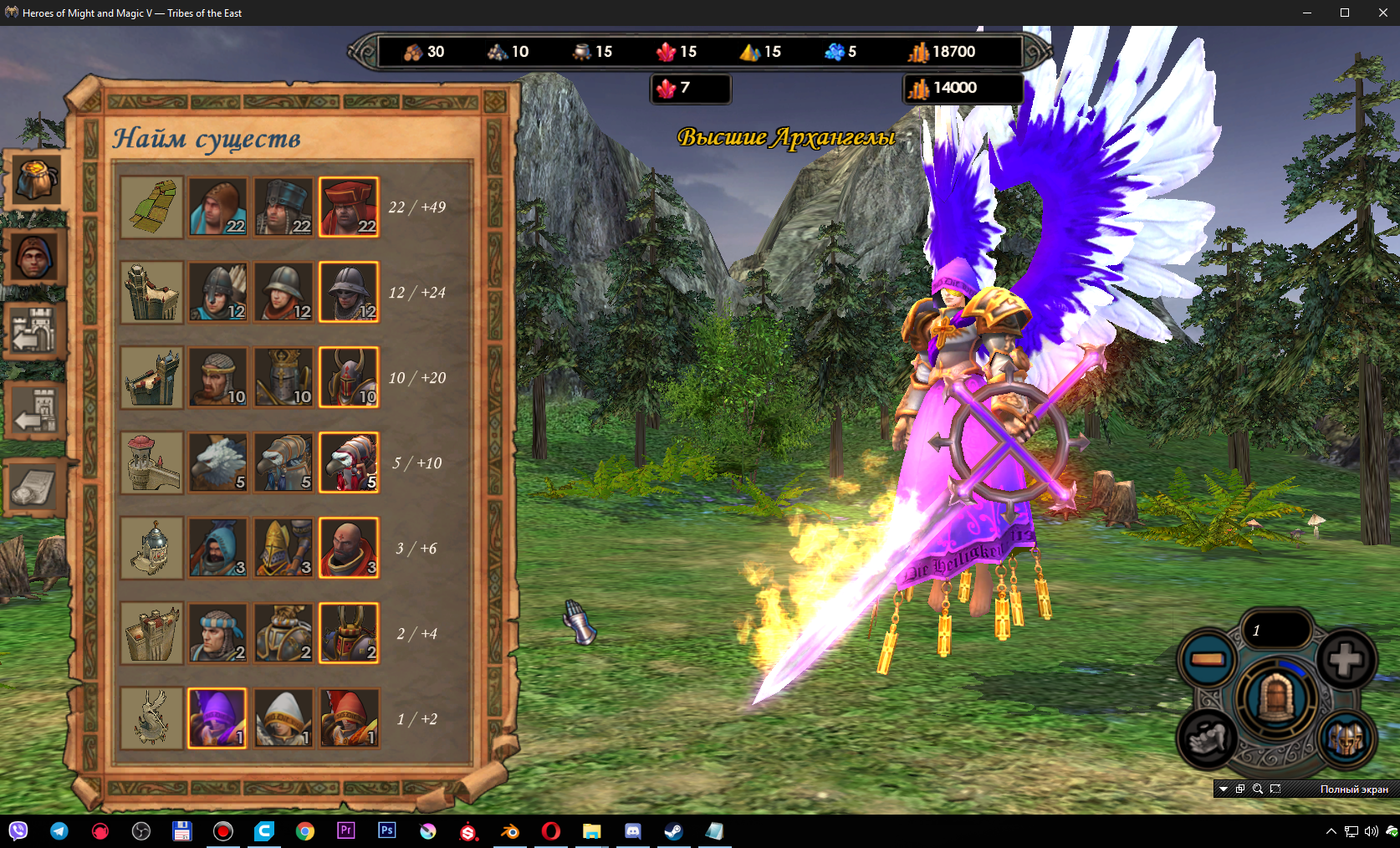
Here's a question: how do you change the camera position during recruitment? Or rather, I can create a new camera for a creature; I know where it's created. BUT, in which file do I create a link to the newly created camera? I thought the creature's camera would be in the CreatureVisual file as a separate line, like it is for heroes, but I couldn't find it there.
I need the camera for the Greater Archangels to be the same as the Archangels and Seraphim.
Added 9 hours and 57 minutes later
I solved the problem thanks to an Estonian user =)
For those who need it, here's the solution:
I extracted the recruitment camera of the Death Knight from RIDER and inserted it into Archangel; it all worked.



 Waterfall_13