Connection ErrorBad RequestThis page went staleSession ExpiredSign in requiredForbiddenNot FoundToo Many RequestsServer ErrorBad GatewayService UnavailableGateway TimeoutHTTP Version Not Supported
Session Expired
Your session has expired. Please log in to continue.
Sign in required
You need an account to do that. Sign in or create one — it only takes a minute.
This page went stale
Your security token was rejected, usually because the page sat open too long or you signed in elsewhere. Nothing was saved. Reload the page and try again.
Request Failed
We encountered an issue while processing your request.
Please check your internet connection and try again.
Error Details:
Share Link
Current questions and answers regarding the map editor.Auto-translated
Godric's Hollow, your script will not work correctly if there are insufficient resources. But this is a minor issue. The castle destruction is handled by the RazeTown() function, and that part is correct. I haven't experimented with it, so I can't offer any practical advice, but it is described in detail in the official documentation, and it doesn't seem to be particularly complex (except for creating the model of the destroyed castle):
RazeTown
RazeTown – raze a town on the map
Syntax
RazeTown(townName);
Description
Removes the specified town from the map and replaces it with a static object – razed town. The ‘razed town’ object is determined by the razedfield in AdvMapTownShared. If this field is empty, the town can’t be razed. The set of blocking tiles of the razed town must be the same as those of the original one’s. The razed town, as any other static object, must have no interactive tiles.
townName – town name
Warning!
The modifications made in the "Shared" properties of an object will affect all the objects of that kind in the game. If you want your modification to be effective only on a specific map, follow these steps: 1) Place on the map the desired object. 2) Go to the Shared field of that object. 3) In the Objects list, create a new folder (Right click - New Folder) with the name of your map. 4) Place in this folder a copy of the object you want to modify. 5) Make the desired modifications to the copy. For the modifications to be in effect, make sure that the path of the shared property leads to the copy.
РПГ-сценарий для HoMM5: Путь героя ЧаВо по созданию карт для HoMM5: ЧаВо
I know what's wrong; it's the main part, but there are another 10-15 lines. But the key problem is with replacing the castle model. Because then I want to use a similar function to turn ruins into a normal castle. Okay, I'll keep trying, maybe something will work.
Added 1 minute ago
I also read the manual; I'll read it again tomorrow, maybe I'll come up with something.
How can I implement a check to ensure that a battle has been completed? In my case, if a battle has been fought, touching another object triggers the completion of the task.
Godric's Hollow, if it's a battle with a monster, the easiest way to check for the monster's presence on the map is to use IsObjectExists(). If it's a hero, there's a trigger for the hero's death.
РПГ-сценарий для HoMM5: Путь героя ЧаВо по созданию карт для HoMM5: ЧаВо
No, it’s not a battle with a monster, but a scripted event triggered by touching an object. I know how to handle battles with monsters, but I’m still figuring this one out.
I wrote a script, a thread that checks if certain key guardians have been visited, and displays a message depending on the conditions. It works as I need it to, but for some reason, it completely floods the console with warnings. Help me figure out what's wrong.
Scripts:
```
function StartKeyMasterObserv()
Trigger(NEW_DAY_TRIGGER, "StartKeyMasterObserv", nil);
print("Start keymaster observe thread");
startThread(CheckKeyMasterFoundThread);
end;
function CheckKeyMasterFoundThread()
GreenKeymasterMessageNotShow = true;
RedKeymasterMessageNotShow = true;
TanKeymasterMessageNotShow = true;
repeat
if HasBorderguardKey(PLAYER_1, GREEN_KEY) and GreenKeymasterMessageNotShow then
GreenKeymasterMessageNotShow = false;
MessageBox(GetMapDataPath().."KeymasterMessage/Green.txt");
end;
if HasBorderguardKey(PLAYER_1, RED_KEY) and RedKeymasterMessageNotShow then
RedKeymasterMessageNotShow = false;
MessageBox(GetMapDataPath().."KeymasterMessage/Red.txt");
end;
if HasBorderguardKey(PLAYER_1, TAN_KEY) and TanKeymasterMessageNotShow then
TanKeymasterMessageNotShow = false;
MessageBox(GetMapDataPath().."KeymasterMessage/Tan.txt");
end;
sleep(5);
until(HasAllKeymasterFound())
end;
function HasAllKeymasterFound()
if HasBorderguardKey(PLAYER_1, GREEN_KEY) and HasBorderguardKey(PLAYER_1, RED_KEY) and HasBorderguardKey(PLAYER_1, TAN_KEY) then
MessageBox(GetMapDataPath().."KeymasterMessage/All.txt");
print("Keymaster thread finish");
return true;
end;
return false;
end;
```
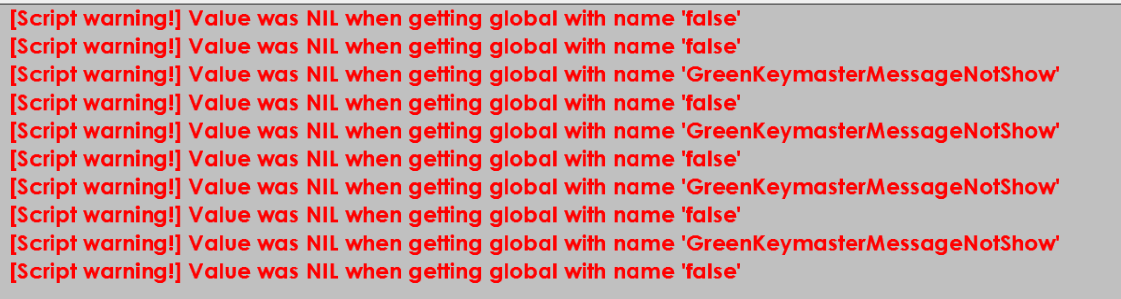
Warnings:
I wrote a script, a thread that checks if certain key guardians have been visited and, depending on the conditions, displays a message. It works the way I need it to, but for some reason, it completely clutters the console with warnings. Help me figure out what's wrong. Scripts:
function StartKeyMasterObserv()
  Trigger(NEW_DAY_TRIGGER, "StartKeyMasterObserv", nil );
  print("Start keymaster observe thread");
  startThread(CheckKeyMasterFoundThread);
end;
function CheckKeyMasterFoundThread()
  GreenKeymasterMessageNotShow = true;
  RedKeymasterMessageNotShow = true;
  TanKeymasterMessageNotShow = true;
  repeat
        if HasBorderguardKey(PLAYER_1, GREEN_KEY) and GreenKeymasterMessageNotShow then
        GreenKeymasterMessageNotShow = false;
        MessageBox(GetMapDataPath().."KeymasterMessage/Green.txt");
    	end;
    	if HasBorderguardKey(PLAYER_1, RED_KEY) and RedKeymasterMessageNotShow then
         RedKeymasterMessageNotShow = false;
    	 MessageBox(GetMapDataPath().."KeymasterMessage/Red.txt");
    	end;
      if HasBorderguardKey(PLAYER_1, TAN_KEY) and TanKeymasterMessageNotShow then
         TanKeymasterMessageNotShow = false;
         MessageBox(GetMapDataPath().."KeymasterMessage/Tan.txt");
      end;
      sleep(5);
  until(HasAllKeymasterFound())
end;
function HasAllKeymasterFound()
  if HasBorderguardKey(PLAYER_1, GREEN_KEY) and HasBorderguardKey(PLAYER_1, RED_KEY) and HasBorderguardKey(PLAYER_1, TAN_KEY) then
     MessageBox(GetMapDataPath().."KeymasterMessage/All.txt");
     print("Keymaster thread finish");
     return true;
  end;
  return false;
end;
Warnings:
Replace the global variables so that they don't take the value nil, for example, with 1 and 0. And replace false everywhere with nil.
As a result, if all references to empty global variables (with a value of nil) are removed, the warnings will also disappear.
Thank you.
The way the code is structured here is a bit strange.
The problem lies in HasBorderguardKey(PLAYER_1, RED_KEY). If you access it by name, the function returns nil if the keyholder hasn't been visited, but when they have been visited, everything works fine. When I replaced the name with a number (HasBorderguardKey(PLAYER_1, 1)), along with the other recommendations, the notifications disappeared.
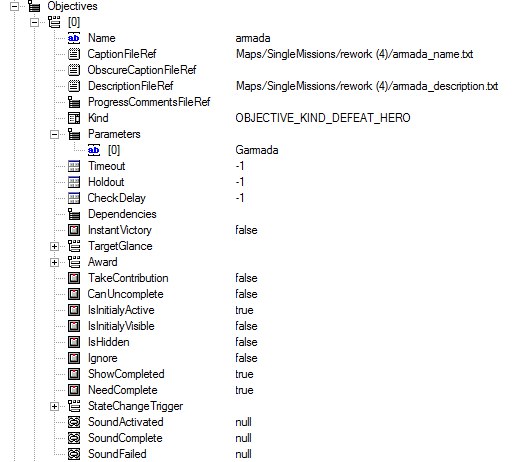
I have a question. I couldn't find any relevant information in the search results. Here's the question: I created a quest, but I want it to be initially hidden and only appear after it's "activated." I made a script, and it works, but the quest activation doesn't trigger any sound notification, and there's no icon at the top of the screen indicating that the quests have been updated. How can I fix this? (The quest itself appears correctly in the journal). Also, I noticed that when the quest conditions are met (e.g., killing an enemy hero), the quest doesn't automatically complete; it remains in the list. Here are the settings for this quest.
Set isInitialyActive to false and ShowCompleted to false as well, so that it disappears after completion.
Now, instead of the task name and description, the fields are empty, and it still doesn't register the completion. I'm wondering if the issue is with the script? I used the SetObjectiveVisible command there. Maybe I should change it to GetObjectiveState; would that make a difference?
`SetObjectiveVisible()` should affect the visibility of the quest in the interface. Perhaps if the second parameter is `nil`, something might be displayed incorrectly. Also, there's a possibility that quests of the type `KIND_DEFEAT_HERO` cannot be handled by the script. According to Jack_of_Shadows' guide, `KIND_MANUAL` is required for this. But I'm not sure about that.



 Jack_of_shadows