Connection ErrorBad RequestThis page went staleSession ExpiredSign in requiredForbiddenNot FoundToo Many RequestsServer ErrorBad GatewayService UnavailableGateway TimeoutHTTP Version Not Supported
Session Expired
Your session has expired. Please log in to continue.
Sign in required
You need an account to do that. Sign in or create one — it only takes a minute.
This page went stale
Your security token was rejected, usually because the page sat open too long or you signed in elsewhere. Nothing was saved. Reload the page and try again.
Request Failed
We encountered an issue while processing your request.
Please check your internet connection and try again.
Error Details:
Share Link
MMH5.5 - Heroes of Might and Magic 5.5Auto-translated
Help me understand the problem!
I have the Steam version of Tribes of the East, version 3.1, which is not localized. I found a Russian localization for it on Steam.
The problem is that when I play in "single-player" mode, the artifacts from the backpack don't work; they don't add any creatures or resources, or anything at all. And when I wear, for example, 2 out of 3 items from a set, it only shows 1/3 everywhere... Can you provide a guide on how to fix this so that it works in single-player mode?
Thank you!
Vedmed, hello! Regarding the "artifacts not working" issue, I suggest you try a different distribution; I have the Gold Edition installed (not Steam), and everything works. If you need a link to the source, feel free to contact me personally.
As for "1/3," the "set" description is static; it doesn't change depending on how many artifacts you've collected, and if I understood correctly what was said to me earlier, this cannot be fixed. However, the set bonus still applies.
Heroes 5.5 + NCF (Manual) / My templates / DeSync? / Русификация кампаний Required ARMG Settings:Monster Strength - Strong (3); Resources - Little (2); Experience - 3. AI Settings:Difficult - Heroic (3); Lookahead Depth - Normal (1).
The problem is as follows: network desynchronization occurs, approximately after the second month (all conditions to prevent desynchronization are met). Desynchronization only occurs after a battle with anyone; if you just run around, pick things up, and do nothing, everything is fine. This problem was never observed in the original game or in the "Era of Chaos" expansion, only here (latest version, beta 10.4). Any ideas about this?
rikzombie, hey! To be honest, I've only played 5.5 solo so far. You were talking about the conditions for preventing desynchronization... are you referring to this?
dredknight
Eight skills - Whenever you start a new LAN game using the 8th skills option, you must follow these steps; otherwise, desync is very likely to happen mid-game, and turns would not be passed. Also, some of the players (that do not have 8th skills on) may have some of their main heroes' skills changed/removed when loading a save game.
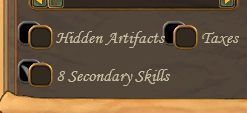
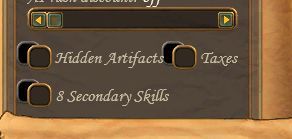
a) Before creating/joining a new or saved game, all participants must activate the 8th skills by going to Multiplayer -> Hot Seat -> Standard Game and marking the 8th skills option as shown here (Here is how it looks unmarked ).
b) Create/Join the game and play.
c) The 8th skills option should be ON before joining a saved game that has been started as such. If one or some of the players join without the option ON, the game will likely crash.
Note - The 8th skills option is automatically turned off every time the Heroes V application is closed. The save game does not include a note on how many skills the game started with, so check it every time when loading :).
And another important thing... you can't use the new AI in a LAN game; playing with AI in a LAN is only possible with the MMH55-Utility.exe file.
If you haven't seen anything like this before, I recommend translating it, reading it, and following the instructions written back in 2015.
If you have followed these conditions, and you are sure that your friend has followed them, then you need to describe the situation as detailed as possible: what happens, when, and how it happens, what are the launch parameters... everything that might help to understand what the error is.
Good luck!
PS: I found all this on Google... although I don't quite understand it. It says that EE won't work in a network game, but this isn't mentioned in EWA, and it seems to work. The only question is whether this problem also occurs in EWA.
Heroes 5.5 + NCF (Manual) / My templates / DeSync? / Русификация кампаний Required ARMG Settings:Monster Strength - Strong (3); Resources - Little (2); Experience - 3. AI Settings:Difficult - Heroic (3); Lookahead Depth - Normal (1).
Yes, that's correct. Version 3.1 was installed on both computers. We were running two maps downloaded from the internet (without AI, so there was no need for 5.5utility), patched with MMH55_Mapmixer, and copied to the other computer. All the "rules" were followed (specifically, those regarding 8 skills, saves, etc.). The game was launched using 5.5x64 on Windows 10x64.
Initially, everything worked fine. The difficulty was set to hero level (it's more interesting without resources), and we chose the races and random starts ourselves. The actions always differed. However, as soon as the second month arrives, around the second week, everything falls apart – desynchronization occurs after any battle, regardless of whether it's with map-bound monsters or "weekly" ones. The result is always the same. Only if we don't fight and just move around, collect items, etc., does everything work normally.
Regarding EVE (2.7.1 and previously 2.6.2), there were no such problems at all. We used the latest version of EVE (in 2.6.2, I downloaded it separately because you can only use 8 skills in HotA; in 2.7.1, the standard version was used).
We haven't tried playing HotA with 5.5, and I don't see how there could be any desynchronization there.
I can send you the save files from both computers, as well as the profile from the documents folder. Maybe this will help in investigating the problem.
P.S. I forgot to mention that we always used mayors in the cities. Once we appointed them, they stayed there behind the walls
@rikzombie, this kind of desyc happens when <game folder>//data is not cleaned after you have created the map. What both players should check before starting a map is go in <game folder>/data and delete the following files and folders (if exist): - index.bin - RMGTemp
You can check this guide. All known issues and preventions are described there.
Thanks for the tip, but I didn't create this map; I downloaded it from the internet, and there are no similar files in this folder. Regarding the link to the manual, I started with it, and everything was done according to these "rules," but as I said, nothing changed. In the end, we gave up and are playing HotS.
Oh.. the game crashes in hotseat? This has never happened before.
I assume it is either an installation issue or the map you play has its own scripts which break the mod. Try playing a default ToTe map that come with the game.
Hello. I've encountered a problem that after some time cursor starts changing into hourglass and back every half of the second or so. Reloading the game didn't help, rebooting too. Skipping some days didn't help either. Wat do? It's very irritating.
@rikzombie, desync happens because both installations (yours and your friend) are not the same. I would advise to prepare your MMH55 folder as per requirements for multiplayer, archive it and send it to your friend in order to be certain they are the same.
@Bowmore this is a known issue that appears when playing against the new AI. So far we have not found a solution for the issue.
I suppose you'd been told that a lot of times, but treasure building guard is very unbalanced vs external guards, even on medium. Is there a way to make the treasure buildings' guards easier without lowering monster strength to weak?
Yes there is a way. Open MMH55-SETTINGS.pak in <game folder>/data
The file consists of variables that allow twitching global balance and enabling/disabling some of the game features. It also allows lowering initial adventure sites strength level. Check this guide on how to edit the pak file.
Yes, there is a way. Open MMH55-SETTINGS.pak in <game folder>/data
The file consists of variables that allow tweaking the global balance and enabling/disabling some of the game features. It also allows lowering the initial adventure sites' strength level. Check this guide on how to edit the pak file.
Wow, thank you.
Added after 1 hour 53 minutes Bowmore
Wow, thank you.
Also, there's a Necropolis hero, Caspar, he moves way too slow on the adventure map compared to other heroes.



 Vedmed