Skip to content

Posts from Modding

No ratings yet — be the first to rate!
In reply to Manulli
5 years ago
Auto-translated
Hello. I'm making a small balance patch for myself and would like to know how I can change the amount of experience required for the sacrificial pit of the Dungeon faction to increase creature production. I think the Dungeon is too weak in the late game, but I don't want to directly increase the production rate of beasts and minotaurs, as these creatures are already quite strong, and I've already increased the production rate of assassins. I understand that the answer is probably already on the forum, but it would take a lot of time to find it, so I decided to ask here. Thank you in advance!

User Avatar
5 years ago
Auto-translated
Technical post: fixing the thread.
User Avatar
5 years ago
Auto-translated
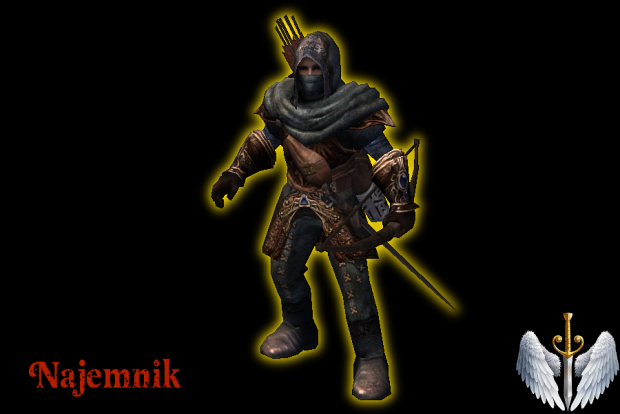
Good evening, fellow forum members! Does anyone know where I can find a "working" version of the "Chaos Theory" mod? I mean, where can I download it?
https://www.moddb.com/mods/homm-5-chaos-theory/downloads At this address, you can download "Neutral Creatures," and there's an archer I'm interested in. But all the texture files in the mod don't open and cause an error – "index was out of bounds of the array." Also, does anyone know where I can find these guys? -> Mercenary update
User Avatar
5 years ago
Auto-translated
The file system in that package I downloaded is awful... It's just a mess. And overall, it's terrible. One camera for all creatures, heartbreaking cries from the angel, low-quality icons, no animations, poor effects. In short, everything needs to be redone to fit the Zakhara system. smile01
User Avatar
5 years ago
Auto-translated
}{0TT@6bI4

I can't help with the little guy in the picture, but in the file at the link - "NCF Neutral Creatures", all the textures open without errors. And the textures of the archer, if that's him , also - .
Maybe your DDS plugin has crashed or is broken.
I recently updated my programs for viewing and editing DDS format, maybe something will be useful to you:
For viewing images and DDS format - Imagine_1.1.1_x64_Unicode.rar (except for new DDS formats like and the like).
For simple viewing and re-saving in other formats (including new DDS formats like ) - NVIDIA_Texture_Tools_Exporter_2021.1.1.exe (It works independently through an exe file (you don't need to install it, you can unpack it with 7Zip and use the two files "FreeImage.dll and nvtt_export.exe")).
For Photoshop - NVIDIA_Texture_Tools_Exporter_for_Adobe_Photoshop_2021.1.1.exe (plugin, you can also not install it, but unpack it with 7Zip into the "Plug-ins" folder, for example, in - "C:\Program Files\Adobe\Adobe Photoshop 2020\Plug-ins") file "nvtt_export.8bi".
Attachments 2
2 files attached • Total size: 428.9 KB
User Avatar
5 years ago
Auto-translated
No, the archer texture, thank goodness, is normal; the sword texture too. The icon is broken, though, but it's easy to fix. However, most of the textures still don't open, and the problem is more likely with the files themselves than with my plugins, because in other cases, everything works fine. Still, thank you very much for the list; I'll save it.
In reply to }{0TT@6bI4
User Avatar
5 years ago
Auto-translated
}{0TT@6bI4
Good evening, fellow forum members! Does anyone know where I can find a "working" version of the "Chaos Theory" mod? I mean, which one. You can download "Neutral Creatures" at this address: https://www.moddb.com/mods/homm-5-ch...eory/downloads. It contains the archer I'm interested in. But all the texture files in the mod don't open and crash with a paint error - index was out of bounds. ->
I don't know if the question is still relevant, but I sometimes have problems with DDS textures as well. I don't have Photoshop; I use GIMP, and simply unchecking the "Loading mipmaps" option helps.
User Avatar
5 years ago
Auto-translated
Thanks, I’ll give it a try!
In reply to }{0TT@6bI4
User Avatar
5 years ago
Auto-translated
}{0TT@6bI4
Thanks, I'll try it!

I forgot to mention that when saving, you will definitely need to recreate the mipmaps, otherwise the texture will flicker a lot in the game.
In reply to Manulli
User Avatar
5 years ago
Auto-translated
Manulli

forgot to mention, when saving, you definitely need to regenerate the mipmaps, otherwise the texture will have a lot of artifacts in the game.
but for icons, you can't generate mipmaps - otherwise, on low graphics settings, the icon will look pixelated.
In reply to fktifzobr@mail.ru
5 years ago
Auto-translated
hello everyone!! I need help with mapmaking, specifically with adjusting mine settings.
Since I don't have much programming experience, I would appreciate it if someone could explain how to do this in detail.
1. Idea: Make gold mines produce 2000 gold per day instead of 1000.
2. Idea: Make mines constantly guarded. If a hero defeats the guards, a new, twice as strong guard appears.
In reply to JORAJAN
User Avatar
5 years ago
Auto-translated
JORAJAN
Hello everyone! I need help with map editing, specifically with adjusting the settings for mines.
Since I don't have much experience in programming, I'd appreciate it if someone could explain how to do this in detail.
1. Idea: Make gold mines produce 2000 gold per day instead of 1000.
2. Idea: Make mines constantly guarded, and if a hero defeats the guards, a new, twice as strong guard appears.
There might be some issues here. The mine's guards and the mine itself are two independent objects. You can organize the generation of new guards using a script (I don't know how to do this).
As for increasing the gold income from mines, I don't know where this is configured, and it might not even be possible to change, as it could be a fundamental game mechanic.
User Avatar
5 years ago
Auto-translated
The flow of resources from mines can also be organized using a script.
User Avatar
5 years ago
Auto-translated

Hello! Is it possible to disable the highlighting aura on the global map (like when pressing Alt or when the hero is behind an obstacle)? Is it tied to the model, or is it in the game engine itself? Because of it, models added through an effect are colored with the player's color, as in the screenshot below:

[spoiler=Screenshot below][/spoiler]

In reply to Andrias_Bartlett
User Avatar
5 years ago
Auto-translated
Andrias_Bartlett

Hello! Is it possible to disable the highlighting aura on the global map (like when pressing Alt or when the hero is behind an obstacle)? Is it tied to the model, or is it in the engine itself? Because of it, models added through an effect are colored with the player's color, as in the screenshot below:

Screenshot below
Nobody knows how to fix this(( Manulli solved this problem by changing the texture settings, but this can cause bugs with the transparency of the model, meaning that the legs of the model will be visible through the owl model.

Statistics

Welcome our newest member: recijeb