


 rebellious

Auto-translated
Various modules can be connected to the HoMM3 HD mod, which allow you to run the game with individual properties and features in terms of interface, font, game settings, and more.
To use the module, you need to install and connect it.
To install the module, simply unzip the downloaded ZIP file into the root (main) folder of the game. Errors often occur during installation when the user tries to independently determine their own path for copying it (the final location of the module file is already defined in the downloadable archive). The path to the modular (DLL library) file should always be of this type: D:\...\Heroes of Might and Magic 3\_HD3_Data\Packs\HW_rules_1.37\HW_rules_mod_1.37.dll.
To connect the module, click 'Connect' in the launcher in the "Plug-in Modules" field. After that, a window with a list of installed modules appears, where you select the desired one and then click 'Ok'.
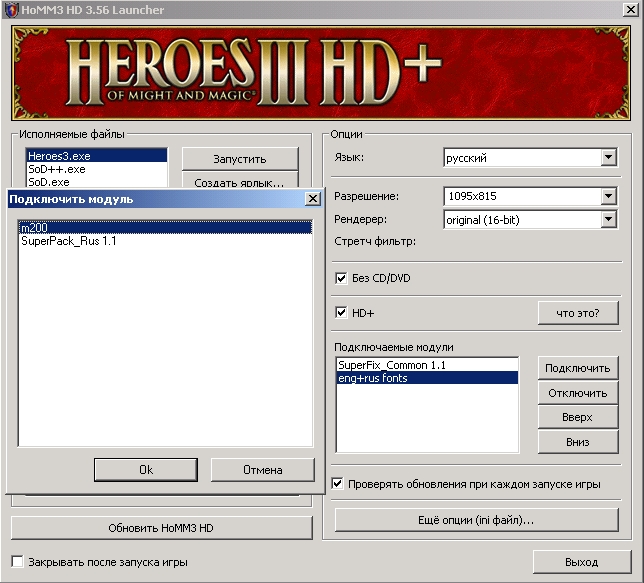 To disable the module, click 'Disable' for the selected one.
Note. Playing the game and connecting with the M200 module is only possible if your opponent also has it connected
To disable the module, click 'Disable' for the selected one.
Note. Playing the game and connecting with the M200 module is only possible if your opponent also has it connected
| Module Name | Module Properties and Application | Module Author | Original Location or Link |
Englification | - translates the game interface (graphics and text) into English. | baratorch | Download (5714 KB) |
| eng+rus fonts 1.0 | - adds the ability to correctly display Russian text in the English version of the game. | baratorch | Download (364 KB) |
| SuperPack_Rus 1.1 | - fixes graphical errors in the Russian localization of SoD by Buku, including overlapping text; - makes the RoE Campaigns in Russian in SoD; - can be used as a translator for any language version. | baratorch | Download (3919 KB) |
"HW rulez" mod for games in Tournamentsaccording to the forum rules | - when starting on a difficulty of 200%, you receive 2500 gold and 5 ore (in M200 tournaments); - ability to ban objects: cartographer, fort on a hill, obelisks (for the Grail map), keymaster tents, and much more in the topic. | WiZarDX_576 | Download (31 KB) |
Pack_Ukr | - translates the game and HoMM3 HD into Ukrainian (all game texts and graphics have been translated, as well as campaigns and all maps). | baratorch& Hurtom Localize Team | Download (12401 KB) |

