



Skip to content

Posts from Current questions and answers regarding the map editor. Auto-translated

5.0 (12 ratings)
In reply to Dogenator
User Avatar
#5914
Auto-translated
Dogenator
I followed the manual, added a new hero to AdvMapHeroShared, and specified the path to him in AdvMapSharedGroup in "Academy" and "Any". This is to ensure that the game recognizes the hero.

The only problem I encountered was adding face textures, so for testing purposes, I used textures from Or.
I launch the map, and the hero is not there.
Honestly, I don't know what else I need to do because I followed the "guide."

UPDATE: The file appears in the editor in AdvMapHeroShared, but the hero is still not in the game.
While you're waiting for a "shot in the dark" solution, create a test map with your hero so that it can be launched in the game and post it here. Someone will take a look, see the error, and respond.
In reply to Dogenator
User Avatar
#5915
Auto-translated
Dogenator

I watched Esto100nec's video, where he shows how to add objects to the Objects toolbar, but that's not exactly what I need.

I followed the manual, added a new hero to AdvMapHeroShared, and specified the path to it in AdvMapSharedGroup in "Academy" and "Any." This is to ensure that the game recognizes the hero at all.
The only problem I encountered was adding face textures, so for testing purposes, I used Oryn's textures.
I launch the map, and the hero is not there.
Honestly, I don't know what else I need to do because I followed the "instructions."

UPD: The file appears in the editor in AdvMapHeroShared, but the hero is still not in the game.

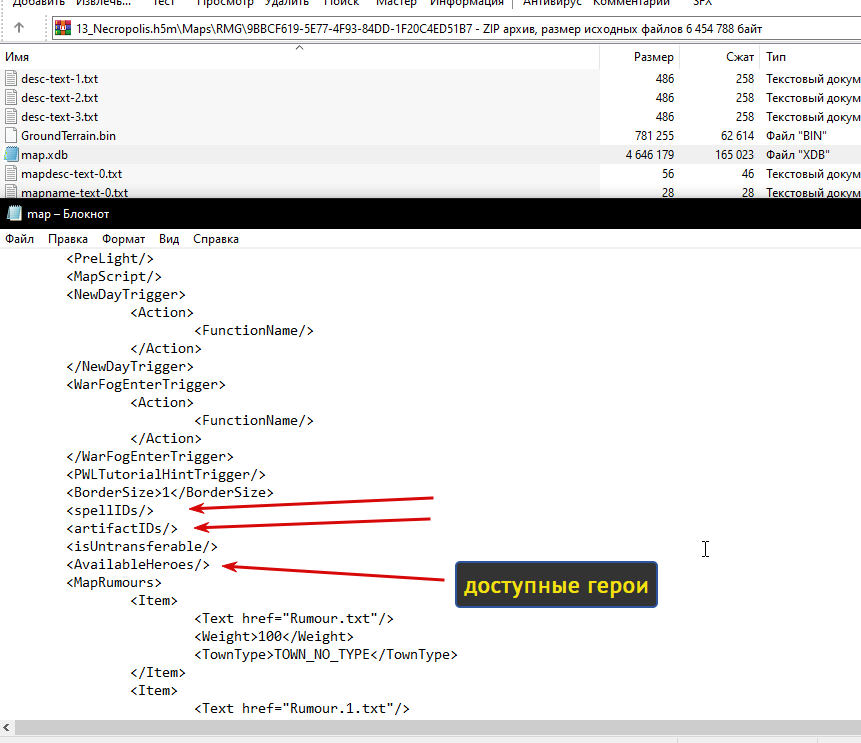
I don't quite understand what the problem is, but as a suggestion, I recommend checking if your hero is available in the map itself. Since maps are often "generated," the map editor enters a standard pool of heroes, artifacts, and other elements. This is the game's logic: to be able to prohibit something on a map, you must first allow it on the map. Therefore, when generating a map, all available heroes for the map are written into the map file (heroes from Campaigns are not included there, of course). I think your hero is not listed in the map as available for selection. You need to either add it or disable this function, as I did in my screenshot.
Ссылка на мой мод Heroes 5 Armageddons Blade

Ссылка на мои уроки по модостроению в Героях 5

Ссылка на мой Artstation
In reply to Waterfall_13
User Avatar
#5916
Auto-translated
Waterfall, thank you very much for your help. I added the hero to the map.xdb, and now he's on the map! For some reason, the editor doesn't allow me to add new heroes in the map properties tree. Also, could you tell me what might be the problem with the texture? Is the path specified incorrectly, or was the texture itself created incorrectly?
Attachments 1
1 file attached • Total size: 78.3 KB
In reply to Dogenator
User Avatar
#5917
Auto-translated
Dogenator
Could you also tell me what might be causing the texture issue? Is the path specified incorrectly, or was the texture itself created improperly?
Attachment 74080

It's overcompressed.
In reply to Dogenator
User Avatar
#5919
Auto-translated
Dogenator

How can I fix this?

In the editor you used for compression. Save it without compression and without mipmaps in dds format.
In reply to Mооnst@r
User Avatar
#5920
Auto-translated
Could someone please take a look at what I might be doing wrong with the textures? I've been at it for 1.5 hours, and nothing is working. The game is giving me an error saying that there is no icon for my character. The textures are located in: Textures\Icons\Heroes\Academy New hero: MapObjects\Academy\Storm_Caller
Attachments 1
1 file attached • Total size: 3.2 MB
User Avatar
#5921
Auto-translated
One error can be fixed by changing `<combatvisual` in the hero file. you can take this line from `gamemechanics\creature\creatures\academy` for the titan. i changed the icons, but the map won't launch. try to remember what you did. in the hero file, you can take this line from `gamemechanics\creature\creatures\academy` for the titan. i changed the icons, but the map won't launch. try to remember what you did. in the hero file. you can take this line from `gamemechanics\creature\creatures\academy` for the titan. i changed the icons, but the map won't launch. try to remember what you did. in the hero file, you can take this line from `gamemechanics\creature\creatures\academy` for the titan. i changed the icons, but the map won't launch. try to remember what you>
User Avatar
#5922
Auto-translated
Add a line and delete the Creature folder in GameMechanics; the error is somewhere there.
Attachments 1
1 file attached • Total size: 113.8 KB
User Avatar
#5923
Auto-translated
The texture of the icon with an error, Academy_Storm_Caller_128x128x64.(Texture).dds, has a white background. P.S. I've attached the icons without the white background. You can also add a personal camera to the hero using .
Attachments 1
1 file attached • Total size: 35.5 KB
In reply to Mооnst@r
User Avatar
#5924
Auto-translated
Mооnst@r
I changed the icons, but the map won't launch. Try to remember what you did.

Initially, the map launched, but the textures were compressed, as you said. Then, I created new textures, replaced them in the file, and after that, the game started giving an error: "Hero 'Storm_Caller' has no visual part."
I didn't do anything else.

Added 35 minutes later
Mооnst@r
Add the line and delete the Creature folder in GameMechanics; the error is somewhere there.

I added the line, and it really worked. I somehow didn't think it could be due to the "Combat visual" parameter.
I replaced the DDS images you sent; the background is transparent, and everything looks great. Did you add an alpha channel to the original image to get a transparent background?
I cut out the background, but it still appeared during export.

And the Creature folder doesn't affect anything; the problem was really in "Combat visual" and in the error in the texture name you specified.

Thank you for your time and help
In reply to Dogenator
User Avatar
#5925
Auto-translated
Dogenator

Initially, the map launched, but the textures were compressed, as you mentioned. Then, I created new textures, replaced them in the file, and after that, the game started giving an error: Hero "Storm_Caller" has no visual part.
I didn't do anything else.

I only replaced the icons, and the errors didn't disappear. The game doesn't launch. I checked my mod with the hero, removing the <combatvisual line, and the game stopped launching. I added it to your hero, but the game continued to complain about creaturevisual animcharacter. I deleted the creature folder, and the game launched along with>
These aren't the icons; they have nothing to do with it. There were other changes, but they can't be found due to the update of the date and time of the map files.

I've attached the errors and the map (with the actions listed above).
In reply to Dogenator
User Avatar
#5926
Auto-translated
Dogenator
I added a line, and it really worked. I somehow didn't think it could be due to the "Combat visual" parameter.
I replaced the dds images you provided; the background is transparent, and everything looks great. Did you add an alpha channel to the original image to get a transparent background?
I cut out the background, but it still appeared when exporting.
I didn't add anything; it was already on the Titan icons; I just modified it slightly for you.
Dogenator
And the "Creature" folder doesn't affect anything; the problem was really in "Combat visual" and in the error in the texture name you pointed to.

I checked again just now: it doesn't launch the game with the "Creature" folder. It says what I mentioned above, and the original version of the HoMM V game cannot be found.

It's better to check it on a clean game.
In reply to Mооnst@r
User Avatar
#5927
Auto-translated
Mооnst@r


I checked again: the game doesn't launch with the Creature folder. It displays the error message mentioned earlier, stating that the original version of HoMM V cannot be found.

It's best to test it on a clean game installation.

I understand why the game doesn't launch with the Creature folder. The reason is that this map is designed for the "Universe" modification, if you're familiar with it. Consequently, that's why the game doesn't start for you.
The mod has its own executable file and data pack.
User Avatar
#5928
Auto-translated
Hello everyone. I was wondering how to give a unit a spellbook so that it can use 2 abilities, but I couldn't find anything on this topic. Could you please tell me where this parameter is set?