

Skip to content

Current questions and answers regarding the map editor.

User Avatar
#5915
Auto-translated
Dogenator

I watched Esto100nec's video, where he shows how to add objects to the Objects toolbar, but that's not exactly what I need.

I followed the manual, added a new hero to AdvMapHeroShared, and specified the path to it in AdvMapSharedGroup in "Academy" and "Any." This is to ensure that the game recognizes the hero at all.
The only problem I encountered was adding face textures, so for testing purposes, I used Oryn's textures.
I launch the map, and the hero is not there.
Honestly, I don't know what else I need to do because I followed the "instructions."

UPD: The file appears in the editor in AdvMapHeroShared, but the hero is still not in the game.
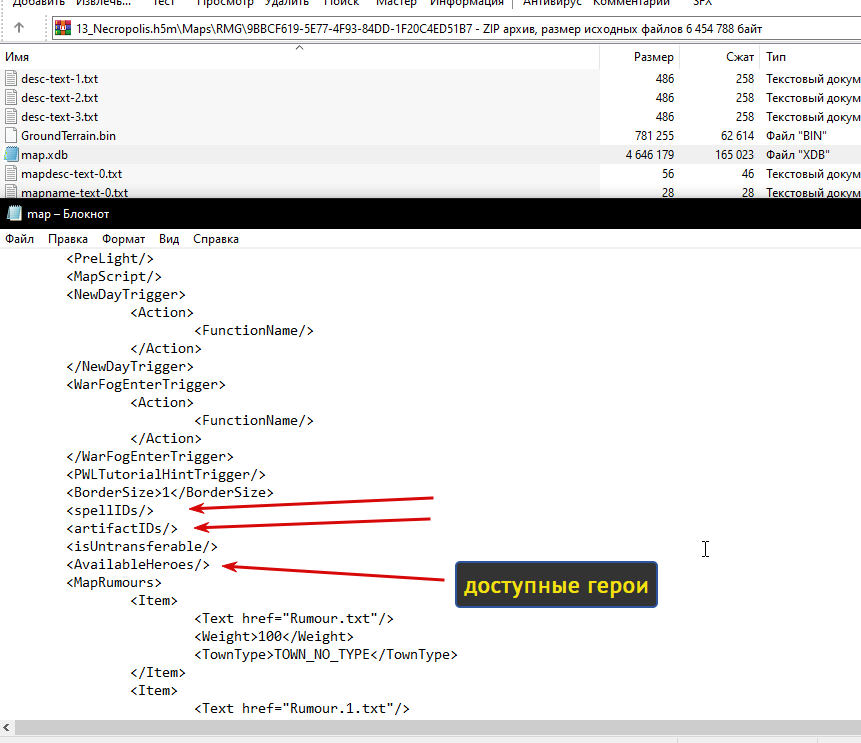
I don't quite understand what the problem is, but as a suggestion, I recommend checking if your hero is available in the map itself. Since maps are often "generated," the map editor enters a standard pool of heroes, artifacts, and other elements. This is the game's logic: to be able to prohibit something on a map, you must first allow it on the map. Therefore, when generating a map, all available heroes for the map are written into the map file (heroes from Campaigns are not included there, of course). I think your hero is not listed in the map as available for selection. You need to either add it or disable this function, as I did in my screenshot.
Ссылка на мой мод Heroes 5 Armageddons Blade

Ссылка на мои уроки по модостроению в Героях 5

Ссылка на мой Artstation

