Hello everyone!!!
I struggled for a long time (and as it turns out, so did others after the heated discussion following my post 😱) with adding key attributes to animations (the moment of striking an opponent, etc.). With sheer will and hundreds of attempts, I honestly stormed the depths of exporter settings, scoured almost every website mentioning the
gr2 format and everything related to it... but nothing worked. I had to find a workaround: - I found a converter program on the web called
GrannyConverter_ricky92.zip written by someone named
ricky92 (back in 2012); according to the author, it converts files from version 2.6 to 2.4. I decided to try it, and it worked. Now, briefly, as my brain is fried
(some of the points described below might not even be necessary, I'm just describing how I did it; I performed a minimum of experiments)I needed 3ds max 7 (which, by the way, works with ActorXImporter) and the plugin
expotron3Dsmax7.zip. In theory (probably), you can do without Maya (by creating some kind of dummy
.mb file), but I used it 😁, as I no longer have the strength for additional experiments.
After I prepared the model (without animation) in 3ds max and exported it from MAYA to
.mb (partially following the steps from the Manuals of this topic), I opened the map editor and performed an export of the skeleton and model. Then, I replaced the files in the
Skeletons and
GrannyGeometries folders with files exported from 3ds max 7 (
other .gr2 files version 2.6.0.10). During export, I specified the exporter settings files (the
.ges files located in .
..\Editor\MayaExport\) [
settings_skeleton.ges for the skeleton] and [
settings_geom.ges for the model (+ when exporting the model, I unchecked
"include reference in export" in the
meshes section for all bones except the mesh itself)], after which I deleted the
Geometries folder created during the map editor's model export and exported the model again (i.e., I didn't close it after the first skeleton and model export) so that the editor would optimize the replaced model from the
GrannyGeometries folder into the
Geometries folder (a message should appear in the editor log -
"Optimized geometry dumped ......"). Now you can close the map editor (
Most likely these file replacement manipulations are a waste of time - I haven't checked). Phew, is your head spinning too? Let's continue!
To save space, the rest is under the spoiler
And some images on how to add attributes to animation:
In the 3ds max scene with the attack animation, I added a Dummy 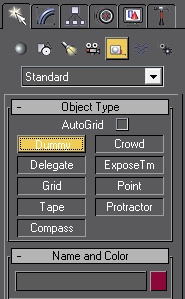 , renamed it to Global.Mark and attached it to the global bone Global, opened TrackView\CurveEditor and selected Dope Sheet
 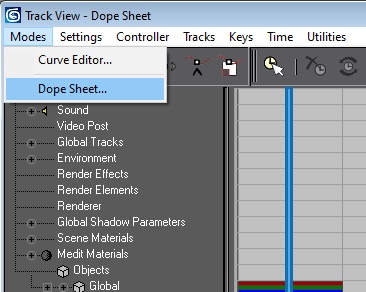 ; selecting Global.Mark in the list, I added a Note Track
 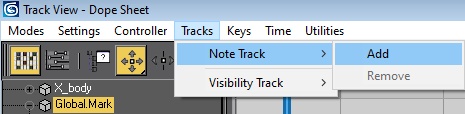 to it, then by selecting Note
 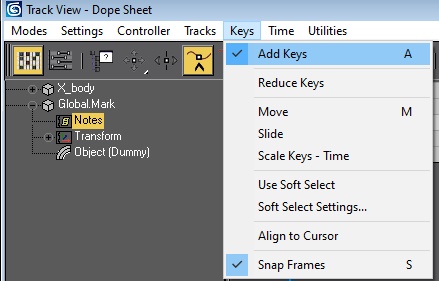 we add animation keys at the necessary moments
 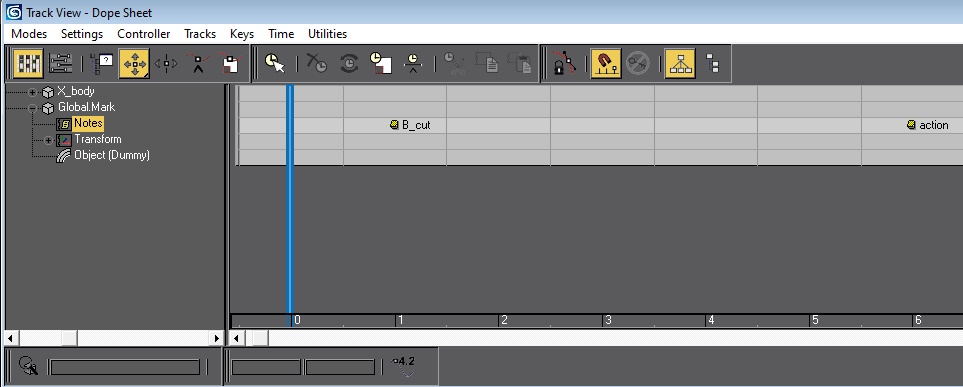 . Now you can export the animation via 3ds max 7 (in gr2 version 2.6.0.10) specifying the settings -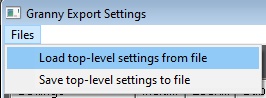
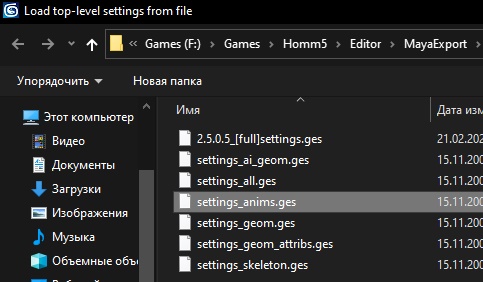
Next, I converted them using GrannyConverter_ricky92.exe( this is done by simply dragging and dropping the file; a file with the suffix ...._converted.gr2 appears next to it). After conversion, you can use the animation files ("...._converted.gr2").
I assume that: (but this is not certain)
B_cut and action are only involved in attack animations
B_cut - indicates that this is an attack animation
action - triggers the damage-receiving animation for the opponent
E_cut is involved in damage-receiving animations
E_cut - indicates that this is a damage-receiving animation
Extremely important for GrannyConverter_ricky92.exe to work: when exporting GR2 files from 3ds max 7, you must check the boxes ("Include exporter info" and "Include atr tool specific data") in the settings 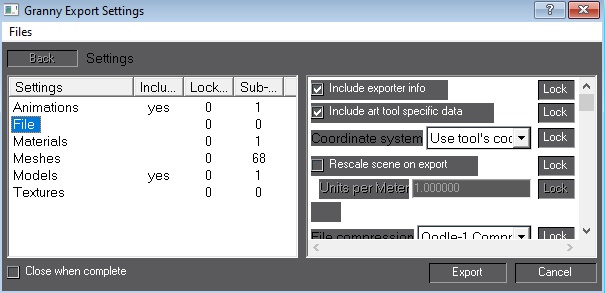
P.S. My Windows Defender rated GrannyConverter_ricky92.exe as a low threat.



 zahar0z



