

Skip to content

Posts from Modifying existing animations? Auto-translated

No ratings yet — be the first to rate!
In reply to footman
User Avatar
#46
Auto-translated
footman
The only hassle is the MovementSpeed parameter in the xdb files; you always have to adjust it randomly using the editor and see how accurately it's been set.

Does this parameter control the movement speed on the battlefield? In other words, how quickly does a creature "jump" from one cell to another?
Группа в вк посвящённая моим модам

Страничка моего последнего мода на ModDB

Моя страничка на Artstation,
где можно посмотреть и повертеть внутри браузера мои 3d модели.
In reply to zahar0z
User Avatar
#47
Auto-translated
zahar0z
Sometimes you come across unsuccessful builds, try downloading and installing a different one.
I have this issue with all max settings. I googled the problem, but no one has found a solution. In general, the most important thing is to do absolutely all the animations in one go, and do it correctly. It's very inconvenient, of course, but I can't do anything about it...
In reply to Elu
User Avatar
#48
Auto-translated
Elu
I just realized that the .gr2 skeleton is exported in the correct position, i.e., without a 90-degree tilt. It turns out I was exporting it correctly all along, but to attach it to the model in the game, I needed to tilt it by 90 degrees, and I didn't figure that out before.

It's amazing how everything is done in such a convoluted way...
Because we're not using their software; for the developers, it was probably automated and done with a single click.
Группа в вк посвящённая моим модам

Страничка моего последнего мода на ModDB

Моя страничка на Artstation,
где можно посмотреть и повертеть внутри браузера мои 3d модели.
User Avatar
#49
Auto-translated
The problem is that you can't import animations through the **editor**, so this parameter can't be set automatically. It seems that **CrazyPill** withheld some files for exporting them through the editor at the time.
In reply to Elu
User Avatar
#50
Auto-translated
Elu
I have the same issue with all maxed-out units. I googled the problem, but no one has found a solution. In general, the most important thing is to perform absolutely all animations in one go, and do it correctly. It's very inconvenient, of course, but I can't do anything about it...
In my opinion, it is impossible to work like this; you need to find the cause of the problem and solve it.

Added 54 seconds ago
footman
The problem is that you can't import animations through the editor so that this parameter is set automatically. It seems that CrazyPill withheld some files for their export through the editor.
It seems like someone is holding something back from you. It's not a fact that he had it. Most likely, he didn't.

Added 1 minute ago
zahar0z
Does this parameter control the movement speed on the map? That is, how quickly does a creature "jump" from one cell to another?
Are you talking about movement speed?
Группа в вк посвящённая моим модам

Страничка моего последнего мода на ModDB

Моя страничка на Artstation,
где можно посмотреть и повертеть внутри браузера мои 3d модели.
User Avatar
#51
Auto-translated
The animations created in the editor cannot be exported; the editor complains about the missing files containing the export settings.
In reply to zahar0z
User Avatar
#52
Auto-translated
zahar0z
Because we're not using their software; the developers probably had this automated and could do it with a single click.
That's definitely true. I wish we could get our hands on their software... But for now, I've noticed one thing: to avoid the objects rotating in the wrong direction, you need to check the rotation coordinates using Rotate. I've set everything to zero there; let's see what happens.
User Avatar
#53
Auto-translated
I'm not sure I can explain the significance of MovementSpeed correctly; it affects:
1) the speed of the movement animation per "step".
2) how many times the animation should play, depending on the animation speed, until the creature reaches the desired square.

Added 22 minutes later
zahar0z
By the way, you mentioned earlier that the new animation doesn't work well in cutscenes; is that still the case?
I said that the cavalry unit's movement animation loops incorrectly in Max, and it's even worse in Maya; yes, it's still the same.
User Avatar
#54
Auto-translated
footman, could you please provide more details on how you rotated the skeleton by 90 degrees and which program you used? I'm still having trouble getting it to work... And when I import your edited version back into Max, the rotation is lost.
User Avatar
#55
Auto-translated
In Maya, you rotate the bone globally along the X-axis by 90 degrees, and that's it. But in 3ds Max, it will import without any rotation. In general, it's better to create the animation first and then rotate it by 90 degrees.
User Avatar
#56
Auto-translated
I tried doing it this way. It still doesn't work. I must have messed something up somewhere... Okay, I'll figure it out tomorrow. It's late at night, so I should go and clear my head. I'm 100% sure it's some small error that's bothering me, so I'd better do everything tomorrow.
In reply to footman
User Avatar
#57
Auto-translated
footman
The fact is that animations cannot be exported through the editor; the editor complains about the lack of files containing the export settings.
And what makes you think that CrazyPill had these files? And why do you assume that someone is "withholding" something from you again?)

Added 2 minutes later
I've noticed that you often say "fact" and "I'm one hundred percent sure," but the information isn't always correct. I'm not trying to "attack" you, but I think it's best not to be so confident about things that haven't been fully verified.

Added 47 minutes later
Elu, to tilt the skeleton using the "global" bone, it must be the root bone (meaning the highest in the hierarchy) for all other bones in the skeleton. By the way, it might seem strange, but my animations, when tested with animations from Heroes 7, are exported normally without a 90-degree tilt.
Группа в вк посвящённая моим модам

Страничка моего последнего мода на ModDB

Моя страничка на Artstation,
где можно посмотреть и повертеть внутри браузера мои 3d модели.
In reply to Elu
User Avatar
#58
Auto-translated
Elu
I imported the skeleton and already animated it myself from scratch.

Cool! :smile54:

By the way, many creatures don't have animations for stir and happy – it would be really cool to finish what the Nival developers didn't implement!
С уважением, Psatkha (Псатха)

---------------------------------------------

Неудачное планирование ведёт к неудаче ...

NCF - мод, добавляющий дополнительных существ в HeroesV 3.1
In reply to psatkha
User Avatar
#59
Auto-translated
I haven't seen many of them, but who doesn't have a happy one?

And again, it's very difficult, almost impossible, to create complex animations using only one skeleton that was exported from Heroes 5. Without a headache, you can only normally do something on the level of "moving the model a couple of meters." (I'm talking about the movement animation for the ballista from Footman, by the way, it's a cool idea.)

But in general, when an animator creates an animation, they have various control elements attached to the skeleton that allow them to do their job properly.
This entire structure (a model with skinning on a skeleton and control elements for animation) is called a "rig" in the industry, and there are often separate people who create such a structure. By the way, it's a very in-demand profession in game development.
In short, to create normal animations, you first need to set up this "rig." In fact, Elu has already started doing this by attaching an inverse kinematic system to the skeleton. If someone manages to properly set up the skeleton and control elements during the process, it would be helpful to share this with the Community.

But, given our level of knowledge, it would be optimal to find a way to export normal animations from Heroes 5 and edit them (especially since such a method definitely exists). There's a lot of room for creativity here, without requiring special skills. You can simply slightly modify an animation, create an animation from different parts, and often you can reassign an animation from one creature to another, or create an animation from parts of different creatures. For example, I created an animation for a plate armor unit with an orcish flail on a chain (by reassigning the animation from orcs) and an animation for a foot pikeman (by taking the leg animation from Nicholas and the torso animation from an Empire rider). Then I deleted all the animations because I didn't think of how to import them into the game.
Группа в вк посвящённая моим модам

Страничка моего последнего мода на ModDB

Моя страничка на Artstation,
где можно посмотреть и повертеть внутри браузера мои 3d модели.
In reply to zahar0z
User Avatar
#60
Auto-translated
zahar0z
I haven't seen many people with good animations, but who doesn't have them?

And again, it's very difficult, almost impossible, to create complex animations using only one skeleton that was exported from Heroes 5. You can only normally create something on the level of "moving the model a couple of meters" without any headaches. (I'm talking about the movement animation for the ballista from Footman, by the way, it's a cool idea.)

But in general, when an animator creates an animation, they have various control elements attached to the skeleton that allow them to do their job properly.
This entire structure (the model with skinning on the skeleton and control elements for animation) is called a "rig" in the industry, and there are often separate people who create such a structure. By the way, it's a very in-demand profession in game development.
In short, to create normal animations, you first need to set up this "rig." Elu has already started doing this by adding an inverse kinematic to the skeleton. If someone properly sets up the skeleton and control elements during the process, it would be helpful to share this with the Community.

But, given our level of knowledge, it would be optimal to find a way to export normal animations from Heroes 5 and edit them (especially since such a method definitely exists). You can go wild here without any special skills. You can simply slightly modify the animation, create an animation from different pieces, often you can reassign the animation of one creature to another, or create an animation from pieces of different creatures. For example, I created an animation for a plate armor unit with an orcish flail (by reassigning the animation from orcs) and an animation for a foot pikeman (by taking the leg animation from Nicholas and the torso animation from an Empire rider). Then I deleted all the animations because I didn't figure out how to import them into the game.
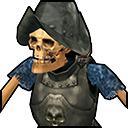
I don't remember... but there are such creatures!

By the way, I haven't gotten to the revision of the compiler with my developments for Heroes 5 yet... all sorts of utilities and plugins should remain, the only thing is that all this is scattered across a bunch of flash drives and hard drives! :smile04:

So, I uploaded the skeleton-axeman animation and moved some of its arm and leg bones because I armed it with a halberd... but during the movements, the halberd's shaft passed through the leg... in the end, I just broke the halberd's shaft and added the lower part of the shaft to the hand with the shield, and instead of the sword - the upper part... essentially the same axe... creature #296 (not published on my page, I don't remember why - this is a test version from 01/03/2012)

С уважением, Psatkha (Псатха)

---------------------------------------------

Неудачное планирование ведёт к неудаче ...

NCF - мод, добавляющий дополнительных существ в HeroesV 3.1