Connection ErrorBad RequestThis page went staleSession ExpiredSign in requiredForbiddenNot FoundToo Many RequestsServer ErrorBad GatewayService UnavailableGateway TimeoutHTTP Version Not Supported
Session Expired
Your session has expired. Please log in to continue.
Sign in required
You need an account to do that. Sign in or create one — it only takes a minute.
This page went stale
Your security token was rejected, usually because the page sat open too long or you signed in elsewhere. Nothing was saved. Reload the page and try again.
Request Failed
We encountered an issue while processing your request.
Please check your internet connection and try again.
Unfortunately, I didn't learn anything new. The question of how to apply a grid has been bothering me for several years. I need a working tool. When saving, I used to spend several hours analyzing views and calculating cells for serious party compositions.
In reality, there is no problem at all. In view mode, there are 3 zoom options: x1, x2, x2. Accordingly, you only need 3 grid options with a transparent background. Then just open the screenshot and press ctrl+V.
Once, Cobra mentioned that at a certain screen resolution, he could accurately determine which cell he would jump to using the Dimension Door spell.
You just need to learn how to manage layers. I'm too lazy to figure it out and install Photoshop; paint.net is enough for me.
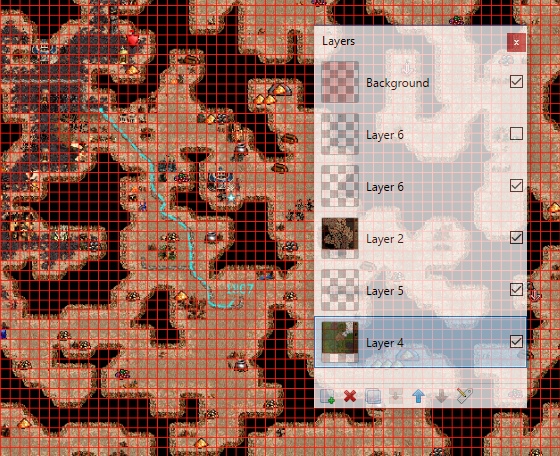
For a resolution of 1920х1080, one grid cell is 11х11 pixels. I open a pre-saved grid, then screenshot the views in x2 mode (that's only two screenshots per surface), and save them on different layers. Then I stitch each surface together. The grid is on a separate layer, so it can be easily toggled on/off. Similarly, potential Dragon Utopia areas and calculated routes between cities are kept on different layers.
This is what it looks like
I'm attaching my grid for the 1920x1080 game. In principle, if you stretch it correctly, it should work for all cases
I am constantly amazed by how much game design has advanced over time. And how much better dads are at the game compared to the average player who "was moving around units in 2000."
You just need to learn how to manage layers. I'm too lazy to figure it out and install Photoshop; paint.net is enough for me.
For a resolution of 1920х1080 - one grid cell is 11х11 pixels. I open a pre-saved grid, then screenshot the views in x2 mode (this way there are only two screenshots per surface), and save them on different layers. Then I stitch each surface together. The grid is on a separate layer, so it can be easily toggled on/off. Possible Dragon Utopia areas and calculated routes between cities are also on different layers.
This is how it looks
I'm attaching my grid for the 1920x1080 game. In principle, if you stretch it correctly, it should work for all situations.
I really liked Paint net at first glance. Our requirements regarding graphics work are quite primitive (except perhaps for layer support), and the fact that the program is intuitive and not overloaded with unnecessary functions in our case is a big plus. Plus, it's officially free.
I didn't quite understand the x2 part. On XL+U maps at x1, I need 2 screenshots per surface, and unfortunately, a thin strip remains along the edges. At x2, it would take 6 screenshots to fully cover the surface. On L maps, 4 screenshots in x2 and still two screenshots in x1. I assume that scale may vary between different players due to different monitor resolutions and HD mod launcher settings. I also have 1920x1080 and default HD settings (1180x664). Do you have different settings, or are there other factors affecting the scale?
I didn't quite understand the x2 part. On XL+U maps, with x1, it requires 2 screenshots per surface, and unfortunately, a thin strip remains on the edges. With x2, it would require 6 screenshots to completely cover the surface. On L maps, it's 4 screenshots with x2, and still 2 screenshots with x1. I understand that the scale may differ for different players due to different monitor resolutions and HD mod launcher settings. I also have 1920x1080, and the settings in HD are default (1180x664). Do you have different settings, or are there other factors that affect the scale?
I specifically have a 1920x1080 monitor and a 1920x1080 setting in HD. Anyone using other resolutions needs to take screenshots, stitch them together (it's convenient to stitch 2 layers, if you make one of the layers semi-transparent, overlay it on the other, and then remove the transparency), and then adjust my grid to the edges of the stitched result. After that, the grid should be saved separately so that it doesn't need to be adjusted every time.
If all of this is completely unclear how to do it, I can record a short video of how I do it in paint.net
Overall, the principle is clear. With a resolution of 1920x1080, both on the monitor and in the launcher, things are simpler.
In this case, a single x2 view will be 1584 pixels wide, and accordingly, 144 cells will be perfectly divided, resulting in 11 pixels per cell.
However, not many people play with such a resolution. The objects become small, and not everyone finds this comfortable. It's a matter of habit and taste; both options have their advantages. However, based on my observations, most people use the default settings, and I personally find that more comfortable as well.
With a resolution of 1920x1080 on the monitor, the launcher defaults to 1180x664, as I mentioned above. In this case, the width of the screenshot seems to be 1580 pixels. In the game, for an x2 screenshot, this corresponds to approximately 90 cells. Accordingly, it turns out to be 17.5 pixels per cell. And this is what puzzles me a bit. Half a pixel cannot be divided. If you create a grid of 17 or 18 pixels, it will shift towards the end by a few cells, which is not an option. Therefore, a perfectly even grid will not work; we need to subtly "borrow" pixels somewhere.
With the height, it's easier. There are 988 pixels on the screenshot and 55 cells in the game. This is 17.963 pixels per cell, which can be rounded to 18; it's unlikely to be noticeable to the eye.
As for the width, I don't yet know how to solve this properly. Most likely, we need to alternate: make one cell 17 pixels, and the next 18. Every 9 cells, have two consecutive cells of 18 pixels. This will probably not be very noticeable to the eye, in any case, it is clearly better than changing the grid thickness.
But I don't yet know how to draw this to see what it will look like
MicroElf, why bother when Nodl has already provided a graphical solution for this task? You create a complete image from as many screenshots as you want and then overlay Nodl's drawn grid on it.
(You can thank him for the grid :) )
I understand that patience and hard work will eventually lead to success, but I think it's better to practice and develop the ability to feel and solve such problems on the fly. But of course, this is just my opinion.
Mainly because I got a bit fixated on the idea of applying a grid to a specific screenshot, which turned out to be not that easy. And then it just snowballed :-)
First, you need to combine the screenshots into a single image, and then applying the grid should be much easier. Plus, there's already a ready-made grid for this version, so a big thank you to Nodl for that. I'm at approximately a zero level when it comes to working with graphics, but I think patience and hard work will eventually help me figure out the grid.
MicroElf and why, if Nodl has already graphically proposed a solution to this problem? You create a complete picture from as many screenshots as you want and overlay Noooodl's drawn grid on it.
Mainly because I got a little stuck.
Although I'm not sure anymore. According to my latest attempts, it seems to me more and more that my idea wasn't that bad after all. The point is that when overlaying (and, accordingly, stretching) the grid provided by Nodl, we certainly preserve the total number of cells, but the quality of the picture can hardly be called satisfactory.
Example of a fragment of the view:
And the same area in the game:
Looking at it, it seems that there is one free cell between the pile of gold and the road, while in reality there isn't. And in general, although the scale of the grid is correct (a long section of the road is 14 cells both in the view and in the game), it all looks very clumsy, and I doubt that it can be applied in practice in this form. It needs to be refined.
Another problem when gluing fragments into a single whole is the presence of frame elements, which are not so easy to remove. When selecting a strictly rectangular area, they "get into the frame." Accordingly, no matter which layer is on top, there will be a few corners in one place or another. In theory, they can be removed if you select a more accurate (non-rectangular) area and correctly adjust the order of the layers. But in practice, I haven't gotten to that yet.
Perhaps I just lack the skills to work with graphics to do everything correctly. But at the moment, I can't get a correct grid using this method. Has anyone else tried to "stretch" the existing grid (1180x664 in the launcher of the HD mod, 1920x1080 on the monitor)?
You can create a grid for viewing in HD. You can even export (save) an entire image of the view from HD. This would make the gameplay less tedious and more accessible to a wider audience. But it would be better to come up with some more elegant solutions, such as fixing the information from the ground and air on a regular view before the start of the next turn.
I'm all for it! The fact that there's no need to use third-party programs is a definite plus, and a significant one at that. If such functionality were available in HD, I wouldn't even consider using anything else. And I assume it would be more convenient functionally.
Ideally, I think the information obtained from the scouting should be available until the start of the next turn. Then you could calmly study the scouting during the opponent's turn, and no screenshots would be needed. There would be no need to stitch fragments together, overlay (combine) ground and air scouting, etc. No need for any complicated procedures – everything would be available to everyone within the game itself. And to prevent the grid from bothering anyone, you could make it so that if the grid is enabled on the map, it would also be on the scouting. And if the grid is disabled on the map, the scouting would also be without a grid. In my opinion, that would be ideal.
Although, the ability to export the scouting of an entire area (if that's what we're talking about) in a decent resolution would also be a useful addition. Firstly, in case a game is saved, it would allow you to study the scouting again without any screenshots or other workarounds. And secondly, it would allow you to view an old scouting, but without incurring new mana costs.
It would be possible to create a grid for viewing in HD. It would even be possible to export (save) an entire image of the view from HD. This would make the gameplay less tedious and more accessible to the masses. But it would be better to come up with some more elegant solutions, such as fixing information from the ground and air on a regular view until the start of the next turn.
Exporting would be really cool. If there is no export function, it will be impossible to exclude screenshots, because the distances between important points are displayed on them. It is too difficult to remember them.
since it won't be possible to remove it anyway, I think it would be best to implement this permanently for everyone. Those who are willing to go the extra mile with third-party programs and personal developments will only create general confusion and resentment towards the game. Learning to use all of this will be difficult, but the provided opportunity is "all that is needed."
It's possible to create a grid for viewing in HD. You could even implement an export (save) function to save an entire HD view as an image. This would make the game less tedious and more accessible to a wider audience. But it would be better to come up with some more elegant solutions, like fixing the information from the ground and air during a normal view until the start of the next turn.
Many years ago, I suggested that pressing PrintScreen should automatically save a screenshot to a folder like Heroes/Screens, as in many games. And I like the idea of saving views. If everyone is taking screenshots, let them do it without any hassle. Also, there's an idea to save a screenshot of the entire map (like in Heroes IV), but it might result in a very large file.



 Dirty_Player