Connection ErrorBad RequestThis page went staleSession ExpiredSign in requiredForbiddenNot FoundToo Many RequestsServer ErrorBad GatewayService UnavailableGateway TimeoutHTTP Version Not Supported
Session Expired
Your session has expired. Please log in to continue.
Sign in required
You need an account to do that. Sign in or create one — it only takes a minute.
This page went stale
Your security token was rejected, usually because the page sat open too long or you signed in elsewhere. Nothing was saved. Reload the page and try again.
Request Failed
We encountered an issue while processing your request.
Please check your internet connection and try again.
Error Details:
Share Link
Current questions and answers regarding the map editor.Auto-translated
function Player2LoseHero(looser, winner) if(looser == 'hero_name') then ... end end
Additional checks might be needed if the target hero can be lost in ways other than being killed by a player.
Before adding the second trigger, all cutscenes and the first trigger worked.
EnableHeroAI('Brem', nil);EnableHeroAI('Straker', nil);StartAdvMapDialog(0);function rewF()StartAdvMapDialog(1);end;Trigger(REGION_ENTER_AND_STOP_TRIGGER, "rew", "rewF" );
After adding the trigger for hero death and subsequent actions, all cutscenes and triggers stopped working.
EnableHeroAI('Brem', nil);EnableHeroAI('Straker', nil);StartAdvMapDialog(0);function rewF()StartAdvMapDialog(1);end;Trigger(REGION_ENTER_AND_STOP_TRIGGER, "rew", "rewF" );Trigger(PLAYER_REMOVE_HERO_TRIGGER, PLAYER_2, 'Player2LoseHero');function Player2LoseHero(looser, winner) if(looser == 'Brem') then StartAdvMapDialog(2); StartAdvMapDialog(3); CreateMonster(134,inferno,134,90,10,0,mood= MONSTER_MOOD_AGGRESSIVE,courage= MONSTER_COURAGE_CAN_FLEE_JOIN,rotation= 0 ); StartAdvMapDialog(4); StartAdvMapDialog(5); StartAdvMapDialog(6); StartAdvMapDialog(7); StartAdvMapDialog(8); end;end;
The parser probably crashed on this line.
Second, if the script crashes, it's good practice to check the console and provide the error message here (it can often help you understand the problem yourself).
Third, if you're aiming for a moderately complex scripted map (>200 lines of code), I recommend a different approach to code structure. Currently, all your initialization functions are located at the top level in a disorganized manner. As a result, even a small error in the code can cause the interpreter to crash, the scripts to stop working completely, and, most importantly, it becomes unclear where to look for the problem.
I recommend placing everything that is executed directly when the map starts into a separate function, supplementing it with periodic `print` statements:
This code is placed at the very end of the script, and when the map starts, we first look at the console.
If there is a syntax error in the code that the Lua interpreter cannot handle, the console will be empty; the `InitMap()` function will simply not be reached.
If everything is fine, the console will end with the line 'init finish'.
If we try to initialize something incorrectly, for example, we make a mistake with the region name "rew", the console will show:
init start init heroes OK some error in red font
and based on this log, it will be immediately clear in which lines to look for the error.
I removed the monster spawn and another cutscene. Now, the cutscenes play until the hero is killed, after which the game ends.
EnableHeroAI('Brem', nil);
EnableHeroAI('Straker', nil);
StartAdvMapDialog(0);
function rewF()
StartAdvMapDialog(1);
end;
Trigger(REGION_ENTER_AND_STOP_TRIGGER, "rew", "rewF" );
Trigger(PLAYER_REMOVE_HERO_TRIGGER, PLAYER_2, 'Player2LoseHero');
function Player2LoseHero(looser, winner)
if(looser == 'Brem') then
StartAdvMapDialog(2);
StartAdvMapDialog(3);
StartAdvMapDialog(4);
StartAdvMapDialog(5);
StartAdvMapDialog(6);
StartAdvMapDialog(7);
end;
end;
So, when a hero is killed, both tasks are marked as true, everything is completed, and the scenario automatically ends. It's unclear what the desired outcome is and what actually happens. If the goal is: the player kills a hero, final cutscenes are shown, and the scenario ends, then this can be implemented differently: we manually detect the hero kill event, show the cutscenes, and call the Win() function. The quest to kill the hero is then transformed into something else (the description can remain the same, but the task type is changed to manual).
Thank you, everything is working now. :) And another question. Is there a way to make the Dungeon editor brighter? I can only see the object when I select it. I tried searching for something useful on the forum, but I didn't find anything.
Is there a way to make the dungeon editor brighter?
You can either temporarily change the lighting type to daytime, or place a light source on some object and set its radius to 200-300; this will illuminate everything very brightly (you can add several such light sources in different places, and simply delete them before the release).
There seems to be something with the "light" setting; you need to click "add," set the color, and adjust the offset relative to the object (set the z-value to be greater than zero, and leave x and y at zero). If you take any tree, it will have only a few of these properties, making it easy to find the one you need.
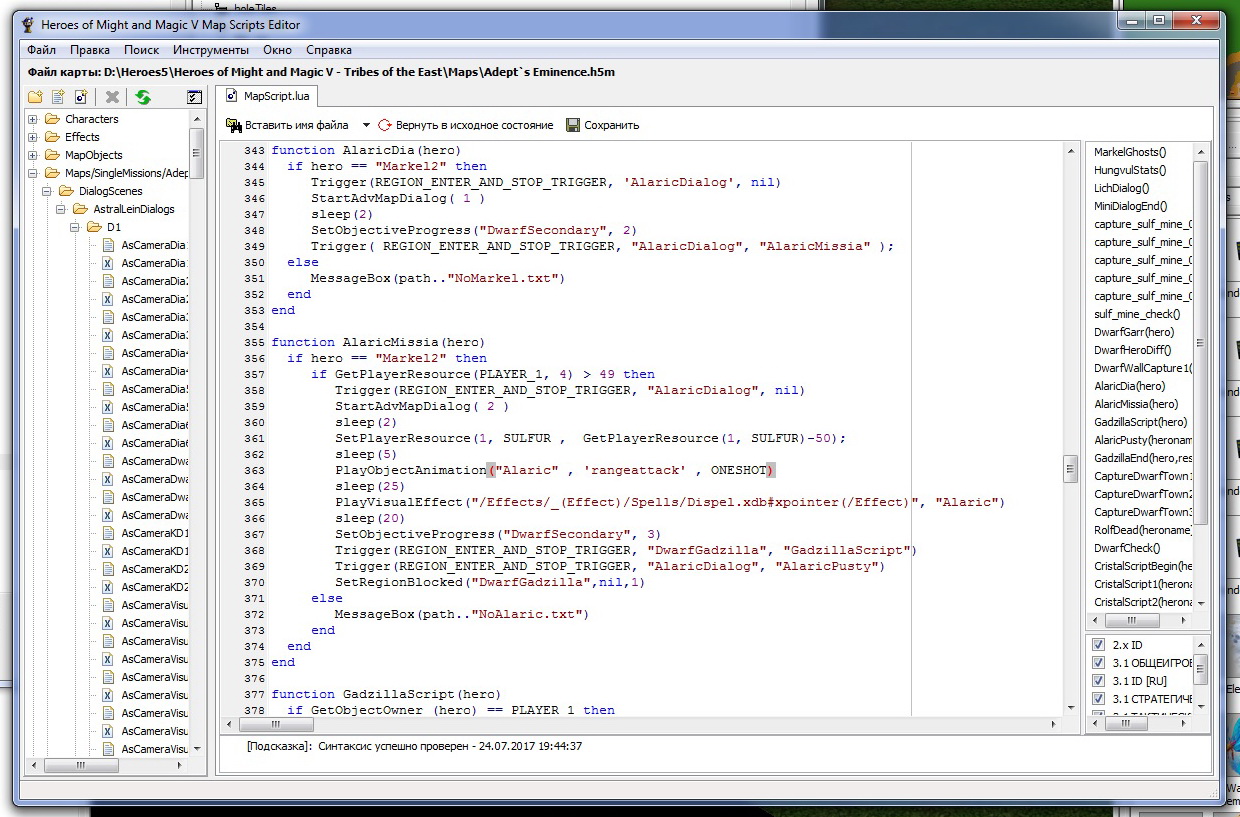
We have a script command that forces Alaric to play the casting animation once. However, nothing happens in the game; this command doesn't work, but the script continues to run without any issues. There are no errors in the console, and the same command works perfectly with neutral creatures.
Question: Is it possible to force a hero to play an animation using a script?
AstralLein, Alaric's AnimSet only lists idle00 and move. If these animations play correctly (which is likely the case), it means the standard animation function works for heroes as well. To make him cast spells on the map, you probably need to create a copy of Alaric (or modify the existing one) and change his animation list. I personally have never done this, so I can't offer any specific advice.
I'll take a look at the animations now; it's a good thing there's a specialist in this area.
Added 8 minutes later
Nope, all the animations are there. A complete set, plus three types of dialogue and much more. By the way, take a look at the script itself. It works, but feedback would be helpful.
Added 2 minutes later
Here's an addition to the task: How can I make the appearance of a quest update visible to the player without them having to know the method of "going into the quests and seeing what has changed"? The SetObjectiveProgress command doesn't affect the global map.



 Jack_of_shadows


 AstralLein