Skip to content

Posts from mod for experience gain in the campaign.

No ratings yet — be the first to rate!
3 years ago
Auto-translated
Hello. Is there a mod that removes the experience limit in the scenarios of the story campaigns? So that it would be possible to gain the maximum experience even on the first mission of a campaign. Sorry if I created the topic in the wrong place.
User Avatar
3 years ago
Auto-translated
That's an interesting idea. The maximum hero level can be set in the map properties, not through scripts, but as a map property, and it can be changed with a couple of clicks in the editor. However, this is all in TE; I can't say for sure about the vanilla version.
In reply to fktifzobr@mail.ru
3 years ago
Auto-translated
Could you please tell me how to open them in the editor? In data.pak, everything I found related to scenario maps is in the xdb extension, but the editor only opens h5m files.
User Avatar
3 years ago
Auto-translated
Okay, let's try this:
1) You need to enable the advanced map editor.
In the game folder, find the profiles folder, and in it, the editor.cfg file.
You need the second-to-last line:
setvar map_editor_mode = 1
Change 1 to 0:
setvar map_editor_mode = 0

2) Launch the editor and create a map.

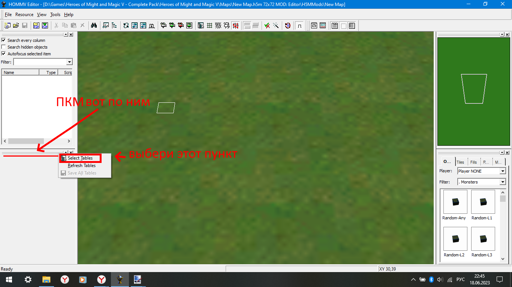
3) We need to create a new auxiliary window.
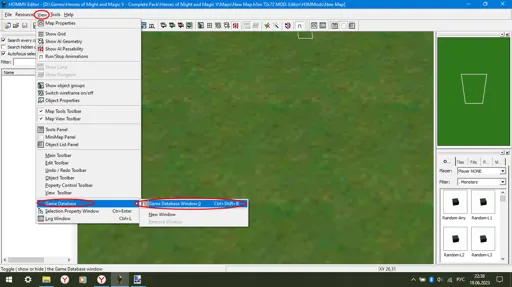

This window will look like this; I don't know where it will appear for you.
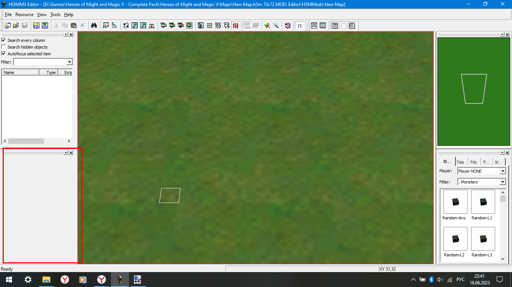

4) Configure the window; you need to right-click on the two bars; nothing will happen in other places.


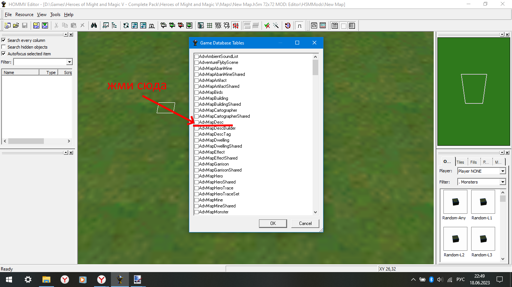
5) Click the "select tables" button; then, a window will open. In it, select AdvMapDesc.

Click OK.

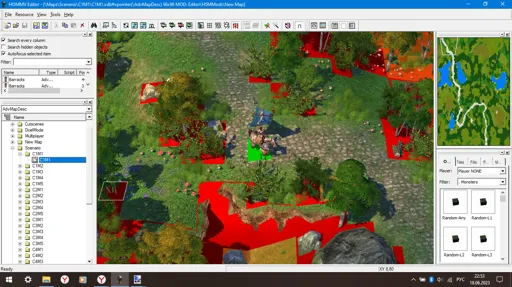
6) Done; the list will contain the game maps. Double-click to open them.
The Campaign maps are located in the Scenario folder and are marked with numbers, for example, C2M3 - Campaign 2, Mission 3, where Argil invades Irollan.


To remove the level cap, go to the map settings and uncheck the box.
In reply to fktifzobr@mail.ru
1 year ago
Auto-translated
fktifzobr@mail.ru
Okay, let's try this:
1) You need to enable the advanced map editor.
In the game folder, find the profiles folder, and in it, the editor.cfg file.
You need the second-to-last line.
setvar map_editor_mode = 1
Change 1 to 0.
setvar map_editor_mode = 0

2) Launch the editor, create a map.

3) We need to create a new auxiliary window.
Attachment 70086

This is what the window will look like; I don't know where it will appear for you.
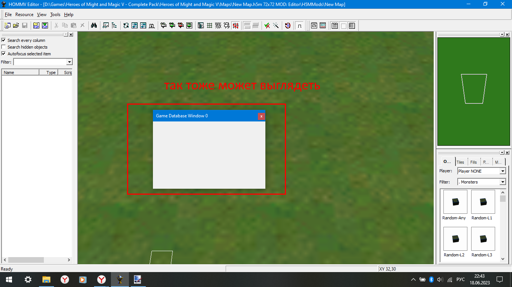
Attachment 70087Attachment 70088

4) Configure the window: right-click on the two bars; nothing will happen if you click anywhere else.
Attachment 70089

5) Click the "select tables" button. A window will open; in it, select AdvMapDesc.
Attachment 70090
Click OK.

6) Done! The list will contain game maps; double-click to open them.
Campaign maps are located in the Scenario folder and are simply marked with numbers, e.g., C2M3 - Campaign 2, Mission 3, Argil invades Erathia.
Attachment 70092

To remove the level cap, go to the map settings and uncheck the box.
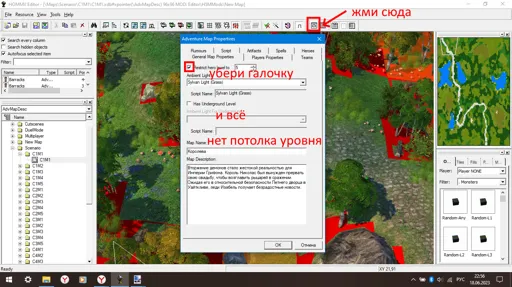
Attachment 70091


Hello, in the vanilla version (1.6), it saves to the folder C:\Program Files (x86)\Steam\steamapps\common\Heroes of Might and Magic 5\Editor\H5MMods\aaa00036. It does not overwrite campaign maps, meaning the restrictions remain.
In reply to Hamon_jing
User Avatar
1 year ago
Auto-translated
Hamon_jing


Hello, in the vanilla version (1.6), it saves to the folder C:\Program Files (x86)\Steam\steamapps\common\Heroes of Might and Magic 5\Editor\H5MMods\aaa00036. It doesn't overwrite the campaign maps, meaning the restrictions remain.
If it was saved in ...\Heroes of Might and Magic 5\Editor\H5MMods[map name]..., then take the "maps" folder from that folder and put it into the "data" folder.
In reply to fktifzobr@mail.ru
1 year ago
Auto-translated

fktifzobr@mail.ru
if it's saved in ......\Heroes of Might and Magic 5\Editor\H5MMods[map name].... then take the maps folder from that folder and put it in the data folder.


Thank you, it worked. I put all the maps from which I removed the restrictions into the data folder, and they all work. 

In reply to fktifzobr@mail.ru
1 year ago
Auto-translated
fktifzobr@mail.ru
Okay, let's try it.
1) You need to enable the advanced map editor.
In the game folder, find the profiles folder, and in it, the editor.cfg file.
You need the second-to-last line:
setvar map_editor_mode = 1
Change 1 to 0:
setvar map_editor_mode = 0

2) Launch the editor, create a map.

3) We need to create a new auxiliary window.
Attachment 70086

This is what the window will look like; I don't know where it will appear for you.
Attachment 70087Attachment 70088

4) To configure the window, right-click on the two bars; nothing will happen if you click anywhere else.
Attachment 70089

5) Click the "select tables" button. Then, open the window and select AdvMapDesc.
Attachment 70090
Click OK.

6) That's it; the list will contain game maps. Double-click to open them.
Campaign maps are located in the Scenario folder and are marked with numbers, e.g., C2M3 - Campaign 2, Mission 3, Argil invades Irollan.
Attachment 70092

To remove the level cap, go to the map settings and uncheck the box.

Attachment 70091
Hello, almost 2 years later. I wanted to ask if there is a similar way to do this in HOMM 5 Hammers of Fate? I tried following the instructions, but some buttons are simply missing. Version 2.1
In reply to Pinchuk
User Avatar
1 year ago
Auto-translated
Pinchuk
Hello, it's been almost 2 years. I wanted to ask if there's a way to do the same thing for the Hammers of Fate in Heroes of Might and Magic 5? I tried following the instructions, but some buttons are simply missing. Version 2.1.
To be honest, I don't know. Since the button is missing from the interface, we need to figure out where this is configured in the map's property tree, and then we can do it... but tomorrow or the day after, I'm too tired, I'm going to sleep.
In reply to fktifzobr@mail.ru
1 year ago
Auto-translated
fktifzobr@mail.ru
to be honest, I don't know. Since the button is missing from the interface, we need to figure out where this is configured in the map's properties tree, and then we can do it... but tomorrow or the day after, I'm too tired, I'm going to sleep.

Okay, thank you.
User Avatar
1 year ago
Auto-translated
increased the maximum level to 40, found the line where this can be changed in the map tree, and realized that instead of creating instructions, I can simply select all campaign maps and set the level for all of them at once.
Attachments 1
1 file attached • Total size: 1.4 MB
In reply to fktifzobr@mail.ru
1 year ago
Auto-translated
fktifzobr@mail.ru
I increased the maximum level to 40, found the line where this can be changed in the map tree, and realized that instead of creating instructions, I can simply select all campaign maps and set the level for all of them at once.
Thank you very much.

Statistics

Welcome our newest member: recijeb