Connection ErrorBad RequestThis page went staleSession ExpiredSign in requiredForbiddenNot FoundToo Many RequestsServer ErrorBad GatewayService UnavailableGateway TimeoutHTTP Version Not Supported
Session Expired
Your session has expired. Please log in to continue.
Sign in required
You need an account to do that. Sign in or create one — it only takes a minute.
This page went stale
Your security token was rejected, usually because the page sat open too long or you signed in elsewhere. Nothing was saved. Reload the page and try again.
Request Failed
We encountered an issue while processing your request.
Please check your internet connection and try again.
Error Details:
Share Link
Posts from Restoring the texture of Renegade Knights from Hammers of Fate.Auto-translated
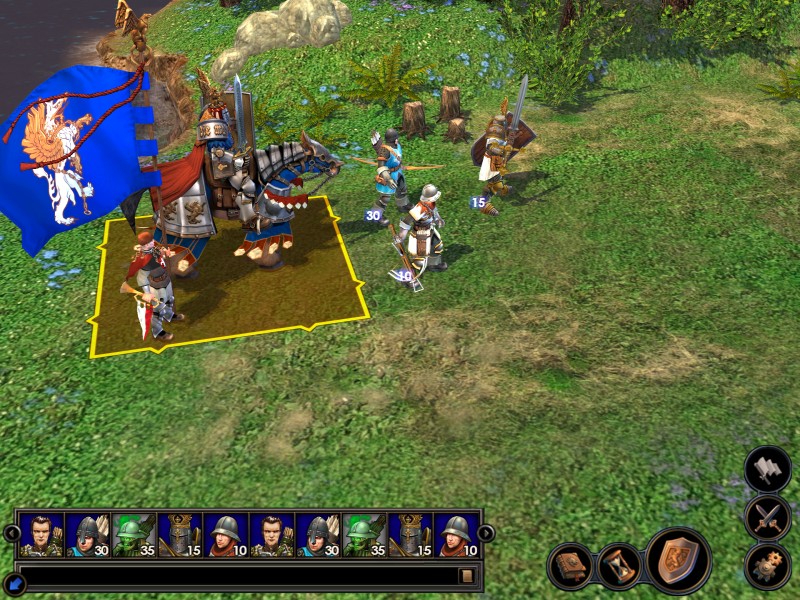
Hi everyone, I'm new to your forum and I need some help. I recently remembered that I once played the expansion for Heroes 5 Hammers of Fate and realized that I prefer the old texture of the Renegade Knights from that expansion more than the one in Tribes of the East. Specifically... without the flag, and with a Shield instead. Anyway, here is the gist of it: I was digging through the Editor files, trying to replace the textures using model files from the Hammers of Fate Editor and what happened was that instead of the flag being replaced by a shield, the flag simply took on the texture of the shield itself. And this is where I need your help... I want it to be just like in Hammers of Fate
Also... I have a question: can this be done as a mod (.h5u) or as a file that needs to be copied into the data folder (.pak)? :3 Thanks in advance!)

Hi everyone, I'm new to your forum and I need some help. I recently remembered that I once played the expansion for Heroes 5 Hammers of Fate and realized that I prefer the old texture of the Renegade Knights from the expansion more than in Tribes of the East. specifically.. without the flag, and with a Shield instead. Anyway, here is the gist: I was digging through the Editor files, trying to replace the textures using model files from the Hammers of Fate Editor and what happened was that instead of the flag being replaced by a shield, the flag simply took on the texture of the shield itself. and this is where I need your help.. I want it to be just like in Hammers of Fate
also... there's a question: can this be done as a mod (.h5u) or as a file that needs to be copied into the data folder (.pak)? :3 Thanks in advance!)
Well, actually, they are exactly like that, and you either have a MOD installed explicitly or it's embedded in some map!
I was digging around in the Editor's files, trying to replace textures using model files from the Heroes of Might and Magic III: The Shadow of Death Editor. The result was that instead of the flag being replaced with a shield, the flag simply adopted the texture of the shield itself.
You only replaced the creature's texture, but that's not enough. The geometry of the creature determines how the texture will be "stretched" onto it. To display the unit correctly, you need to replace not only the texture but also the geometry file from Heroes of Might and Magic III: The Shadow of Death. PlushRabbitHarvey
and also... is it possible to do this in the form of a mod (.h5u) or as a file that needs to be copied to the data folder (.pak)? :3 Thank you in advance!
There's nothing complicated about it. Perform all the operations I mentioned and create a zip archive with the changes, preserving the path structure. For example, if the file that needs to be changed is located at data.pak\Characters\Creatures\..., then your archive should include the folders Characters\Creatures\...\ and the modified file. Then, change the file extension from zip to h5u.
You only replaced the creature's texture, but that's not enough. The geometry of the creature determines how the texture will be "stretched" onto it. To ensure the unit is displayed correctly, you need to replace not only the texture but also the geometry file from Lords of the North.
There's nothing complicated about it. Follow all the steps I mentioned and create a zip archive with the changes, preserving the directory structure. For example, if the file you need to change is located at data.pak\Characters\Creatures\...., your archive should include the Characters\Creatures\... folder and the modified file. Then, change the file extension from zip to h5u.
P.S. Your attached images are not displaying.
Thank you, but I'm a bit of a newbie at this. I mean, I've been playing the game for a while, but until last year, I didn't even know there was an editor, and I still don't fully understand what's what... ^^" Could you describe it more precisely? :3 And yes... if it helps, I replaced not only the files with the extensions (texture).dds but also .xdb. But I can't find the geometry folder for Renegade; is it located in data.pak?
Well, about the pictures... I don't know why, but I can see them all.
Added 1 minute ago psatkha
Well, that's basically what they are, and you either have a MOD installed explicitly or it's embedded in some map!
I don't have any mods installed, except for HD rendering of terrain textures and various dwellings, but I don't have any mods that change the textures of heroes and creatures
I don't have any mods installed, except for HD rendering of terrain textures and various dwellings, but I don't have any mods that change the textures of heroes and creatures.
As you were pointed out earlier, texture and geometry are different things!
By the way, why do you need monotonous renegades without a flag?! :eek:
Here, by the way, is a link to my UVH (Unique View of Heroes) project!
In the images, you can see what the heroes of the "Haven" faction and the renegades look like!
The link to the UVH mod file has been removed from the file sharing service again; I will re-upload it later (I am currently in the process of migrating to a different hosting for my website)!
As you were previously told, texture and geometry are different things!
By the way, why do you need monotonous renegades without a flag?! :eek:
Here, by the way, is a link to my UVH (Unique Hero Appearance) project!
In the images, you can see what the heroes of the "Haven" faction and the renegades look like!
The link to the UVH mod file has been removed from the file-sharing service again; I will re-upload it later (I am currently in the process of migrating to a different hosting for my website)!
I apologize for being such a clueless person... but again, this is all new to me :3 Why do I need renegades without a flag? Because I don't really like the flag; I don't think it's very beautiful. The flag with the Griffin on the regular Knights is okay, but this one is not great; I don't like it, and without it, they look more compact than with that huge banner. But again, this is just my opinion.
Yes, I've already looked at your mod; it's quite cool, thank you, but I don't need it right now. I'm looking for auxiliary mods, like a table for raising undead, or a skill wheel, something like that
Thank you, I'm just a bit of a newbie at this. Well... I mean, I've been playing the game for a while, but until last year, I didn't even know there was an editor, and I still don't quite understand what's what... ^^" Could you describe it in more detail? :3 And yes... if this helps, I replaced not only the files with the extensions (texture).dds, but also .xdb files. But I can't find the folder with the geometry for Renegade; is it located in data.pak?
Each creature has not only geometry but also a file that, let's say, describes the path to its location and sets some settings. This file is what you need; it will indicate the path to the geometry you need to replace. It usually has the following format: "creature name"-geom.xdb. In your case, it is located in Characters\Creatures\Renegades\ and is called Champion-geom.xdb and Champion-geom-AI.xdb.
Champion-geom.xdb describes the creature's geometry in the Castle/hiring window/battlefield. Champion-geom-AI.xdb describes the creature's geometry on the world map.
Open the Champion-geom.xdb file, and you will see:
25E7AA41-C3A0-41A7-8D53-409E08705CF0
Global
.................................................... We are interested in the geometry ID, which is in the line 25E7AA41-C3A0-41A7-8D53-409E08705CF0
This ID is responsible for the creature's geometry; to change it, you need to find the geometry file with this ID. All geometry files are stored in the data.pak\bin archive; just find it and replace it with the geometry file from the Lords of the North, but don't forget that the file name must match the ID specified in Champion-geom.xdb. Don't forget to do the same with Champion-geom-AI.xdb; otherwise, the creature will not be displayed with changes on the world map.
Each creature has not only geometry but also a file that, let's say, describes the path to its location and sets some settings. This file is what you need; it will indicate the path to the geometry you need to replace. It usually has the following format: "creature name"-geom.xdb. In your case, it is located in Characters\Creatures\Renegades\ and is called Champion-geom.xdb and Champion-geom-AI.xdb.
Champion-geom.xdb describes the creature's geometry in the castle/recruitment window/battlefield. Champion-geom-AI.xdb describes the creature's geometry on the world map.
Open the Champion-geom.xdb file, and you will see:
25E7AA41-C3A0-41A7-8D53-409E08705CF0
Global
.................................................... We are interested in the geometry ID, which is in the line 25E7AA41-C3A0-41A7-8D53-409E08705CF0
This ID is responsible for the creature's geometry. To change it, simply find the geometry file with this ID. All geometry files are stored in the data.pak\bin archive. Just find it and replace it with the geometry file from Lords of the North, but remember that the file name must match the ID specified in Champion-geom.xdb. Don't forget to do the same with Champion-geom-AI.xdb; otherwise, the creature will not be displayed with changes on the world map.
Thank you, I understand. But... what do the Knight creatures (Isabelle's creatures) have to do with it? I need to change the Heroes - Knights, like... Andreas, Lorenzo, etc
thank you, I understand now~ but... what do the Knights of Isabel (creatures) have to do with it? I need to change the Heroes-Knights, like... Andreas, Lorenzo, etc.
Ah, I see, I didn't quite understand you, as your images didn't display for me. In any case, whether they are heroes or creatures, the principle is the same.
Ah, I see, I guess I didn't quite understand you, as your images didn't display for me. In any case, whether it's heroes or creatures, the principle is the same.
Well, I apologize if my opinion seems ignorant to you... but again, all of this is still new to me :3 Why do I need Renegades without a flag? Because I don't really like the flag; it doesn't seem very beautiful to me. The griffin flag on regular Knights is fine, but this one isn't great; I don't like it, and they look more compact without it than with that huge banner. But again, this is just my opinion~
If you see Renegades in the game with a flag depicting a falcon's head, then you definitely have either the full UVH-Haven or part of it!
By the way, the link to the Russian version of UVH-Haven is available for download again! However, the content there is from 01/17/2012, and it will no longer be updated within UVH, as all my developments have been transferred to the NHF project, which includes many changes to the visual appearance of heroes from the Haven and Necropolis Factions, as well as one or two heroes/heroines from other factions!
Ah, I see, apparently I didn't quite understand you because your images weren't displayed for me. In any case, whether it's heroes or creatures, the principle is the same.
Sorry to bother you again; it still didn't work. They remained with the flag, even though I found both files of their geometry and placed them in their respective locations. What should I do now?
Added 44 seconds later psatkha
Well, if you see renegades in the game with a flag depicting a falcon's head, then it means that you either have UVH-Haven completely installed, or at least part of it!
By the way, the link to the Russian version of UVH-Haven is available for download again! The only thing is that the content there is from January 17, 2012, and it will no longer be updated within UVH, as all my developments have been transferred to the NHF project, which includes many changes to the visual appearance of heroes from the "Haven" and "Necropolis" factions, as well as one or two heroes/heroines from other factions!
Oh man... a griffin flag on vanilla Knights; Renegades aren't involved here. I don't know what symbol it is on the Renegades. Maybe it's a sun?
Yeah, seriously... a flag with a griffin, on the standard Knights, renegades aren't involved here. I don't have that, and I'm not smart enough to know what that symbol is. Maybe it's the sun...