



Skip to content

Posts from A series of issues.

No ratings yet — be the first to rate!
In reply to Mооnst@r
User Avatar
7 months ago
Auto-translated
Mооnst@r
A VPN couldn't have been the cause of the block; it wasn't there before the block. I only installed it after I was no longer able to access the site, to report the issue.
This isn't the first time this has happened; it's the exact same issue. The site tries to load for a while and then displays "Error establishing a secure connection" or immediately "Access denied." I thought it would be resolved within a day, as it was last time, but it hasn't. So, I installed a VPN and wrote about it. My ISP doesn't know anything about this. They might be experiencing difficulties, but they won't tell me, and I highly doubt that they're suddenly having trouble with forum.heroesworld.ru. No other sites that I use regularly have been blocked; only this one stopped working overnight.

Perhaps you should check on your end. If the site isn't on the list of blocked sites by the RKN (Roskomnadzor), why are some users no longer able to access the site and are now using a VPN? Or, can you suggest something specific for me to check on my end?

Currently, the site is accessible from many locations; I checked using another service.
In the last few weeks, we haven't received any notifications that the site is unavailable due to server issues.
I can suggest checking in real-time.
The next time you encounter this error, please write to me on Discord, and we'll try to figure out what the problem is.

Attachments 1
1 file attached • Total size: 23.4 KB
In reply to HwKeeper
User Avatar
7 months ago
Auto-translated
hw_founder

Currently, the site is accessible from many locations; I verified this using another service.
In the last few weeks, we haven't received any notifications about the site being unavailable due to server issues.
I can suggest checking in real-time.
The next time you encounter an error, please message me on Discord, and we'll try to figure out what the problem is.

I don't have Discord. I still can't access the site without a VPN.
In reply to Mооnst@r
User Avatar
7 months ago
Auto-translated
Mооnst@r
I don't have Discord. Even now, I can't access the site without a VPN.
I understand. Then, I can suggest trying to check the route to the site with and without a VPN. Here's the instruction: https://www.advantshop.net/help/pages/trassirovka-saitov Let's compare the results and try to figure out if there are any problems on the route without a VPN. The site is located on Hetzner's servers, and access to them has been experiencing problems from some Russian operators in recent years due to the blocking of some subnets on the routes. https://ntc.party/t/недоступность-hetzner/12845
Attachments 1
1 file attached • Total size: 19.2 KB
In reply to HwKeeper
User Avatar
7 months ago
Auto-translated
hw_founder
Understood.

Then, I can suggest trying to check the route to the website with and without a VPN.

Here is the instruction.

https://www.advantshop.net/help/pages/trassirovka-saitov

Let's compare the results and try to figure out if there are any problems on the route without a VPN.

The website is located on Hetzner's servers, and access to them has been experiencing problems from some Russian operators in recent years due to the blocking of certain subnets on the routes.


https://ntc.party/t/недоступность-hetzner/12845
Without a VPN. The VPN extension in the browser was disabled during the tracert.
Attachments 1
1 file attached • Total size: 36.9 KB
In reply to Mооnst@r
User Avatar
7 months ago
Auto-translated
Mооnst@r
Without a VPN. The VPN extension in the browser was disabled during the tracert.

The specified route indicates that the request successfully reaches the server, at least at the time of this check.

Try clearing your browser cookies related to the site and logging in again without a VPN.
Also, I would try accessing the site in incognito mode to rule out the possibility of browser extensions affecting the process.
In reply to HwKeeper
User Avatar
7 months ago
Auto-translated
hw_founder

The specified route indicates that the request is successfully reaching the server, at least during this check.

Try clearing the cookies in your browser that are related to the site and log in again without using a VPN.
Also, I would try logging in in incognito mode to rule out the possibility of browser extensions affecting the process.
The history is not being saved, but I pressed the delete button for what was accumulated during the session. I reset the router to factory settings, rebooted to get a new IP address, disabled all extensions, the standard Windows 10 antivirus, and everything is at its maximum as shown in the screenshot, and then I get "Error establishing a secure connection."
Attachments 1
1 file attached • Total size: 74.4 KB
In reply to Mооnst@r
User Avatar
7 months ago
Auto-translated
Mооnst@r
The game doesn't save progress, but I tried deleting the saved data from the current session. I reset the router to factory settings, rebooted it to get a new IP address, disabled all extensions, used the standard Windows 10 antivirus, and set everything to the maximum as shown in the screenshot, but then I got the error "Error establishing a secure connection."
That's a strange error. They say that on the website's side, it can only be due to problems with the certificate or outdated protocol settings, but the website has an up-to-date certificate and everything is configured correctly according to the check, and it receives a high rating from A. https://www.ssllabs.com/ssltest/analyze.html?d=forum.heroesworld.ru https://www.perplexity.ai/search/prichiny-oshibki-oshibka-pri-u-7gZtur5qS3GY9gfQGsfDaQ Try checking what the AI says from your side.
In reply to HwKeeper
User Avatar
7 months ago
Auto-translated
hw_founder

A strange error.

They say that on the website's side, it can only be due to certificate problems or outdated protocol settings, but the website has a current certificate, and everything is configured correctly according to the check, and it receives a high rating.

https://www.ssllabs.com/ssltest/analyze.html?d=forum.heroesworld.ru


https://www.perplexity.ai/search/prichiny-oshibki-oshibka-pri-u-7gZtur5qS3GY9gfQGsfDaQ


Try to verify what the AI says on your end.
Date and time were the first things I checked. I disabled the firewall and reset it to default. There is no other protective software. No proxy. No proxy in the browser. I deleted cert9. I didn't touch any settings. There was a browser update on the 13th, but on an old PC with Windows 7, another browser version that hasn't been updated yet also can't access the forum. Edge also can't access it. I don't even understand what to do with the certificates and why. That's all.
In reply to Mооnst@r
User Avatar
7 months ago
Auto-translated
Mооnst@r
I checked the date and time first. I disabled the firewall and reset it to default settings. There is no other protective software. No proxy. No proxy in the browser. I deleted cert9. I didn't touch any settings. 13 There was a browser update, but on an old PC with Windows 7, another browser version that hasn't been updated yet also can't access the forum. Edge also can't access it. I don't understand how to deal with certificates, what they are, and why they are needed. That's all.
Does the site open on a smartphone?

If possible, please record a video of your actions when the "Error establishing a secure connection" error appears, and screenshots from the "Network" tab, which can be accessed by pressing CTRL+SHIFT+E in Firefox (it needs to be opened before the site loads, otherwise it will be empty, or open it and reload the page, which will be indicated in the tab itself).

In the screenshot you sent, the browser shows that a secure connection has been established, so the error contradicts itself.

If the connection were insecure, there would be a completely different icon - a "crossed-out lock," which appears when opening a site with a problematic certificate or without a certificate over HTTP, which happens, for example, when opening the website of the Central Bank of Russia http://cbr.ru

Attachments 2
2 files attached • Total size: 37.9 KB
In reply to HwKeeper
User Avatar
7 months ago
Auto-translated
hw_founder
Does the site open on a smartphone?

If possible, please record a video of your actions when the "Error establishing a secure connection" appears, and screenshots from the "Network" tab, which can be accessed by pressing CTRL+SHIFT+E in Firefox (it needs to be opened before the site loads, otherwise it will be empty, or open it and reload the page, which will be indicated in the tab itself).

In the screenshot you sent, the browser shows that a secure connection has been established, so the error contradicts itself.
It doesn't open on a smartphone. I can't make a video. At first, it (the secure connection) is established, but then the error appears.


I can't upload images here because of the damn VPN extension.
In reply to Mооnst@r
User Avatar
7 months ago
Auto-translated
Mооnst@r
It doesn't open on a smartphone. Videos don't play. It seems to be installed correctly at first, but then an error occurs.


I can't upload images here using that crappy VPN extension.
I suspect that the cause might be the default DNS servers of your internet provider.


https://www.perplexity.ai/search/chto-oznachaet-oshibka-ns-erro-_0a5yLBgQmmqnr3gYSC25g

If you are using the default DNS servers from your internet provider, try using Google's DNS: 8.8.8.8 and 8.8.4.4, or Cloudflare's DNS: 1.1.1.1 and 1.0.0.1

Here are instructions for Google DNS:
https://cloudparser.ru/wiki/google-dns

And here are instructions for Cloudflare:
https://one.one.one.one/ru-RU/dns/
Attachments 2
2 files attached • Total size: 105.4 KB
In reply to HwKeeper
User Avatar
7 months ago
Auto-translated
hw_founder
I suspect the cause might be the default DNS servers provided by your internet service provider.


https://www.perplexity.ai/search/chto-oznachaet-oshibka-ns-erro-_0a5yLBgQmmqnr3gYSC25g

If you are using the default DNS servers from your internet provider, try using Google's DNS: 8.8.8.8 and 8.8.4.4, or Cloudflare's DNS: 1.1.1.1 and 1.0.0.1.

Here's a guide for Google DNS:
https://cloudparser.ru/wiki/google-dns

And here's one for Cloudflare:
https://one.one.one.one/ru-RU/dns/
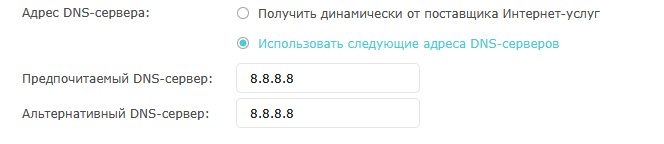
I set it up in the router, but there were no changes.

In general, this seems to be some kind of isolated case, a bug, an error, or perhaps a deliberate restriction imposed by the provider, probably on my end. I'm sorry that I wasted your weekend, I acted impulsively and behaved rudely. Please forgive me.
I'm tired and I want to take a break from the endless searching.

Statistics

Welcome our newest member: recijeb

Users Online 3 users 1314 guests