


 Pit for LM

Auto-translated
Tournament topics.[/COLOR]
English version
Since January 2014, our section has introduced a system for automatic submission of reports, which works in special Tournament topics.
FAQ16. What are tournament topics and how do they differ from regular ones?
In our section Heroes 3 Tournament - Tournaments for Heroes 3 - ONLINE there are 2 types of topics:
- regular topics, like on any other forum, which can be created by every registered user of the forum; they are dedicated to various issues related to the game, discussions, and problems;
- tournament topics, which are currently being tested and refined. These topics are created to host HoMM3 online tournaments. Currently, only the forum coordinator Dirty_Player and the moderator responsible for maintaining the ranking in the HoMM3 section, Pit for LM, can create them. After all bugs are fixed and the structure is improved, the right to create tournament topics will also be granted to organizers of official tournaments.
Visually, tournament topics differ from regular ones in their structure.
The first page of a tournament topic displays the following information:
- dates of the tournament;
- the very top post, repeated on each page of the topic, contains the current information about the tournament (viewable in Russian and English);
- then follows the post List of players, containing a list of participants with their contact details;
- List of reports - reports of matches played within the framework of the tournament, with information about confirmation / non-confirmation of the game;
- the block Participation in the tournament is also repeated on each page of the topic. It allows players to Register for the tournament by clicking this button.
After submitting an application, the player sees the status of his application in this block, as well as a comment from the tournament organizer, and after being included in the list of participants, a button appears here: New report, by clicking which the player can write a report on the game;
- Post No. 1 (and possibly several more) is usually created by the organizer and contains the rules, regulations, and organizational issues of the tournament; it must be read before registering for the tournament;
- then follow standard posts for any topic: participant applications, discussions, comments on the tournament;
- in addition, due to technical reasons, there is no Quick Reply option in tournament topics. To reply in the topic, any user can use the Reply button, which is located in two places: at the top and bottom of each page of the topic on the left side (see the second screenshot in this post).
FAQ17. How do I submit an application to participate in a tournament?
1. You need to read the information provided by the organizer about the tournament and think about whether everything suits you (the theme of the tournament, time limits, templates, deadlines per turn, etc.), as well as understand if you meet the organizer's requirements for participants (compliance with deadlines, level of play, availability of ways to contact you, etc.).
2. A mandatory requirement for most organizers is that you have an ICQ number. For the system to work correctly, it must be reflected in your profile. If you have one, then under your avatar you will see a small green daisy - the ICQ symbol. If you don't have one, you need to follow this algorithm:
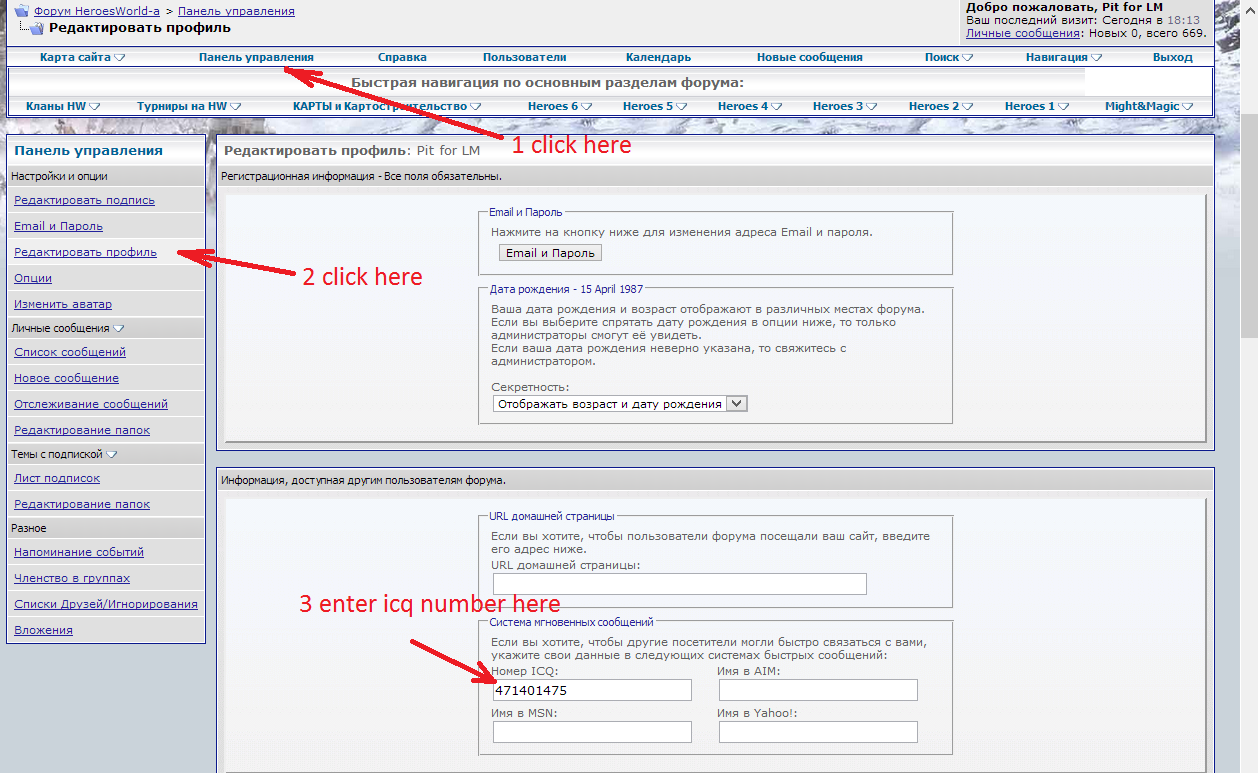
or go to the link, which immediately takes you to Profile Editing.
It is also possible that the organizer requires having a login on Skype. The steps are the same - Nickname in Skype is entered on the same page at the bottom.
3. Leave an application in the tournament topic. To do this, click the button Register for the tournament:
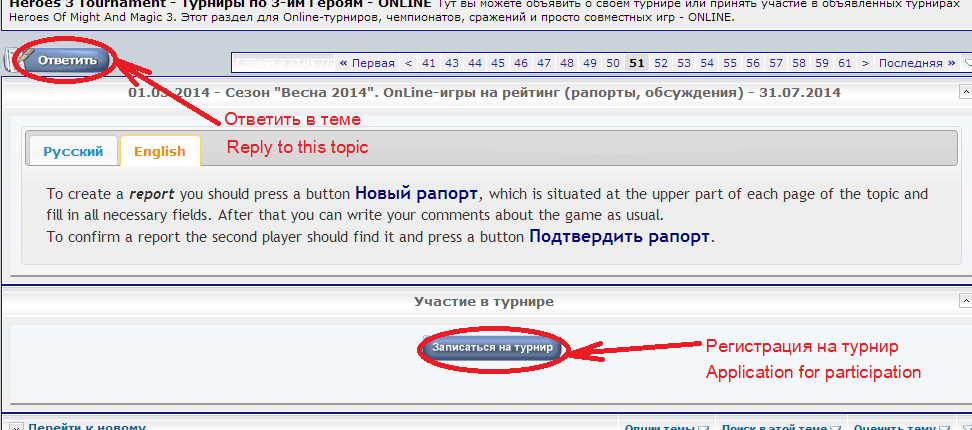
At the same time, in your application, you must indicate the information required by the organizer (for example, in Favorites - favorite castle, in Beginner - your gaming experience, in OFB-8 - templates, etc.)
4. Wait for the organizer to review your application, after which you will see his comment in the field Participation in the tournament. Also, during the tournament, you need to pay attention to this field, as the tournament organizer may write a message about your current problems there.
English version
Since January 2014, our section has introduced a system for automatic submission of reports, which works in special Tournament topics.
FAQ16. What are tournament topics and how do they differ from regular ones?
In our section Heroes 3 Tournament - Tournaments for Heroes 3 - ONLINE there are 2 types of topics:
- regular topics, like on any other forum, which can be created by every registered user of the forum; they are dedicated to various issues related to the game, discussions, and problems;
- tournament topics, which are currently being tested and refined. These topics are created to host HoMM3 online tournaments. Currently, only the forum coordinator Dirty_Player and the moderator responsible for maintaining the ranking in the HoMM3 section, Pit for LM, can create them. After all bugs are fixed and the structure is improved, the right to create tournament topics will also be granted to organizers of official tournaments.
Visually, tournament topics differ from regular ones in their structure.
The first page of a tournament topic displays the following information:
- dates of the tournament;
- the very top post, repeated on each page of the topic, contains the current information about the tournament (viewable in Russian and English);
- then follows the post List of players, containing a list of participants with their contact details;
- List of reports - reports of matches played within the framework of the tournament, with information about confirmation / non-confirmation of the game;
- the block Participation in the tournament is also repeated on each page of the topic. It allows players to Register for the tournament by clicking this button.
After submitting an application, the player sees the status of his application in this block, as well as a comment from the tournament organizer, and after being included in the list of participants, a button appears here: New report, by clicking which the player can write a report on the game;
- Post No. 1 (and possibly several more) is usually created by the organizer and contains the rules, regulations, and organizational issues of the tournament; it must be read before registering for the tournament;
- then follow standard posts for any topic: participant applications, discussions, comments on the tournament;
- in addition, due to technical reasons, there is no Quick Reply option in tournament topics. To reply in the topic, any user can use the Reply button, which is located in two places: at the top and bottom of each page of the topic on the left side (see the second screenshot in this post).
FAQ17. How do I submit an application to participate in a tournament?
1. You need to read the information provided by the organizer about the tournament and think about whether everything suits you (the theme of the tournament, time limits, templates, deadlines per turn, etc.), as well as understand if you meet the organizer's requirements for participants (compliance with deadlines, level of play, availability of ways to contact you, etc.).
2. A mandatory requirement for most organizers is that you have an ICQ number. For the system to work correctly, it must be reflected in your profile. If you have one, then under your avatar you will see a small green daisy
- the ICQ symbol. If you don't have one, you need to follow this algorithm:or go to the link, which immediately takes you to Profile Editing.
It is also possible that the organizer requires having a login on Skype. The steps are the same - Nickname in Skype is entered on the same page at the bottom.
3. Leave an application in the tournament topic. To do this, click the button Register for the tournament:
At the same time, in your application, you must indicate the information required by the organizer (for example, in Favorites - favorite castle, in Beginner - your gaming experience, in OFB-8 - templates, etc.)
4. Wait for the organizer to review your application, after which you will see his comment in the field Participation in the tournament. Also, during the tournament, you need to pay attention to this field, as the tournament organizer may write a message about your current problems there.