


 Iamsamstan

Auto-translated
Tournament themes.[/COLOR]
Since January 2014, a special system has been implemented in our section that allows for automatic report generation. This system operates within dedicated tournament themes.
FAQ16. What is the difference between a tournament theme and other types of themes?
In the Heroes 3 Tournament - Tournaments in Heroes III - ONLINE section, there are two main types of themes:
- Ordinary themes cover various topics, issues, and discussions related to the game. Any registered forum user can create them.
- Tournament themes are currently under testing and development. These themes are specifically designed for online HoMMIII tournaments. Currently, only the forum coordinator, Dirty_Player, and the moderator responsible for the HoMMIII season, Pit for LM, can create these themes. Once all bugs are fixed and the structure is improved, organizers of official tournaments will also be granted the ability to create tournament themes.
Tournament themes differ from ordinary themes in their structure.
The first page of a tournament theme contains the following information:
- The rules of the tournament;
- A top message that repeats on each page of the theme, providing up-to-date information about the tournament (Russian and English versions may be available);
- The "List of Players" (Список игроков) displays a list of tournament participants along with their contact information;
- The "List of Reports" (Список рапортов) lists submitted match reports, including confirmation status (confirmed (подтвержденный) / unconfirmed (неподтвержденный));
- The "Participation in the Tournament" (Участие в турнире) block appears on every page of the theme, allowing players to register for the tournament by clicking the "Application for participation (Записаться на турнир)" button.
After submitting an application, the player will see the application status, comments from the tournament organizer, and, upon acceptance into the tournament, a "New report (Новый рапорт)" button. Players can use this button to submit match reports;
- Post number 1 (and sometimes several following posts), typically written by the organizer, contains the rules, structure, and other relevant details about the tournament; it is essential to read this post before registering;
- Subsequent posts contain applications, discussions, and tournament-related commentary;
- Additionally, due to technical limitations, there is no "Quick Answer (Быстрый ответ)" feature in tournament themes. To respond, players should use the "Reply (Ответить)" button located at the top left or bottom of each page (as shown in the second screenshot).
FAQ17. How do I submit a tournament application?
1. First, carefully review the information provided by the organizer regarding the tournament and determine if the conditions are suitable for you (tournament theme, time limits, templates, deadlines, and other information). Also, assess whether you meet the requirements (skill level, communication skills, adherence to the rules).
2. Most tournaments require an ICQ account. Ensure that your ICQ number is added to your profile so that the system functions correctly. If you have an ICQ number but don't see the ICQ symbol next to your avatar, follow these steps:
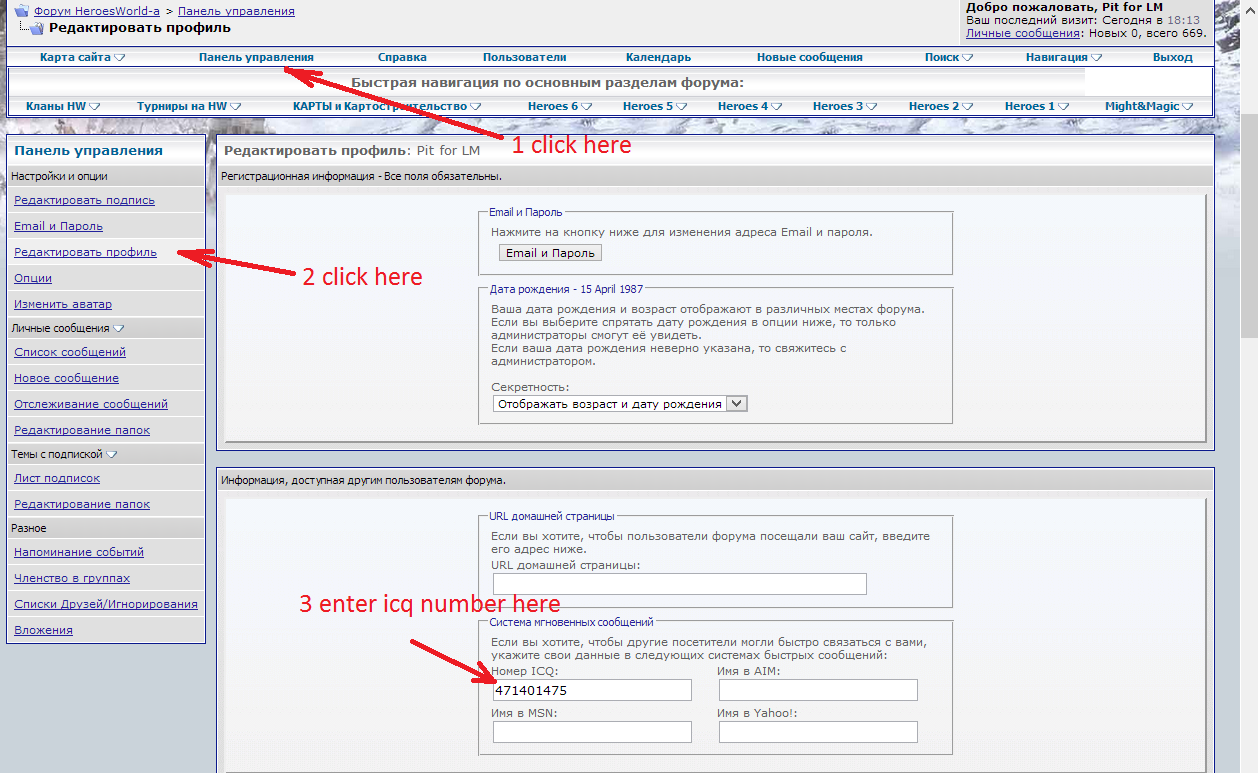
Alternatively, click this link, which will take you to the Edit Profile (Редактирование профиля) page.
The organizer may also request your Skype login. The same procedure applies; enter your Skype nick name at the bottom of the same page.
3. Next, submit your application to the tournament theme by clicking the "Application for participation (Записаться на турнир)" button:
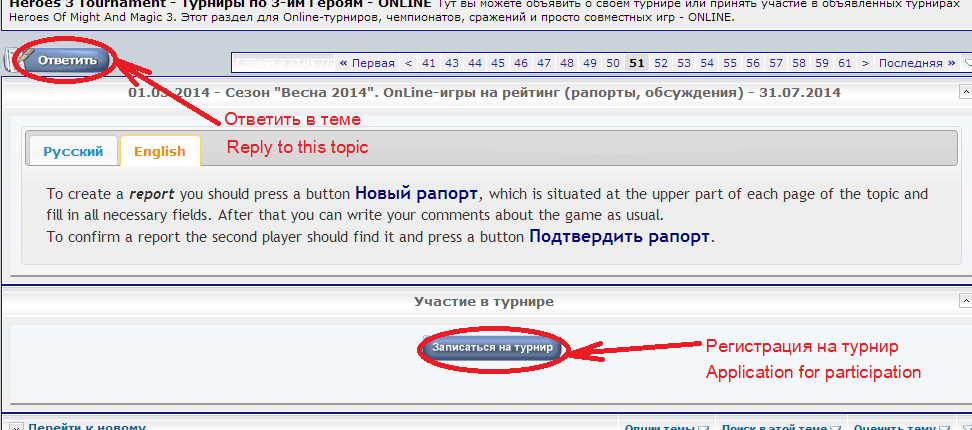
Provide all required information requested by the organizer (e.g., for the "Battle of the Favourites" tournament, specify your favorite castle; for the "New Players" tournament, indicate how long you've been playing online; for "OFB 8," provide template details).
4. Finally, wait for the organizer to review your application and check the Participation in the tournament (Участие в турнире) section for their comments. Pay attention to this field throughout the tournament, as the organizer may post updates or address any issues related to your participation.
Since January 2014, a special system has been implemented in our section that allows for automatic report generation. This system operates within dedicated tournament themes.
FAQ16. What is the difference between a tournament theme and other types of themes?
In the Heroes 3 Tournament - Tournaments in Heroes III - ONLINE section, there are two main types of themes:
- Ordinary themes cover various topics, issues, and discussions related to the game. Any registered forum user can create them.
- Tournament themes are currently under testing and development. These themes are specifically designed for online HoMMIII tournaments. Currently, only the forum coordinator, Dirty_Player, and the moderator responsible for the HoMMIII season, Pit for LM, can create these themes. Once all bugs are fixed and the structure is improved, organizers of official tournaments will also be granted the ability to create tournament themes.
Tournament themes differ from ordinary themes in their structure.
The first page of a tournament theme contains the following information:
- The rules of the tournament;
- A top message that repeats on each page of the theme, providing up-to-date information about the tournament (Russian and English versions may be available);
- The "List of Players" (Список игроков) displays a list of tournament participants along with their contact information;
- The "List of Reports" (Список рапортов) lists submitted match reports, including confirmation status (confirmed (подтвержденный) / unconfirmed (неподтвержденный));
- The "Participation in the Tournament" (Участие в турнире) block appears on every page of the theme, allowing players to register for the tournament by clicking the "Application for participation (Записаться на турнир)" button.
After submitting an application, the player will see the application status, comments from the tournament organizer, and, upon acceptance into the tournament, a "New report (Новый рапорт)" button. Players can use this button to submit match reports;
- Post number 1 (and sometimes several following posts), typically written by the organizer, contains the rules, structure, and other relevant details about the tournament; it is essential to read this post before registering;
- Subsequent posts contain applications, discussions, and tournament-related commentary;
- Additionally, due to technical limitations, there is no "Quick Answer (Быстрый ответ)" feature in tournament themes. To respond, players should use the "Reply (Ответить)" button located at the top left or bottom of each page (as shown in the second screenshot).
FAQ17. How do I submit a tournament application?
1. First, carefully review the information provided by the organizer regarding the tournament and determine if the conditions are suitable for you (tournament theme, time limits, templates, deadlines, and other information). Also, assess whether you meet the requirements (skill level, communication skills, adherence to the rules).
2. Most tournaments require an ICQ account. Ensure that your ICQ number is added to your profile so that the system functions correctly. If you have an ICQ number but don't see the ICQ symbol
next to your avatar, follow these steps:Alternatively, click this link, which will take you to the Edit Profile (Редактирование профиля) page.
The organizer may also request your Skype login. The same procedure applies; enter your Skype nick name at the bottom of the same page.
3. Next, submit your application to the tournament theme by clicking the "Application for participation (Записаться на турнир)" button:
Provide all required information requested by the organizer (e.g., for the "Battle of the Favourites" tournament, specify your favorite castle; for the "New Players" tournament, indicate how long you've been playing online; for "OFB 8," provide template details).
4. Finally, wait for the organizer to review your application and check the Participation in the tournament (Участие в турнире) section for their comments. Pay attention to this field throughout the tournament, as the organizer may post updates or address any issues related to your participation.