


 vova2112

Auto-translated
Hi everyone, lately there's been increased activity in Heroes 5, both online and here on the forum, so I decided to create a few videos for all of you (unfortunately, without voiceover, as the microphone on my video camera is broken):
1) **Converting a model from 3DsMax to GR2** - NewModel.mp4 + I'm also slightly changing the skeleton's appearance for a more convenient workflow in 3DsMax. I also show **how to add attributes to animations and process the resulting GR2 files to add them to the game.**
2) I show **how to convert a GR2 geometry file for the game** from the previous video **using the map editor**. - MapEdit_Archangel.mp4 **+ I immediately show how to extract a model from the game using Archangel.v0.5.beta with everything (skeleton, "skin") and how to avoid some problems that arise when importing the skeleton and after exporting the model to SMD format.**
3) I show **what defects animations may have after exporting a model from Archangel, and how to fix them** - Fix_ForAnim.mp4
Null.rar - an empty file for use when working in the map editor 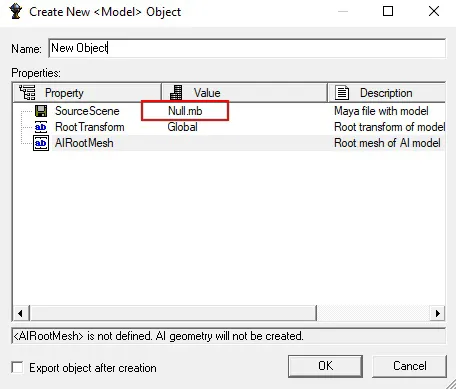 Gr2_Tools_For_Homm5.rar - Contains the programs and plugins that I used in the videos (with the exception of the HEX editor).
In **Gr2_Tools_For_Homm5.rar\Gr2_3DsMax\Tools\Gr2ToFbx\Compiled** there is a program that **very well** converts **GR2 to FBX** (animations and statics).
Gr2_Tools_For_Homm5.rar - Contains the programs and plugins that I used in the videos (with the exception of the HEX editor).
In **Gr2_Tools_For_Homm5.rar\Gr2_3DsMax\Tools\Gr2ToFbx\Compiled** there is a program that **very well** converts **GR2 to FBX** (animations and statics).
The process is as follows: - Combine the necessary data in a notepad **from two SMD files** obtained from Archangel and grnreader98.exe **into one SMD file**. - Load the **skeleton.fbx** file into 3DsMax, unchecking the animation box when loading, select the bones, and set the initial pose - **Set as Skin Pose**, then load the **animation.fbx** file into the same scene, also unchecking the animation box when loading, select the bones, and set **Skin Pose Mode**. Then import the prepared **SMD** file with the correct bone names that we assembled from the other two smd files into the same scene. It is important not to forget after loading the **SMD** file, select all vertices and press Break, then select the vertices again and press Weld Vertices with a value of 0.001 (shown in the video). - Load the **animation.fbx** file into the same scene again, but this time check the animation box. Now you need to select the bones to which you set the initial pose and uncheck **Skin Pose Mode**. In the end, you will have a skeleton in a T-pose, to which all animations from this model are applied without any deviations.
Briefly about working with Archangel
**Don't forget that you need to specify different file names for textures when loading the model, so that everything doesn't merge into one mesh.** Archangel renames "complex bone names" ('Global|Hip' -> 'Hip01'), and sometimes even displays an error message (about a mismatch of bones in the model and skeleton) when loading the skeleton. To prevent these possible errors, there are small programs: 1) - [Tools\Gr2ToSMD\Best_for_Skel\grnreader98.exe] is needed to convert the **skeleton.gr2** to an **SMD** file with correct bone names (as in the original), and their positions if there were errors when loading the skeleton into Archangel. 2) - [Tools\Gr2ToFbx\Compiled\GrannyExporter.exe] is needed to convert the **skeleton.gr2 and any** animation.gr2 (from this model) to **FBX** files.The process is as follows: - Combine the necessary data in a notepad **from two SMD files** obtained from Archangel and grnreader98.exe **into one SMD file**. - Load the **skeleton.fbx** file into 3DsMax, unchecking the animation box when loading, select the bones, and set the initial pose - **Set as Skin Pose**, then load the **animation.fbx** file into the same scene, also unchecking the animation box when loading, select the bones, and set **Skin Pose Mode**. Then import the prepared **SMD** file with the correct bone names that we assembled from the other two smd files into the same scene. It is important not to forget after loading the **SMD** file, select all vertices and press Break, then select the vertices again and press Weld Vertices with a value of 0.001 (shown in the video). - Load the **animation.fbx** file into the same scene again, but this time check the animation box. Now you need to select the bones to which you set the initial pose and uncheck **Skin Pose Mode**. In the end, you will have a skeleton in a T-pose, to which all animations from this model are applied without any deviations.
Грешить, злодействовать, а равно и делать добро или совершать подвиги надо без натуги. А если с натугой — то лучше не надо.
К. Прутков-инженер. Мысль № 77.
Многие вещи нам непонятны не потому, что наши понятия слабы; но потому, что сии вещи не входят в круг наших понятий.
© Козьма Прутков
К. Прутков-инженер. Мысль № 77.
Многие вещи нам непонятны не потому, что наши понятия слабы; но потому, что сии вещи не входят в круг наших понятий.
© Козьма Прутков