Skip to content

Posts from Technical discussion: templates, screenshots, links...

No ratings yet — be the first to rate!
In reply to Сатир
User Avatar
#38
Auto-translated
Satyr
And if you need a step-by-step guide, for the less experienced?

After pressing Alt, the menu appears, but I don't see the desired menu item.
If I understand correctly, the issue is that after entering "Network Connections," you need to press Alt, then go to "Advanced" in the menu that opens, select "Advanced Settings," and then the list of network adapters will appear, where you can make the necessary changes.
User Avatar
#39
Auto-translated
Since the old thread has long been outdated, and also because a unified standard of rules is needed across all Heroes resources, this thread is being created. I would like to express my gratitude to my colleague from heroesportal.net, Sub-Zero, for his help in writing these rules.

General rules of Heroes III offline-tournaments (from 06.10.2012)


0. If you don't understand any rule or you don't know what to do in a certain situation, don't try to think out the rules by yourself; instead, contact the organizer via private message. You will certainly receive help and explanations!

1. To take part in the Heroes III tournament, it is necessary to register on our website and submit an application in the tournament thread.

2. The tournaments are played in the last version of Heroes of Might and Magic 3:
Shadow of Death (version 3.2) or Complete [Platinum collection] (version 4.0)

If you have a version of SoD below 3.2, you should update it. Playing in the tournament using versions Restoration of Erathia (ROE), Armageddon's Blade (AB), or Wake of Gods (WoG) is FORBIDDEN!

3. The order of actions to participate in a tournament:
3.1. Download a savegame (it is normally located at the bottom of the main post of the tournament thread).
3.2. Put the savegame into the GAMES subfolder of the Heroes III folder.
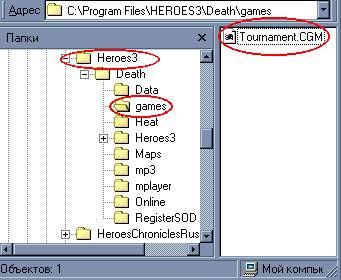
3.3. Load the savegame and start playing whenever you want. It is forbidden to restart; the map should be completed only starting from the downloaded savegame.
3.4. Each player should save the game after each completed day. The organizer may ask for these saves. If you don't have them, the result will be voided without discussion.
3.5. Before the last action (the victory is achieved after this — final battle, town capture, artifact taking, etc.), it is necessary to save the game again.
3.6. A detailed description of the tournament map is welcome (not necessary).
3.7. Before the end of the tournament, the final save should be sent to the organizer (the e-mail must be indicated in the rules of the tournament).
3.8. Wait until the final results are declared.

4. General restrictions:
4.1. It is not allowed to discuss walkthroughs or gaming details during the course of the tournament. Questions can be asked only to the organizer (or judge) of a tournament via private message.
4.2. The game is allowed only from a starting savegame. It is forbidden to restart or start playing from a map.
4.3. Cheats can be used only for scouting (to study the map). In the final walkthrough, it is forbidden to use cheats. Otherwise, the result will be voided immediately.
4.4. It is forbidden to use any programs or files not included in 7 that impose changes on gameplay.

5. During the game it is forbidden:
5.1. To dig for the Grail before the entire puzzle map is opened, i.e., you should first visit all obelisks (even if a cross can be seen beforehand!)
5.2. To dig for the grail on a day when the digging hero performs other actions (movements).
P.S. Digging a hole (without retrieving the Grail) on the same day is also forbidden.
5.3. Hire your killed or dismissed heroes on the day of dying/dismissing (however, running/surrendering from battle and hiring that hero on the same day is allowed; it is allowed to hire killed computer heroes).
P.S. Recruiting a hero with extra movements on another day is also a bug, but an allowed one.
P.P.S. A hero who "wins" a battle using the "Summon Elementals" spell while losing their entire army and disappearing from the map is considered killed.

5.4. To leave a hero with no army (cases where this happens after completing a quest are excluded).
5.5. Artificially interrupt the movement of a hero who uses the "Flight" spell (or Angel Wings) (for example, by pressing the spacebar). This includes capturing blocked cities or defeating their garrisons using this trick; other usage of the spells is allowed.
5.6. To sell artifacts and spell scrolls at higher prices.
5.7. To visit Sirens more than once with the same hero.
5.8. Attack and run/die from a group of neutrals that has an upgraded stack (multidefeat).
P.S. It is allowed to attack such a group and run for the purpose of hiring the hero (without subsequently defeating the same group of neutrals).
P.P.S. It is allowed to run from such a battle after the upgraded stack is killed.

5.9. To use magic in anti-magic garrisons. Automatic spells conjured by some artifacts are excluded.
5.10. To raise undead from summoned elementals, cloned monsters, demons raised by Pit Lords, or undead that were raised by a computer hero after defeating your hero.
5.11. To use the "paralysis" of a monster who is under a berserk spell.
5.12. To use the bug with unlimited ballista ammo without an ammo cart in cases where victory is achieved only using this bug, i.e., by means of the ballista alone.
P.S. Using this trick with the ammo cart is allowed — provided that the number of battle rounds does not exceed 500. The hero must have an ammo cart before entering the battle and keep it undamaged after the battle ends.
P.P.S. Using this bug in a long battle (without an ammo cart or if it was destroyed) where victory is achieved not because of the ballista but due to the hero's army or spells is allowed.

5.13. To use bonuses from navigation on land.
This includes running from a sea battle and subsequent movement of the hired hero in the following cases:
1) When the hero uses the "Admiral's Hat" artifact or artifacts that comprise it;
2) When the hero has the "Navigation" skill of any level;
3) When the Lighthouse is built or taken under control.
P.S. It is allowed to run from a sea battle and move afterward with a hired hero on land in cases 2 and 3 if the basic Navigation skill (or a few levels starting from basic) was acquired, or the building/conquering of the Lighthouse occurred on the day of running.
5.14. To use the "Admiral's Hat" artifact.
P.S. It is allowed to use the artifacts comprising the "Admiral's Hat" ("Captain's Hat" and "Necklace of Navigator") without uniting them.
5.15. All tournament battles can be reviewed by the tournament organizer to check if they can be repeated on any computer. Participants may be asked for detailed descriptions of these battles.
During battle repetition, morale/luck/special abilities should not be the key factor in victory (army preservation) and are not necessary during the repetition by the organizer.
The player can base their victory on a single occurrence of morale/luck/special ability and ask the organizer to repeat the battle a few times to be convinced of the results' reality.
If you do not follow this rule or if the organizer cannot repeat a battle in 25 attempts, your final save is voided.
P.S. Organizers do not strictly count 25 attempts during this check; instead, the reality and probability of the battle are evaluated.
5.16. To use any bugs of the game that are not listed in 6.
P.S. If you find a bug not listed in 6, you should contact the tournament chief for clarification.

6. It is allowed to use the following tricks:
6.1. Hiring a hero who was dismissed or killed on any day following the dismissal/death.
6.2. Hiring a killed computer hero on any day.
6.3. Leaving a hero without an army after they complete a quest.
6.4. Transporting neutral monsters over rough terrain without penalty.
6.5. Dismissing a hero who is in a city garrison.
6.6. Building the Grail on the same day as another building in a city.
6.7. Building two ships in the shipyard at the same time.
6.8. Using artifact transfer from loser to winner as a result of a battle between computer heroes.
6.9. Using mistakes (or explicit and implicit ideas) of the map builder and implicit game errors occurring without player operation.

7. Additional programs and files that can be used:
7.1. HD mod — Mod for improving interface functionality. Author is baratorch. HD+ is FORBIDDEN!
7.2. «Digger HMM» — Program for hiring heroes. Author is ShadeByte download
7.3. HMM3_Lighter — program for quick army and artifact exchange between two heroes in Heroes III. Author is vbn.
7.4. ONLY these text files:
Cranim.txt — accelerates animations in battles.
File ARRAYTXT.TXT — shows the quality ranges (in numbers) for monsters for different H3 versions.
File GENRLTXT.TXT — shows the amount of hero's mana in battles.
7.5. 7-zip — program for creating archives of tournament savegames.

8. Other
8.1. If you find any inaccuracy in the rules, please report it to me via PM.
8.2. To organize your own H3 tournament, it is necessary to contact me via PM for consultation and organizational help.
In reply to Pit for LM
#40
Auto-translated
I'll leave the link here as well.
Tootsie Pie
I've made a revised and improved version of the reference guide:
- The effects of the Sphere of Suppression and Exclusion are now precise;
- The same applies to Unit Classification: Dead, Undead, Alive;
- "Objects on the map that allow you to obtain resources" - a table has been added for all resource locations, and a more functional layout scheme;
- Immunities have been clarified in "Magical and Tactical Abilities of Units During Combat";
- "Monsters in the game and their characteristics" - value has been added;
- "Algorithm for unit movement on the battlefield" - everything has been explained)), + explanatory pictures and examples, + Turn order in combat (with translation), + small notes on AI behavior from Anton (through Leader1);
In the Sphere of Suppression, I've introduced something like spell classes:
mind-affecting spells: blindness, berserk, hypnosis, forgetfulness, joy, sadness, rage
spirit-affecting spells: joy, sadness, fear
life-affecting spells: sacrifice (resurrected/victim), resurrection - this is more convenient and easier to remember
...and I've added some other minor improvements.
http://zoog2.narod.ru/misc/FMfix1.rar - contains 6 modified pages of the Fizmig
In reply to Pit for LM
User Avatar
#42
Auto-translated
I've edited the SoD executable file to increase the speed of actions during combat. The speed has been increased not only for movement, flying, and creature attacks but also for spellcasting, morale, luck, etc. In the archive you will find the .exe file that needs to be copied into the game folder (e.g., C:\Games\Heroes) and launched from there. The acceleration was implemented taking into account the Cranim.txt file in the folder, so it is recommended to use both this executable and the cranim.txt file in the /Data folder. Otherwise, the acceleration will not be complete. I can upload a version for masochists where there won't be any animations at all, and even Cranim won't be needed. But keep in mind that it's quite difficult to get used to. :)
Attachments 1
1 file attached • Total size: 2.6 MB
In reply to Pit for LM
#43
Auto-translated
I placed the Jebus file in the Data folder, renamed it to rmg and rmg.txt. But when generating random maps, the standard game template is generated. Or is this template only for online games? Can it be used for offline games? If so, how?
In reply to Chingis
User Avatar
#44
Auto-translated
Chingis
I placed the Jebus file in the Data folder, renamed it to rmg and rmg.txt. But when generating random maps, the standard game template is generated. Or is this template only for online games? Can it be used for offline games? If so, how?
If you have the HD mod installed, you need to put it in the HiRez Data folder.
In reply to Pit for LM
#45
Auto-translated
I didn't install HD Mode.
In reply to Chingis
User Avatar
#46
Auto-translated
Autosave counter 2.05, when attempting to create a save (during the "unzipping" stage), produces the following error:

"Failed to launch the program or component gzip.exe due to incompatibility with the 64-bit version of Windows."

After this, the save file it was re-saving is deleted, and a new one appears with the correct name and a size of zero kilobytes.
I am using Windows 7 64-bit.
Running it in compatibility mode did not help.

Does anyone know how to fix this?
User Avatar
#47
Auto-translated
Announcement.

Dear players!
I am working on another major edit of the "Useful Information" topic; there have been many requests, unnecessary content, additions, and corrections accumulated.
Therefore, for some time, the topic will be sometimes visible and sometimes not; it is more convenient for me to moderate an invisible topic. I will try to make it accessible in the evenings and on weekends. If necessary and if you cannot wait, please contact me via private message or ICQ.
Also, please note that some links to Useful Information in other topics are likely to stop working. Look for the desired article based on the logical arrangement of information in the topic.
When I finish, we with the tournament organizers will fix everything.

Changes in PI - Spring 2013

In Russia, the game "Heroes of Might and Magic III: The Shadow of Death" was localized by Buka, a publisher, developer, and localizer of many computer games.
The company's website is www.buka.ru.
Here you can buy a license for "Heroes of Might and Magic III: The Shadow of Death" in the digital store - http://www.shop.buka.ru/item/46, as well as other games, download the necessary patches, and receive Technical Support.
The cost of the license in spring 2013 is 99 rubles.

+ image


TeamViewer /topic/at/615639/ - added to Useful Information
In reply to Pit for LM
User Avatar
#48
Auto-translated
General Forum FAQ.

You can find answers to most general questions by using the Help link located at the top of each forum page.
FAQ1. Who can I contact for specific help regarding this section?
The administration of our section: the section coordinator Dirty_Player (his nickname is highlighted in pink), a list of moderators Pit for LM, Mizrael, Scorpiona, numOne, KostyaN, LeBron are located in the lower right corner of the section, and their nicknames are green. You can contact the administration using the Private Messages system (the entrance to it is located in the upper right corner of the page). You can also do this via ICQ or Skype. Contact details can be found in the profile or in the Tournaments that they run.
FAQ2. How do I choose a suitable nickname? Everything I enter is already taken...
Try using the user search system.
At the top of each forum page there is a link - Users, when you click on it, you can see a link on the right side at the top of the page - User Search. Enter the nickname under which you would like to register, and the system will show you registered users with similar nicknames. It will be easier for you to choose a unique name. In addition to numbers, Latin and Cyrillic letters, the following symbols are allowed: =, @, #, & and others.
FAQ3. Registered on the forum, but did not receive the promised letter with instructions on activating the account. What should I do?
Write a message in the topic "Account Activation Requests".
Only users waiting for confirmation of activation via e-mail can leave a message here.
FAQ4. I want to change my nickname because I don't like / am tired of my current one / there is confusion / it is unreadable ... etc.
What needs to be done and what shouldn't be done?
The most important thing: do not create a second account, this is prohibited by the HW rules.
To change your nickname, write a message in the topic "Nickname Change at HW" and after some time you will get lucky.
Don't forget to inform the tournament leaders and season organizers, as well as your opponents, about the nickname change afterwards.
Try not to abuse the ability to change nicknames. Remember that it is not the name that adorns a person.
FAQ5. Forgot my nickname, forgot the password for my account, the email address on which I registered no longer exists.
What should be done and what shouldn't be done?
Anything can happen.
Again, do not create a second account.

It may be possible to remember your nickname using the User Search system (see FAQ2).
If you have forgotten the password for your account, you need to use the password recovery system. This system will send you a new password to the email address you specified during registration.
It is worse if the email address no longer exists. In this case, you must contact the forum administration (see FAQ1).

If you still registered a clone to log in to the forum, be sure to contact the administration and report it. In such cases, accounts can be merged. Do not wait until cloning is detected; registering two accounts is prohibited, and you may receive 50 violation points.
FAQ6. How to insert a single signature into my messages? How to change profile? How to view comments in the Spirit of Battle system?
At the top of each forum page there is a link to your personal Control Panel.
When you click on this link, you go to the Spirit of Battle System panel and can read the last 10 comments about your posts made by other users.
On the left side of the Control Panel there is a menu with settings for your profile.
In particular, here you can Edit Signature, i.e., insert text or an image that will be displayed after each of your messages. According to the Forum Rules:
The user's signature on the HeroesWorld forum should be formatted with no more than 3 font sizes available in the standard forum message editor. The user's signature cannot contain more than 2 large images if there are no small images. The user's signature cannot contain more than 1 large image if there are small images. The user's signature cannot contain more than 5 small images. A large image is less than or equal to 500x140 pixels in area. A small image is less than or equal to 350x20 pixels in area. Images larger than 500x140 are not allowed.
A detailed comment on this item can be viewed here.

Statistics

Welcome our newest member: Emil


