Skip to content

Posts from How can I tell if the templates for random maps are working?

No ratings yet — be the first to rate!
Auto-translated
Hello. Yesterday, after a very long break, I played Heroes 3: Shades of Darkness online with a friend, and the map generated was very unbalanced. Today, I learned that this can be avoided by using templates (the Rmg.txt file). I downloaded a template I liked, put it in the Data folder (there wasn't such a file there before), and decided to check if everything works as it should. In Single Player mode, I created a random 1v1 map with the computer, setting the necessary parameters specified in the template description: size, monster strength, etc. As soon as the map was generated, I entered the cheat code to display the entire map, and what I saw didn't look like what it should be according to the template. I tried repeating it with other settings and rmg.txt files – nothing worked. The maps are generated completely differently than I expected. Could you please tell me what this might be related to (maybe the templates will only work against a human player, but not against the computer)? I downloaded Heroes version 3.58f, but I'm running it through Heroes3.exe to play the classic Shades of Darkness.

User Avatar
Auto-translated
To understand how the map was generated, you need to look at the scenario information (by clicking the "i" button). You can see something like this:
Map created by the Random Map Generator. Template was 2SM4d(3), Random seed was 1315149640, size 108, levels 2, humans 2, computers 0, water None, monsters 4, second expansion map, red is human, red town choice is castle, blue is human, blue town choice is rampart

The part highlighted in bold is the template name. If it matches what it should be, then everything is okay. In general, the map doesn't visually resemble a scheme in any way. You just need to understand the essence of the scheme.
In reply to Dirty_Player
Auto-translated
Dirty_Player
To understand how the template was generated, you need to look at the scenario information (by clicking i). You can see something like this:


What is highlighted in bold is the name of the template. If it matches what it should be, then everything is okay. In general, the map doesn't visually resemble a scheme in any way. You just need to understand the essence of the scheme.
It seems that when creating a random map, the wrong templates are being used :(

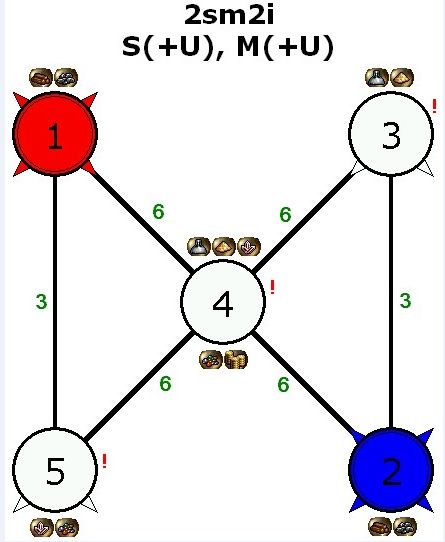
For example, I added the 2sm2i template, restarted Heroes. I created 5 maps in a row with the parameters M+U. 2-0-0-0, water - no, monster strength - strong, difficulty - knight 130%. Each time, by clicking I, I saw different template names (6SM0b, 6SM0d, Dragons, etc.), and never 2sm2i, which I wanted to see.


What could be the problem, please advise?
User Avatar
Auto-translated
It is possible that the display of file extensions is disabled, and in this case, after renaming, the file name turned out to be rmg.txt.txt.
In reply to RiMpel2
Auto-translated
RiMpel2
It's possible that the display of file extensions is disabled, and in that case, after renaming, the file name turned out to be rmg.txt.txt.

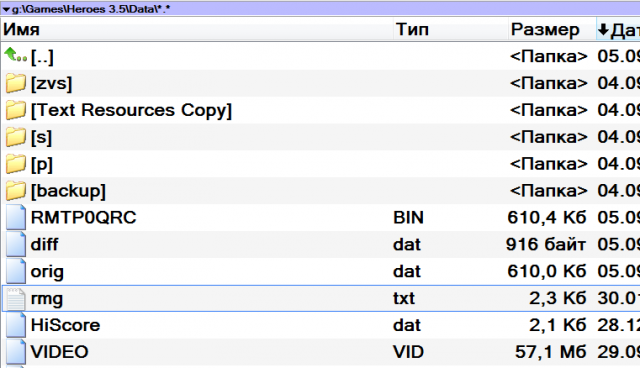
That's definitely not it. I'm working in Total Commander, and everything is clear there.
User Avatar
Auto-translated
Is the .rmg file definitely in the DATA folder?
Сейчас балуюсь этим https://vcmi.eu/download/
За то что нейтралы не бегают за единичкой, для меня это уже стоит того
Auto-translated
User Avatar
Auto-translated
I see you're using Heroes of Might and Magic. Perhaps you're launching SoD from your desktop, which might be causing confusion. Or something might be interfering with the game's launch, like another version installed in a different folder (possibly causing registry issues). Try launching the executable directly from the Heroes folder. If that doesn't work, I'm not sure what the problem is. I downloaded Heroes version 3.58f, but I launch it through Heroes3.exe to play the classic SoD. Here's another thing that bothered me. To play a pure SoD, there shouldn't be anything extra in it. Otherwise, you might end up with situations like in some TE scenarios, where the dimension door is in the water, and the portal to the other world is in the fire, and there's a slowdown on the second level.
Сейчас балуюсь этим https://vcmi.eu/download/
За то что нейтралы не бегают за единичкой, для меня это уже стоит того
Auto-translated
Basically, I've downloaded a whole bunch of different versions of Heroes (both with and without Vog), but the templates only worked in the English version that Lider1 kindly shared. Now I'll try to download a Russian SoD image and try it with that (before this, I was downloading game archives without any installers). I hope everything works out this time, but I would still like to know a more rational solution to the problem than downloading 10 different versions of the game from the internet.

Added after 20 hours 2 minutes
I still haven't found a working Russian version of SoD in which the templates would work. Kind people, please share a working link, because I've been struggling with this for 3 days now.
In reply to Ladezzz
User Avatar
Auto-translated
Ladezzz
I still haven't found a working Russian version of SoD where templates work. Kind people, please share a working link; I've been struggling with this for three days now.
/topic/at/345027/
Here, it seems someone uploaded a working version. It's very strange that you can't get it to work. Everyone else manages to do it on the first try. :confused:
Auto-translated
Another fail :(((( I don't know what to do to get these templates running :((( Maybe someone can take a remote look and try to figure out what the problem is, because I don't even know what to try anymore.

Added after 19 minutes
For those who want to help - the Skype is the same as the nickname.

Added after 19 hours 16 minutes
Looks like the problem is solved!
A huge thank you to phomm, who responded and didn't hesitate to spend his time helping me figure out this issue. It was resolved by replacing the Heroes3.exe file with his working version (the one with the skeleton in a red hood). After that, everything worked as it should. Thank you again.
User Avatar
Auto-translated
I have the same problem as Ladezzz. As I understand it, those who say that everything should be working are actually not playing SoD, but Complete or Blade, or the English SoD.

It seems the problem is specifically related to our Buka version. Another point - it doesn't patch properly from 3.1 to 3.2 (and for those whose does, that's probably the English version again). The folder size changes, but the necessary changes are not there.

For Blade, Buka released an official Russian patch, and everything is fine there - from 2.1 to 2.2.

I am referring to the patches provided in the links on heroesworld.

Kind comrade phomm, please respond if you've read this.
Where can I get the correct Heroes3.exe?
Auto-translated
You can get the executable from me at http://phomm.narod.ru/sodexe.zip. I also shared it with someone else, but nowadays you can find it anywhere; there are ready-made collections on heroes3.tv, Hota, and even on HDMod, I think.
Инфа о разных моих проектах, по большей части геройских, тут http://phomm.narod.ru
In reply to pHOMM
User Avatar
Auto-translated
Thank you very much!

And is it Russified? The same as here? (they say the buttons there are slightly shifted)

http://forum.df2.ru/index.php?showtopic=13635

Added after 1 minute
Can it be dropped directly into the Bukovsky version and everything will work?

Added after 5 minutes
By the way, here http://forum.df2.ru/index.php?showtopic=28737
it is written that changes when moving from 3.1 to 3.2 affect not only Heroes3.exe but also HEROES3.ICD and a mcp.dll file is added.

(the files dplayerx.dll, drvmgt.dll, secdrv.sys, clcd32.dll, clokspl.exe
are actually not in Breath, they are in Blade).

The Bukovsky version is 3.1. I think I'll apply the patch from here /files/10060/>
it will fix HEROES3.ICD and add mcp.dll, then the patch will crash without fixing Heroes3.exe.

And then I'll just replace this file with yours.
User Avatar
Auto-translated
The Bukovskaya version is essentially 3.1. I used to apply a patch to it or simply replace the executable (like the 3.2 version used by phomm). The required template is set in the ND-mod launcher. However, I don't have the HEROES3.ICD and mcp.dll files in my build (apparently, they aren't needed there).
Техника в руках индейца мертва.
Справочник по НоММ-4 http://handbookhmm.ru/pamyatka-dlya-heroes-iv.html
Памятка по НоММ-3 http://handbookhmm.ru/pamyatka-dlya-homm-iii.html
и HotA http://handbookhmm.ru/vyishla-obnovlennaya-pamyatka-dlya-homm-iii-hota.html

Statistics

Welcome our newest member: Emil