


 Победитель

Auto-translated
In Might and Magic: Heroes VI, dynasties were introduced. Each player registered on the Ubi website has their own dynasty that gains levels and ranks. To use this new feature, you need to connect to the internet, specifically to the Ubi game server - CONFLUX.
Network profile of my dynasty
There is a CONFLUX button in the main menu – a blue sphere in the upper right corner. By clicking on this sphere, you can show or hide brief information about the dynasty. You can open the dynasty profile from the main menu.
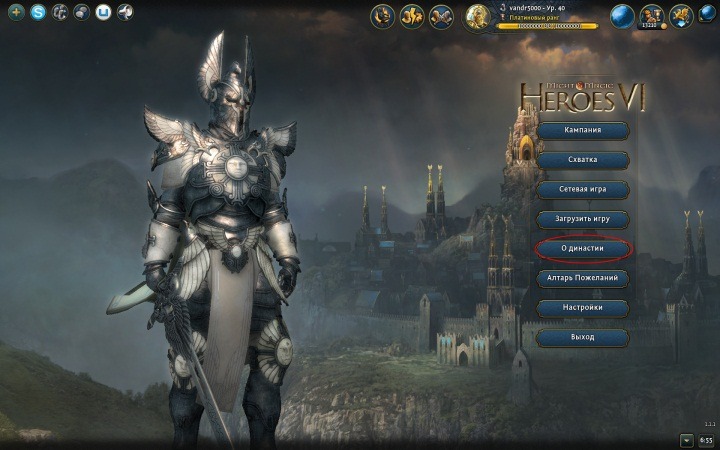
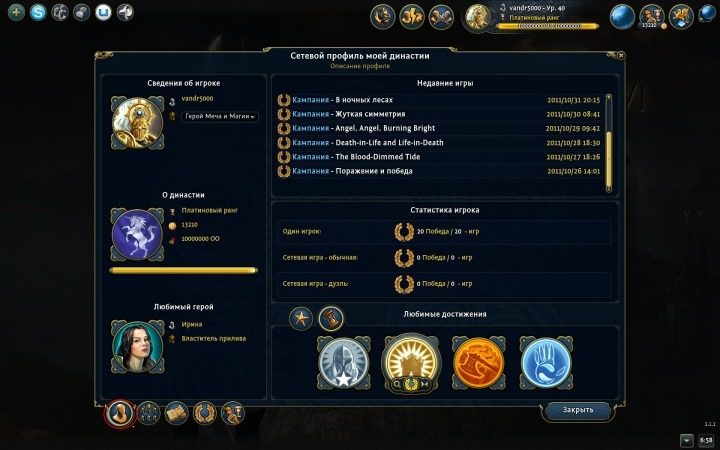
By clicking the "About Dynasty" button, we go to the dynasty profile, where all the information is presented, which opens when you click on the Conflux button. Here you can choose a title, portrait, coat of arms, favorite hero, favorite achievements, view experience, rank, money, and statistics.
At the very bottom of the dynasty menu, there are tabs through which you can go to other parts of the menu. "Network Profile" is the first tab. Now let's move on to the second one.
Heroes of my dynasty
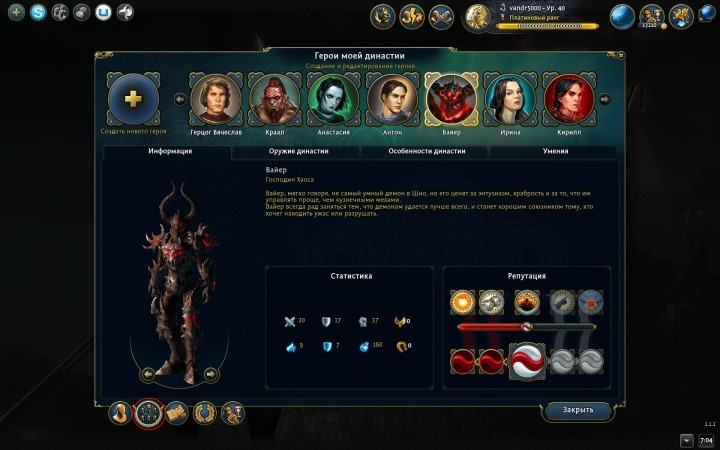
In this tab, you can see all the heroes that you have in your dynasty. Under the portraits of the heroes, there are also sub-tabs with which you can make these heroes even stronger. In the first sub-tab, which we initially see, you can view the appearance, characteristics, and reputation of the selected hero.
We go to the second sub-tab, called "Dynasty Weapon". In this tab, each hero can be assigned a weapon, and by selecting a weapon, you can view bonuses for the level (the description appears if you right-click on the bonus). Dynasty weapons gain new levels when they receive enough experience while being with the hero (including in campaigns). To give a campaign hero a dynasty weapon, you need to open his profile, go to the second tab, and select the desired weapon. Dynasty weapons are discussed in this topic.
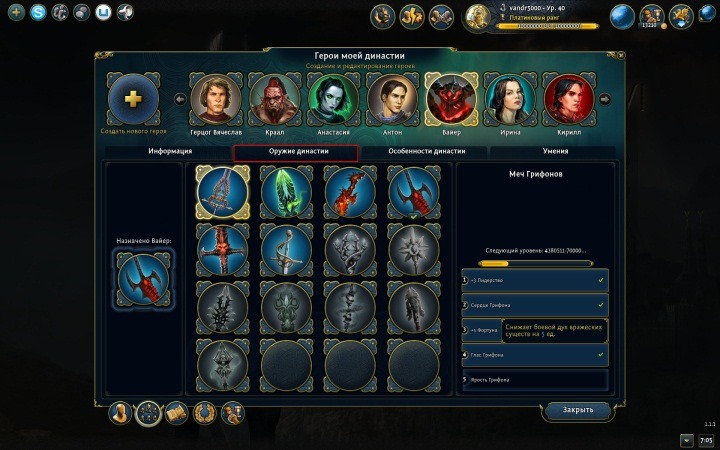
In the third sub-tab, you can view all the features of the dynasty and assign them to heroes. Everything is similar to weapons.
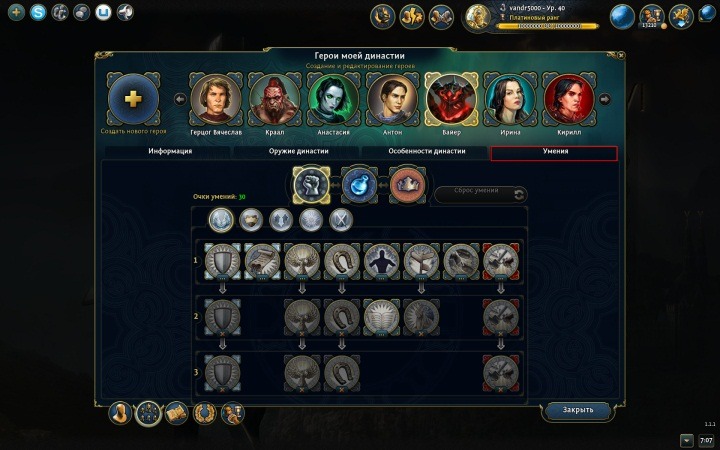
In the fourth sub-tab, you can develop 30 skills for the hero, as it is done in the hero profile in the campaign or multiplayer. These skills only work in duels.
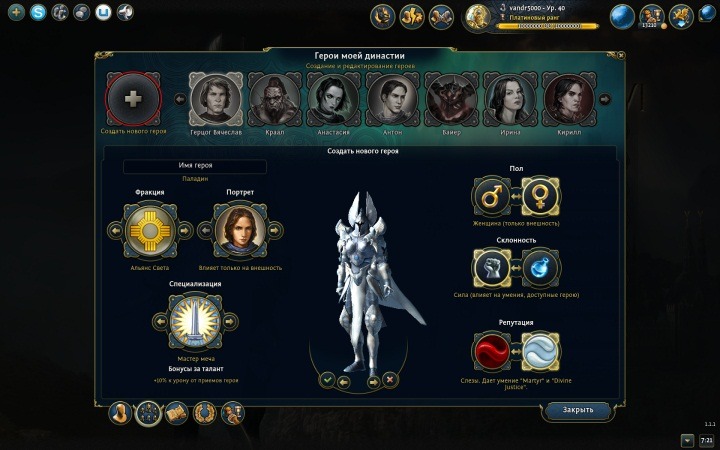
And finally, if you are not satisfied with the heroes obtained by completing campaigns, you can create your own. To do this, click on the "+" to the left of the hero portraits. In the menu that appears, you can choose a portrait, name (only Latin characters), class, gender, specialization, and reputation for the hero. Then the hero is added to your dynasty, and you can equip him in the other tabs.
Now let's move on to the third tab of the dynasty (the one located at the bottom of the menu, and not under the portraits).
Bestiary of my dynasty
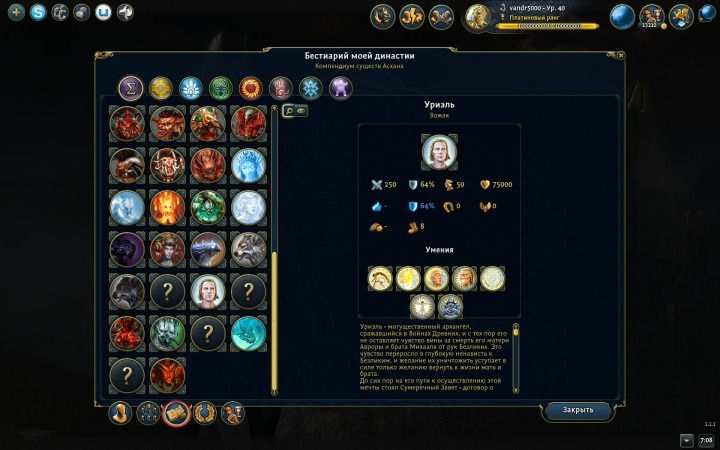
Also a very interesting new feature. Here you can view the characteristics and descriptions of all creatures in the game, including bosses. It was from here that I copied information about the game's bosses :). To add a creature to the bestiary, it must be defeated in the game. All creatures are sorted by factions.
Achievements of my dynasty
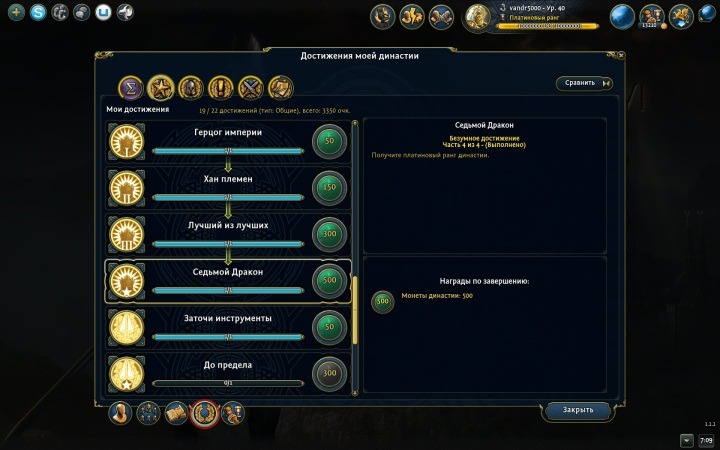
In the fourth tab, you can see both all achievements in the game and those received. Achievements can also be compared with other player dynasties! All achievements are sorted into specific groups. You can receive dynasty coins, yuPlay points, and titles for achievements.
Wishing Shrine
And finally, the store! You can access it not only from the dynasty menu but also by clicking on the wallet button in the brief Conflux information, as well as from the main menu. Here you can buy portraits, titles, dynasty weapons, dynasty features, and additional slots. Purchases cost dynasty money, which can be obtained for achievements.
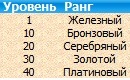
To purchase the best bonuses, you need to get a new rank. The rank, in turn, depends on the level of the dynasty.
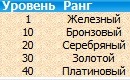
There is a bug for bronze, silver, and gold ranks: you can buy items of these ranks not starting from 10/20/30, but from 11/21/31 levels.
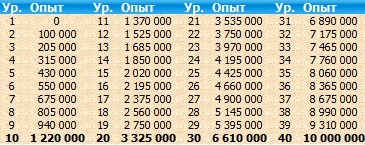
Levels can be gained through dynasty experience. The dynasty gains experience depending on the experience that your hero receives in single-player or multiplayer games. Autobattle does not give dynasty experience!

So, I have finished a detailed overview of the dynasty. If you want to supplement the review, write it in this topic :)!
Network profile of my dynasty
There is a CONFLUX button in the main menu – a blue sphere in the upper right corner. By clicking on this sphere, you can show or hide brief information about the dynasty. You can open the dynasty profile from the main menu.
By clicking the "About Dynasty" button, we go to the dynasty profile, where all the information is presented, which opens when you click on the Conflux button. Here you can choose a title, portrait, coat of arms, favorite hero, favorite achievements, view experience, rank, money, and statistics.
At the very bottom of the dynasty menu, there are tabs through which you can go to other parts of the menu. "Network Profile" is the first tab. Now let's move on to the second one.
Heroes of my dynasty
In this tab, you can see all the heroes that you have in your dynasty. Under the portraits of the heroes, there are also sub-tabs with which you can make these heroes even stronger. In the first sub-tab, which we initially see, you can view the appearance, characteristics, and reputation of the selected hero.
We go to the second sub-tab, called "Dynasty Weapon". In this tab, each hero can be assigned a weapon, and by selecting a weapon, you can view bonuses for the level (the description appears if you right-click on the bonus). Dynasty weapons gain new levels when they receive enough experience while being with the hero (including in campaigns). To give a campaign hero a dynasty weapon, you need to open his profile, go to the second tab, and select the desired weapon. Dynasty weapons are discussed in this topic.
In the third sub-tab, you can view all the features of the dynasty and assign them to heroes. Everything is similar to weapons.
In the fourth sub-tab, you can develop 30 skills for the hero, as it is done in the hero profile in the campaign or multiplayer. These skills only work in duels.
And finally, if you are not satisfied with the heroes obtained by completing campaigns, you can create your own. To do this, click on the "+" to the left of the hero portraits. In the menu that appears, you can choose a portrait, name (only Latin characters), class, gender, specialization, and reputation for the hero. Then the hero is added to your dynasty, and you can equip him in the other tabs.
Now let's move on to the third tab of the dynasty (the one located at the bottom of the menu, and not under the portraits).
Bestiary of my dynasty
Also a very interesting new feature. Here you can view the characteristics and descriptions of all creatures in the game, including bosses. It was from here that I copied information about the game's bosses :). To add a creature to the bestiary, it must be defeated in the game. All creatures are sorted by factions.
Achievements of my dynasty
In the fourth tab, you can see both all achievements in the game and those received. Achievements can also be compared with other player dynasties! All achievements are sorted into specific groups. You can receive dynasty coins, yuPlay points, and titles for achievements.
Wishing Shrine
And finally, the store! You can access it not only from the dynasty menu but also by clicking on the wallet button in the brief Conflux information, as well as from the main menu. Here you can buy portraits, titles, dynasty weapons, dynasty features, and additional slots. Purchases cost dynasty money, which can be obtained for achievements.
To purchase the best bonuses, you need to get a new rank. The rank, in turn, depends on the level of the dynasty.
There is a bug for bronze, silver, and gold ranks: you can buy items of these ranks not starting from 10/20/30, but from 11/21/31 levels.
Levels can be gained through dynasty experience. The dynasty gains experience depending on the experience that your hero receives in single-player or multiplayer games. Autobattle does not give dynasty experience!
So, I have finished a detailed overview of the dynasty. If you want to supplement the review, write it in this topic :)!
Карты для Heroes of Might and Magic V
Цикл "Закадычные враги": "Особенное гостеприимство, "Супероружие", "Меж молотом и наковальней"
"Падение Шантири"
Кампания для "Кодекса Войны"
"Выбор Сагиттеля"
Цикл "Закадычные враги": "Особенное гостеприимство, "Супероружие", "Меж молотом и наковальней"
"Падение Шантири"
Кампания для "Кодекса Войны"
"Выбор Сагиттеля"


