Skip to content

Posts from Heads from Skyrim. Auto-translated

No ratings yet — be the first to rate!
User Avatar
#16
Auto-translated
Regarding textures, there are textures that their authors created from scratch. Regarding the face model: 1) I'm not sure, but it seems like RaceMenu has added content for individual parts of the head, such as lips/nose, etc. 2) You can definitely add these parts with certain mods and/or completely replace these models (replacement is a fairly popular category of mods for faces, as they are quite rough in the original, of course). 3) At the same time, in RaceMenu itself, you can take some kind of ready-made face and completely rework its vertices using the "Sculptor." That is, you can create a face that doesn't borrow anything from anywhere, even if it's not created from scratch. In terms of models, not in terms of textures, and I'm not considering various small details like eyelashes, and you can't rework things like crystals in this way, and some other things. In fact, the interface of the sculptor is clearly visible in the first screenshot in this topic.

 

К А
Стикеры GBF в Telegram
User Avatar
#17
Auto-translated
[email protected]
If I don't forget, I'll write later how to fix the square shadows on the face in Maua6.
By the way, yes, it would be interesting to read about this later.

Added 3 minutes ago
Ment
At the same time, in RaceMenu itself, you can take some kind of conditionally ready face and completely rework its vertices using the "Sculptor". That is, you get a face that, although not created from scratch, does not borrow anything from anywhere.
It still borrows. It's still the same model, just the vertices have been moved. It's still the same mesh, the same UV map.

Added 10 minutes ago
I googled a bit and didn't find any face models created from scratch for Skyrim. Maybe they exist, but I didn't come across them.

There's only this disaster:

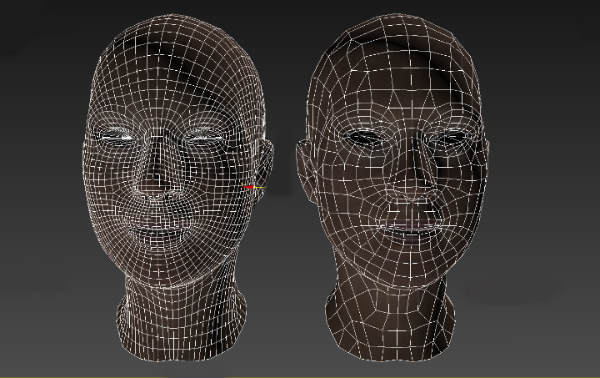
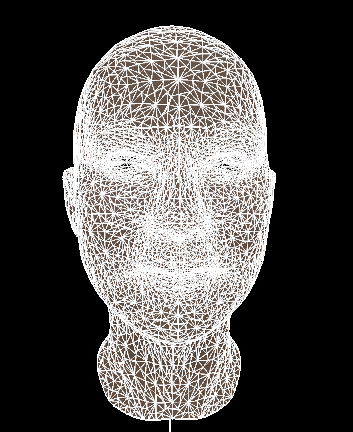
When a guy just throws a turbo-smooth modifier on top of the model, and voila, it's now ultra-mega-super-next-gen-high-poly.
The load on the computer increases by two times for no reason, and there is no difference in the game. Don't do that. Models are not raster images. More polygons do not equal better quality.

Wow. That wasn't the limit. It can be even higher poly.


Added 15 minutes ago
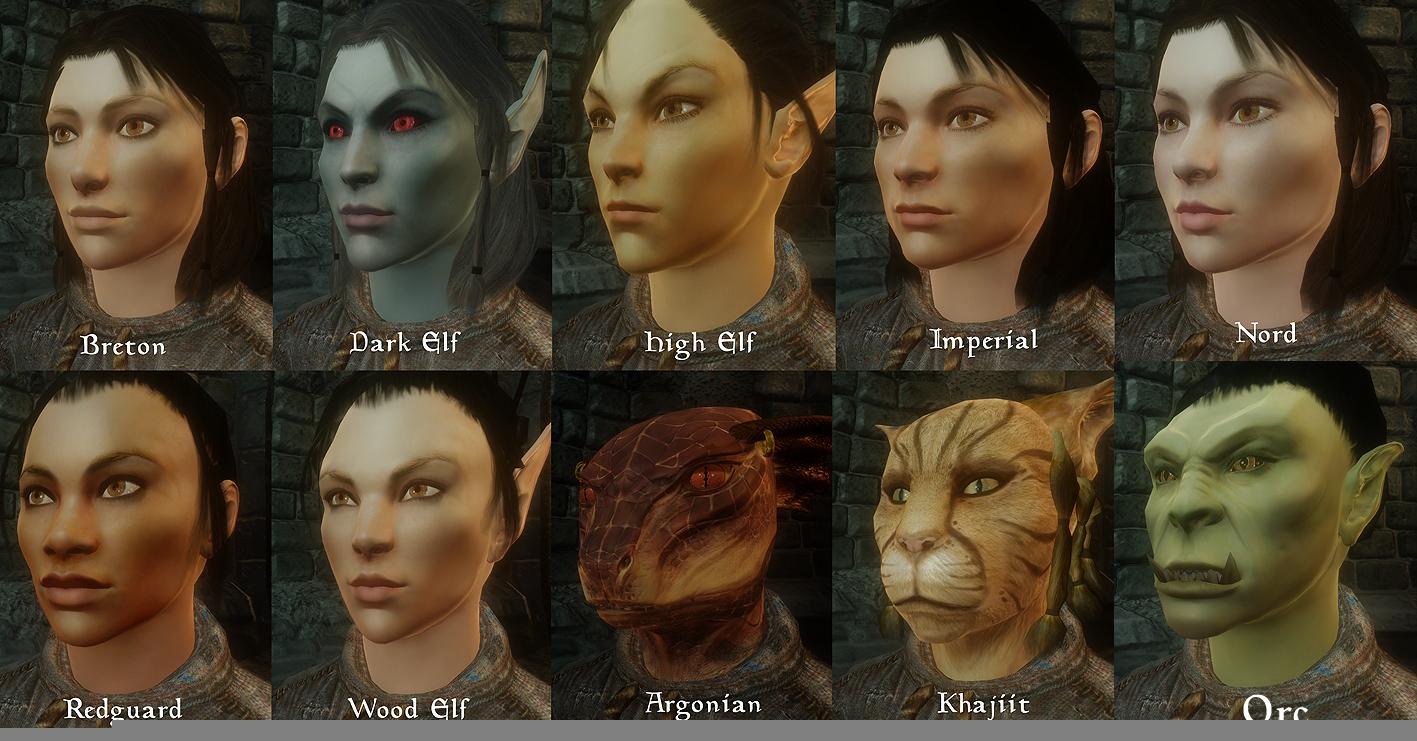
And here's a wonder for Oblivion.


The author writes something like:
All head model and texture assets are my own work based on Bethesda meshes and may be used as modders' resources. Original hairstyles included in this mod also apply.

Perhaps he still used Oblivion models as a reference, but judging by the appearance, there is a new mesh and textures. You can compare and check.
In any case, it seems that the author gives permission to use his work in mods.

Here's the link if you need it.
Just if you use it, mention who the author is and where you got it from.

Added 9 minutes ago
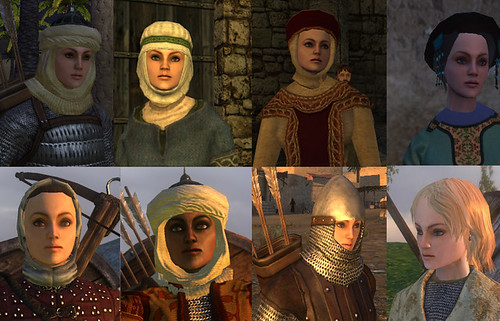
There's a mod with new face models and textures for M&M Warband, but it only has female faces. This mod is an OSP, i.e., its resources are free to use, provided that the author is credited.

Download link
Группа в вк посвящённая моим модам

Страничка моего последнего мода на ModDB

Моя страничка на Artstation,
где можно посмотреть и повертеть внутри браузера мои 3d модели.
User Avatar
#18
Auto-translated
zahar0z
By the way, yes, it would be interesting to read about this later.
I'll describe the process more briefly.
The head needs to be processed with the Smooth proxy and Reduce options; the result will be as follows:


The main advantage of this method is its simplicity, but the disadvantage is the increased "roughness" of the eyes. However, you can leave the original Skyrim eyes or just ignore it because it's impossible to examine the head so closely in the game.
Attachments 1
1 file attached • Total size: 76.7 KB
Мои мини-моды

Мод RTF

Мои NCF существа
In reply to fktifzobr
User Avatar
#19
Auto-translated
It's interesting how quickly retopology is done there with Reduce, judging by the look of it. Moreover, for a quick, one-click option, it looks very, very good. I was going to ask if the Skyrim models are too heavy for Heroes, but I see that you're simplifying them, and that's the right approach. And doesn't Smooth add polygons? I mean, is it just smoothing groups, or does it multiply the polygons? Because if it multiplies, then it's a pointless situation: you multiply first, then divide. If you reduce it directly without multiplying, then you should get a cleaner result. Regarding the squares on the first model: it's just that the smoothing groups aren't configured. They can be fixed in Max with one click. This is in my guide on transferring models from Heroes 7. Or maybe Smooth does the same thing here. I can't visually determine whether it's polygons or just smoothing.

Added 2 minutes later
True, the shadows on the reduced model look a bit rough. I know how to fix this in Max; you need to use the Edit Normal modifier, select all the normals, then break them apart and join them again. The shadows should look smoother after that.
Группа в вк посвящённая моим модам

Страничка моего последнего мода на ModDB

Моя страничка на Artstation,
где можно посмотреть и повертеть внутри браузера мои 3d модели.
In reply to zahar0z
User Avatar
#20
Auto-translated
zahar0z
It's interesting to see how quickly retopology is done there, judging by the appearance.
And for a quick, one-click option, it looks very, very good.
I always wanted to ask if the faces from Skyrim are too heavy for Heroes, but now I see that you're simplifying them, and that's the right approach.
And doesn't smooth add polygons? I mean, is it just smoothing groups, or is it a multiplication of polygons? Because if it's a multiplication, then it's a pointless situation: you multiply first, then divide. If you reduce it directly without multiplication, then it should result in a cleaner version.
Regarding the squares on the first face. It's just that the smoothing groups aren't configured. I can fix it in Max with one click. This is in my guide on transferring a model from the 7th game. Or maybe smooth does the same thing here.

Added 2 minutes ago
The shadows on the reduced model do look a bit rough. I know how to fix this in Max; you need to use the edit normal modifier, select all the normals, then break them apart and join them again. The shadows should look smoother after that.
Smooth does add polygons, but if you don't add them, the face will become too simplified after the reduce. It's probably possible to configure this properly, but I don't understand how.

Added 26 minutes ago
And also, it should be added that Smooth proxy, in addition to increasing the number of polygons, smooths the shadows - this is its purpose, and reduce simply reduces the detail to a reasonable level.
A normal head is made in 5 steps:
1) creating a smooth model
2) deleting the original model
3) adding lighting to the render
4) reducing the detail
5) combining the models into a group for porting to Heroes
Мои мини-моды

Мод RTF

Мои NCF существа
User Avatar
#22
Auto-translated
I found a solution to the shadow problems for those who are not familiar with Maya or 3D Max.
This can be done using NifSkope.
Open the head in NifSkope and immediately export it without selecting anything; this will export it completely.
In Maya, it will look like this:
You can then safely delete the head and other parts as desired (for example, the mouth and eyebrows).
Next, go back to NifSkope, right-click on the face, and select the function shown in the screenshot.
Now you can export only the face, and it will be imported in this form:
Now you can save one thing and then use the import function to combine the two files.
Attachments 3
3 files attached • Total size: 620.0 KB
Мои мини-моды

Мод RTF

Мои NCF существа