Skip to content

Posts from В Map Scripts Editor'e нету "MapScritp.lua"

No ratings yet — be the first to rate!
Auto-translated
what to do?
User Avatar
Auto-translated
create this file manually in the map archive and specify its path in the map.xdb file under the Script section.
Нет войне.
In reply to Gerter
Auto-translated
Could you please provide more details? I apologize for my lack of scripting skills, but I'm just starting out, and I would like to get a complete answer from you, including all the details. Thank you.

Added 3 hours and 29 minutes later
How do I specify the path? And I apologize again for my lack of skills in the field of map scripting.
User Avatar
Auto-translated
I'll try to explain it in as much detail as possible.
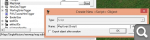
First, in the map properties, find the MapScript line, click "new," and create a new XDB script file:


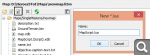
Save, close the editor, open the script editor, and open the map in it. Go to the Maps/SingleMissions/map_name folder, click "new lua file," and create the script file:


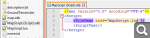
Close the script editor, open the map archive (located in the game folder/Maps), and find the file created in step 1. Open it with any text editor and enter the Lua file path:
Нет войне.
In reply to Gerter
Auto-translated
Thank you! I think I understand now, and I will delve deeper into the editor as much as possible. Thanks again!

Statistics

Welcome our newest member: Emil