


 Gerter

Auto-translated
I'll try to explain it in as much detail as possible.
First, in the map properties, find the MapScript line, click "new," and create a new XDB script file:
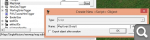
Save, close the editor, open the script editor, and open the map in it. Go to the Maps/SingleMissions/map_name folder, click "new lua file," and create the script file:
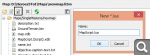
Close the script editor, open the map archive (located in the game folder/Maps), and find the file created in step 1. Open it with any text editor and enter the Lua file path:
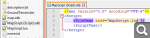
First, in the map properties, find the MapScript line, click "new," and create a new XDB script file:
Save, close the editor, open the script editor, and open the map in it. Go to the Maps/SingleMissions/map_name folder, click "new lua file," and create the script file:
Close the script editor, open the map archive (located in the game folder/Maps), and find the file created in step 1. Open it with any text editor and enter the Lua file path:
Нет войне.