


Skip to content

Posts from HTML/CSS – How to make it look exactly as intended.

No ratings yet — be the first to rate!
User Avatar
19 years ago
Auto-translated
Hello, it's me again… :smile43:
I have a question because I don’t know if this is a bug or not.

I was asked to help improve the appearance of the table, which I did:
Screenshot: Standard Style.
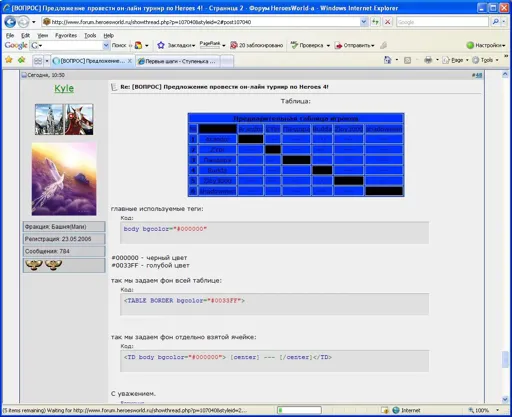

but if you change the style from standard to style 1, you see:
Screenshot: Style 1.
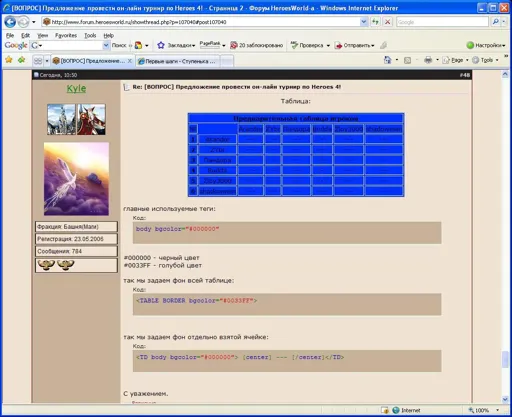

Question: What needs to be done so that the table looks the same in all styles?

The address of the post with the table: /topic/at/107040/

Thank you for your attention.

Attachments 2
2 files attached • Total size: 158.8 KB

Кто состоянием своим доволен, тому жить весело. (с)Алекса́ндр Васи́льевич Суво́ров
User Avatar
19 years ago
Auto-translated
I want to add to Kyle's post! I'm experiencing the exact same image issues in the following styles:
Academy 1
Academy 4
Dungeon 2
Dungeon 3
Haven 2
Necropolis 1
Necropolis 2
Sylvan 2
All other styles display correctly...
Unfortunately, I can't attach screenshots...:o


"Как это странно всегда..
Вроде бы взрослые люди,
А в голове ерунда..
Мечтаем как дети о чуде.."
User Avatar
19 years ago
Auto-translated
Kyle;107055
Hello, it's me again… :smile43:
I have a question because I don’t know if this is a bug or not.

I was asked to help improve the appearance of the table, which I did:
Screenshot: Standard Style.


but if you change the style from standard to Style 1, you see:
Screenshot: Style 1.


Question: What needs to be done so that the table looks the same in all styles?

Address of the post with the table: /topic/at/107040/

Thank you for your attention.

This behavior is related to the inheritance of CSS classes in Style No. 1, since Standard Style and HW_Hammers_of_Fate were created by me, but Style No. 1 was originally not made by me, which is why such differences arise in the display of HTML content.

In this specific case, you can apply the following structure to the cells that are supposed to have color #000000:

...

There may be other solutions, but this is the most optimal one.
Lu41k
I want to add to Kyle's post!! There are exactly the same problems with images in the styles:
Academy 1
Academy 4
Dangeon 2
Dangeon 3
Haven 2
Necropolis 1
Necropolis 2
Sylvan 2
Everything else displays normally..
Unfortunately, I cannot attach screenshots.

Unfortunately, there is simply no time to support and ensure compatibility for styles that were not created by me.
User Avatar
19 years ago
Auto-translated
And I would also like to point out a gross error in the code you wrote, which I have already removed from that post:


   ...


It is completely unnecessary to add this to the post; it is written only once and at the beginning of any HTML page, i.e., in this case, this structure is written by the forum engine itself.

If you use such structures in forum posts, then soon everything here will be displayed not as it should be.
User Avatar
19 years ago
Auto-translated
Thank you very much.

I just have one more question: which tag should I use to set the text color?

Thank you for your attention.

Кто состоянием своим доволен, тому жить весело. (с)Алекса́ндр Васи́льевич Суво́ров

In reply to Kyle
User Avatar
19 years ago
Auto-translated
Kyle;107070
Thank you very much.

Here's just one more question: which tag should I use to set the text color?

Thank you for your attention.

For maximum compatibility, use BBCode, which is provided by the message editor of our forum (the button). If there aren't the colors you need, you can use the same tag, but specify your own color:
[COLOR="#XXXXXX"]text[/COLOR]

where #XXXXXX is any color.

In case of extreme necessity, you can, of course, use the style attribute, which is present in almost all HTML tags:

text

text

text

Please use HTML very carefully and check the syntax before posting, as any carelessness can lead to incorrect display not only of your message but also of the entire page.
In reply to HwKeeper
User Avatar
19 years ago
Auto-translated
Thank you!
Creator;107080
Please use HTML very carefully and check the syntax before posting a message, as any carelessness can lead to incorrect display not only of your message but also of the entire page.

I will try to be more careful. :smile01:

Кто состоянием своим доволен, тому жить весело. (с)Алекса́ндр Васи́льевич Суво́ров
User Avatar
19 years ago
Auto-translated
I've fixed everything in my tables, thanks to everyone!
С самого начала позаботься о своем месте в жизни, чтобы не уподобиться маятнику. /Херберт. Ф./
Клан: "Смертельный Альянс" - "Mortal Alliance"
User Avatar
18 years ago
Auto-translated
Question
When creating tables in a draft version, on my own computer, and editing them, there is a need to transfer the information to the forum. At the same time, spaces appear, which are very difficult to deal with.
Is there a solution to this problem?
Sincerely, Kamikaze!

Индивидуальный и клановый рейтинги Heroes World
Handmade
In reply to Kamikaze
User Avatar
18 years ago
Auto-translated
I deal with extra spaces in Notepad as follows. Since the "unnecessary" spaces that need to be removed before posting a message on the forum are usually between the < and > tags, I simply run a replacement for the character combinations "<"+Space and ">"+Space. If there are several spaces in a row, I repeat this operation several times. We do the same in cases where spaces "interfere" in other places. P.S. Why in Notepad and not, for example, in Word? Because the latter automatically replaces all quotes of the form " " with « ». But, in principle, there is a solution for this as well.
Клан Homo homini

Charity suffereth long, and is kind; charity envieth not; charity vaunteth not itself, is not puffed up,
Doth not behave itself unseemly, seeketh not her own, is not easily provoked, thinketh no evil;
Rejoiceth not in iniquity, but rejoiceth in the truth;
Beareth all things, believeth all things, hopeth all things, endureth all things. Charity never faileth...
User Avatar
18 years ago
Auto-translated
And what about line breaks?

If you need to move to a new line
(in Word, this is Enter)
in HTML, this is done using the <br> tag.

Индивидуальный и клановый рейтинги Heroes World
Handmade
In reply to Kamikaze
User Avatar
18 years ago
Auto-translated
And to remove unnecessary paragraphs, a simple text editor won't be enough; you'll have to use Word. The essence of the operation to remove unnecessary paragraphs: Run a find and replace, substituting the character sequence ">"+"^p" with a single ">" character. "^p" is the designation for the paragraph mark in Word. If there are several consecutive paragraphs, repeat this operation several times. Similarly, proceed in cases where line breaks are created in other places.
Клан Homo homini

Charity suffereth long, and is kind; charity envieth not; charity vaunteth not itself, is not puffed up,
Doth not behave itself unseemly, seeketh not her own, is not easily provoked, thinketh no evil;
Rejoiceth not in iniquity, but rejoiceth in the truth;
Beareth all things, believeth all things, hopeth all things, endureth all things. Charity never faileth...

Statistics

Welcome our newest member: recijeb