


 KillAndAction

Auto-translated
For those who have played extensively on standard maps and generated maps using the in-game map generator in online mode, I suggest trying your hand at maps generated using the alternative map generator, Idans Random Map Generator (hereinafter IRMG).
This map generator allows you to create maps using various templates. It is easy to learn and can give you the opportunity to create a map to your liking.
Here is a picture of what this generator looks like.
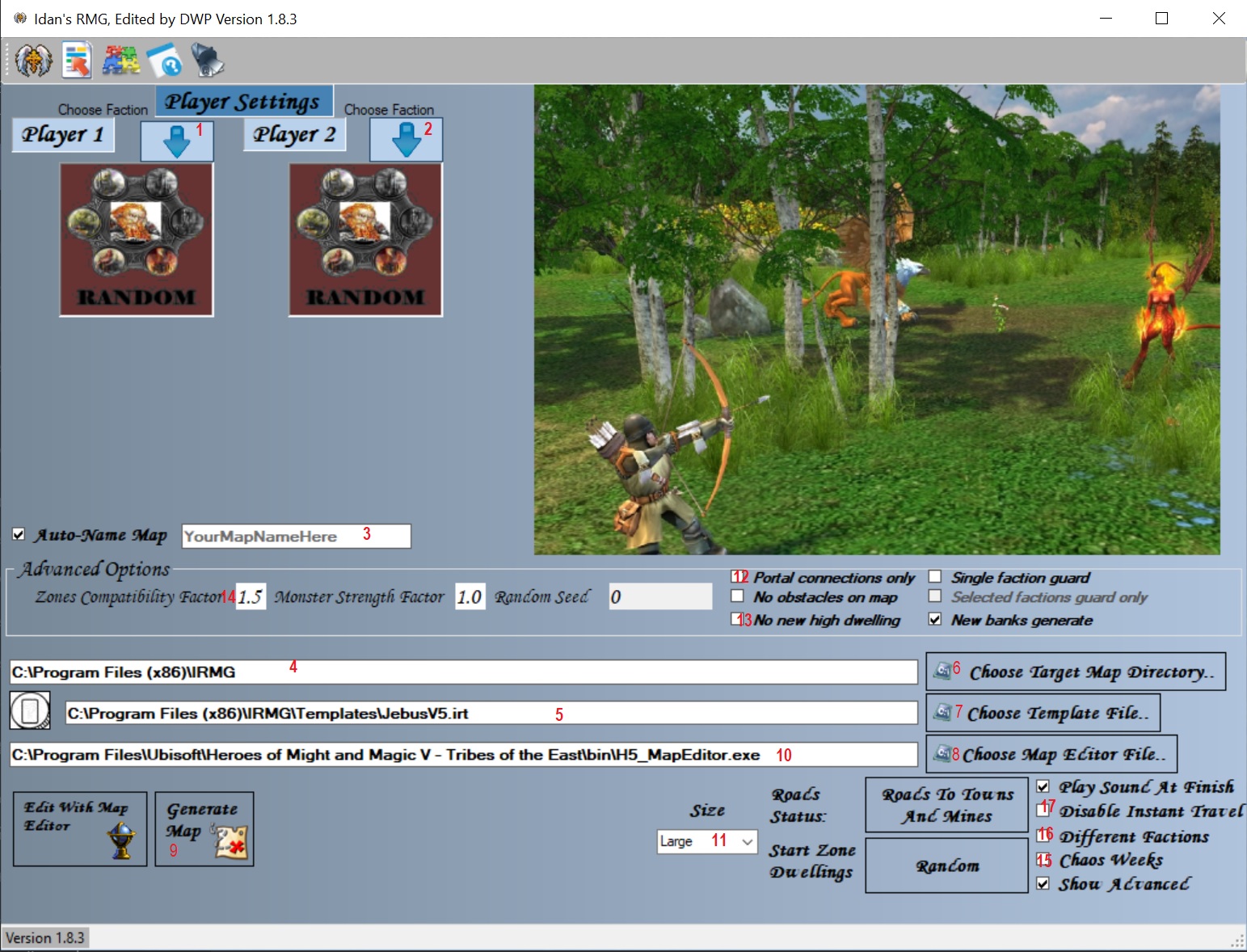 I will describe the options when generating a map.
1. Selection of the faction for the red player.
2. Selection of the faction for the blue player.
3. Name of the map being created.
4. Specify where the map will be saved.
5. Specify the template on which the map will be based.
6. Selection of the location where the map will be saved.
7. Template selection.
8. Map editor selection.
9. Button to start map generation.
10. Location of the map editor.
11. Selection of the map size.
12. Selection of whether there will be roads to cities and mines on the map.
13. Selection of the number of dwellings for native creatures.
14. Enable/disable the option to choose the strength of neutrals, the "density" of objects on the map, and so on. Set Zones compatibility factor to 1.5, Monster strength factor to 1.0, Random seed to 0.
15. Enable/disable "crazy" weeks, that is, weeks that change the game mechanics: either movement, or creature growth, or resource and gold production.
16. Enable/disable different random starting cities.
17. Enable/disable the "Astral Gate" spell in the Guild of Mages.
Recommended settings when generating a map:
1. "Zones Compatibility Factor" = 1.5
2. "Monster Strength Factor" = 1.0
3. "Portal Connection Only" - disabled (i.e., the button is not pressed)
4. "No obstacles On Map" - disabled
5. "Sigle Faction Guard" - Disabled
6. "Selected Faction guard only" - Disabled
7. "Different Faction" - Enabled
8. "Disable Intant Travel" - disabled
9. "Chaos week" - disabled.
IRMG 1.8.3
Template schemes
Large size templates
Huge size templates
The extracted folders with these templates must be copied to the folder where you have the IRMG generator installed.
I will describe the options when generating a map.
1. Selection of the faction for the red player.
2. Selection of the faction for the blue player.
3. Name of the map being created.
4. Specify where the map will be saved.
5. Specify the template on which the map will be based.
6. Selection of the location where the map will be saved.
7. Template selection.
8. Map editor selection.
9. Button to start map generation.
10. Location of the map editor.
11. Selection of the map size.
12. Selection of whether there will be roads to cities and mines on the map.
13. Selection of the number of dwellings for native creatures.
14. Enable/disable the option to choose the strength of neutrals, the "density" of objects on the map, and so on. Set Zones compatibility factor to 1.5, Monster strength factor to 1.0, Random seed to 0.
15. Enable/disable "crazy" weeks, that is, weeks that change the game mechanics: either movement, or creature growth, or resource and gold production.
16. Enable/disable different random starting cities.
17. Enable/disable the "Astral Gate" spell in the Guild of Mages.
Recommended settings when generating a map:
1. "Zones Compatibility Factor" = 1.5
2. "Monster Strength Factor" = 1.0
3. "Portal Connection Only" - disabled (i.e., the button is not pressed)
4. "No obstacles On Map" - disabled
5. "Sigle Faction Guard" - Disabled
6. "Selected Faction guard only" - Disabled
7. "Different Faction" - Enabled
8. "Disable Intant Travel" - disabled
9. "Chaos week" - disabled.
IRMG 1.8.3
Template schemes
Large size templates
Huge size templates
The extracted folders with these templates must be copied to the folder where you have the IRMG generator installed.
I will describe the options when generating a map.
1. Selection of the faction for the red player.
2. Selection of the faction for the blue player.
3. Name of the map being created.
4. Specify where the map will be saved.
5. Specify the template on which the map will be based.
6. Selection of the location where the map will be saved.
7. Template selection.
8. Map editor selection.
9. Button to start map generation.
10. Location of the map editor.
11. Selection of the map size.
12. Selection of whether there will be roads to cities and mines on the map.
13. Selection of the number of dwellings for native creatures.
14. Enable/disable the option to choose the strength of neutrals, the "density" of objects on the map, and so on. Set Zones compatibility factor to 1.5, Monster strength factor to 1.0, Random seed to 0.
15. Enable/disable "crazy" weeks, that is, weeks that change the game mechanics: either movement, or creature growth, or resource and gold production.
16. Enable/disable different random starting cities.
17. Enable/disable the "Astral Gate" spell in the Guild of Mages.
Recommended settings when generating a map:
1. "Zones Compatibility Factor" = 1.5
2. "Monster Strength Factor" = 1.0
3. "Portal Connection Only" - disabled (i.e., the button is not pressed)
4. "No obstacles On Map" - disabled
5. "Sigle Faction Guard" - Disabled
6. "Selected Faction guard only" - Disabled
7. "Different Faction" - Enabled
8. "Disable Intant Travel" - disabled
9. "Chaos week" - disabled.
IRMG 1.8.3
Template schemes
Large size templates
Huge size templates
The extracted folders with these templates must be copied to the folder where you have the IRMG generator installed.
 Будьте осторожны со своими желаниями. Иногда они исполняются.
Сервер в Discord
Стрим на twitch.tv
Стрим на GG
 ЛИДЕР Клана"ХРАНИТЕЛИ НЕБЕСНЫХ ВРАТ" Рейтинг: Латник
Вступление в клан "Хранители небесных врат"

