


 atlant108

Auto-translated
Friends, we would like to remind you that the EWA 2.2.2 mod includes the ability to add new maps and scenarios, both single-player and multiplayer. To add a new map (scenario) to the collection, you need to:
1) choose it from a wide variety of maps, and then download it:
/forum/section/159/
2) place the map in the Maps folder
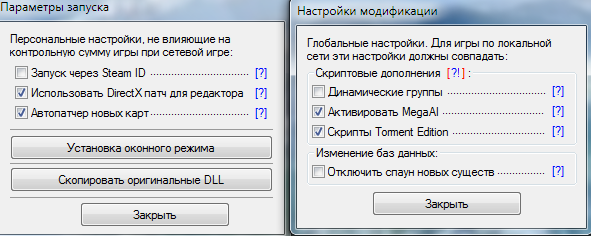
3) launch the launcher. Attention: there should be a checkmark in the launch settings for the "auto-patcher for new maps" option
4) launch Heroes V and enjoy the game.
Note #1: if you have done everything correctly, you should see the added new maps in the list (they will be at the very bottom)
Note #2: if the map does not start, or starts but freezes, this may be due to dynamic groups or TE scripts. To solve the problem, uncheck the "Dynamic Groups" option in the launcher settings, and if that doesn't help, you will need to uncheck the TE Scripts option.
1) choose it from a wide variety of maps, and then download it:
/forum/section/159/
2) place the map in the Maps folder
3) launch the launcher. Attention: there should be a checkmark in the launch settings for the "auto-patcher for new maps" option
4) launch Heroes V and enjoy the game.
Note #1: if you have done everything correctly, you should see the added new maps in the list (they will be at the very bottom)
Note #2: if the map does not start, or starts but freezes, this may be due to dynamic groups or TE scripts. To solve the problem, uncheck the "Dynamic Groups" option in the launcher settings, and if that doesn't help, you will need to uncheck the TE Scripts option.