


 fktifzobr


Auto-translated
Okay, I used to do it that way too.
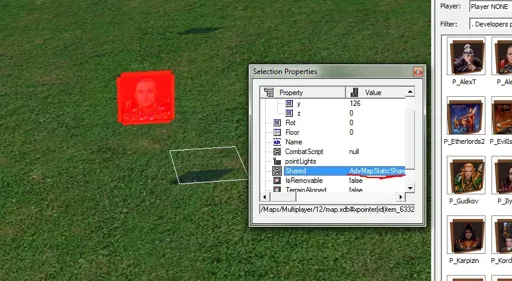
Place any object and go into it through this line (click on it and the ellipsis).
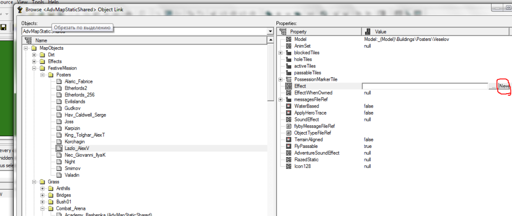
In that window, select the effect line and click on "new." A small window will open; enter any name for the effect in it.
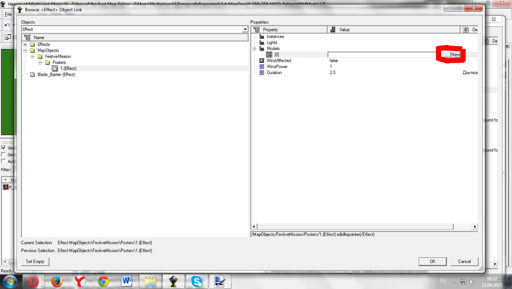
Then, in this line, create a new object, just like the effect, but with a different name.
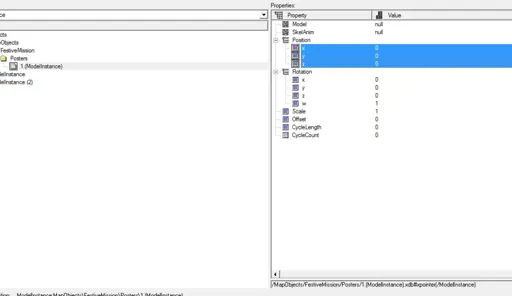
There, you need to insert a model and adjust its location (to make it easier, I immediately enter x -300 y -300).
Place any object and go into it through this line (click on it and the ellipsis).
In that window, select the effect line and click on "new." A small window will open; enter any name for the effect in it.
Then, in this line, create a new object, just like the effect, but with a different name.
There, you need to insert a model and adjust its location (to make it easier, I immediately enter x -300 y -300).