

 Pit for LM

Auto-translated
Automated report submission system.
English version
FAQ18. How to properly submit and confirm a game report?
After your application is accepted and you have played a match within the tournament, you need to submit a report for the game. To do this, use the automated report submission system:
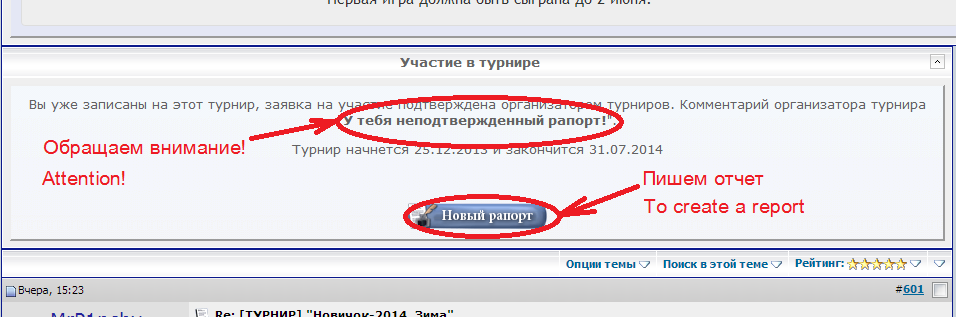
Click on the New Report button and go to the data entry form. Filling out all fields of the form is mandatory! A mini-demonstration of how to fill out a report is recorded in a video.
Enter all required information about the game, write your comments and tell interesting details in the answer box, and don't forget to thank your opponent for the game. Click the Reply button.
Your report appears in the topic, the report line appears in the List of Reports on the first page with the label unconfirmed, and the data is saved in the Heroes 3 reports database on the forum. Your nickname in the report line on the first page is a link to your report in the tournament topic.
If you made a mistake when entering the data, it is necessary to inform the tournament organizer about the error. You will not be able to correct it yourself; physically deleting the post with the report will not lead to its removal from the database.
After submitting the report, you must send a link to the report to your opponent, and he must confirm the game.
To confirm, the player must find the opponent's report either in the tournament topic:
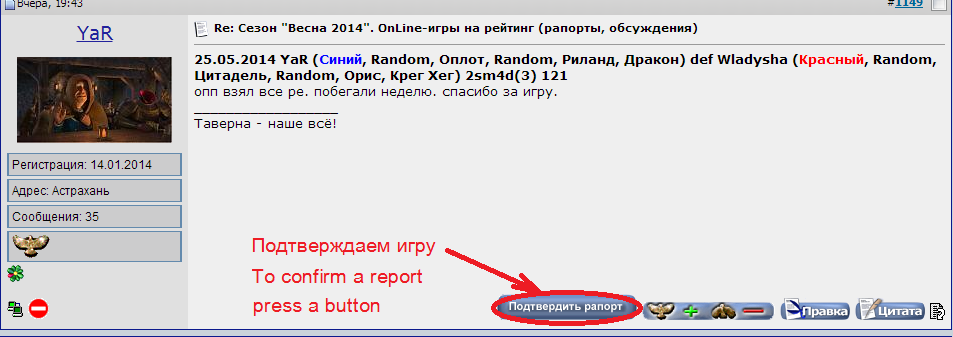
or use the List of Reports on the first page:

and click the Confirm Report button. Write comments about the game, press Reply, and see your confirmation in the tournament topic; in the list of reports, your nickname becomes a link to this post with the confirmation, and the status of the report changes to confirmed.
If you have complaints against your opponent, you should not confirm the game. You need to contact the organizer or judge of the tournament personally - write a Private Message on the forum, or contact them via ICQ / Skype, or use any other means.
English version
FAQ18. How to properly submit and confirm a game report?
After your application is accepted and you have played a match within the tournament, you need to submit a report for the game. To do this, use the automated report submission system:
Click on the New Report button and go to the data entry form. Filling out all fields of the form is mandatory! A mini-demonstration of how to fill out a report is recorded in a video.
Enter all required information about the game, write your comments and tell interesting details in the answer box, and don't forget to thank your opponent for the game. Click the Reply button.
Your report appears in the topic, the report line appears in the List of Reports on the first page with the label unconfirmed, and the data is saved in the Heroes 3 reports database on the forum. Your nickname in the report line on the first page is a link to your report in the tournament topic.
If you made a mistake when entering the data, it is necessary to inform the tournament organizer about the error. You will not be able to correct it yourself; physically deleting the post with the report will not lead to its removal from the database.
After submitting the report, you must send a link to the report to your opponent, and he must confirm the game.
To confirm, the player must find the opponent's report either in the tournament topic:
or use the List of Reports on the first page:
and click the Confirm Report button. Write comments about the game, press Reply, and see your confirmation in the tournament topic; in the list of reports, your nickname becomes a link to this post with the confirmation, and the status of the report changes to confirmed.
If you have complaints against your opponent, you should not confirm the game. You need to contact the organizer or judge of the tournament personally - write a Private Message on the forum, or contact them via ICQ / Skype, or use any other means.