


 ~no1_knows_me~

Auto-translated
I've checked out your OBS setup. What can I say? I downloaded 4.9 MB, installed it, configured it a bit, and I'm ready to stream. Everything is easy and straightforward. To complete the setup guide:
Configuring Open Broadcaster Software (OBS) for streaming on Twitch.tv
1) Register on www.twitch.tv 2) Download OBS http://sourceforge.net/projects/obsproject/files/OBS_0472b_Installer.exe/download 3) Install and launch OBS 4) Configure OBS: - Click Settings - Go to Encoding and set Quality to 10 - Go to Stream: > Mode - Live > Streaming Server - Twitch / Justin.tv > Server - EU: Frankfurt, DE > Play Path/Stream Key: - Go to your Twitch account - Go to the Dashboard and click on Stream Application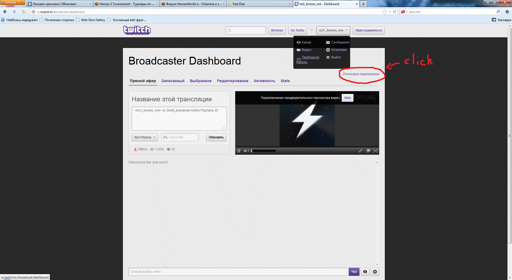 - A new tab will open, and on the right, click on "Show Key" (it should be something like live_38354680_wtg6G7u2irfUt5xe1Wd3QxpPhjlT2k). This is your Stream Key. Copy this string of letters and numbers and paste it into the Play Path/Stream Key field.
- Go to Video and:
> Base Resolution - leave it as is
> Scale Resolution - My base resolution is 1920x1080, and my processor won't allow me to output that without lag, so I set it to 2.00 (960x540)
We're done with the settings. Click OK
Now, at the bottom, where it says Sources, right-click - Add, and then choose either Display Capture (to stream everything that happens on your desktop) and click OK
or choose Game Capture (to stream only the game). You need to configure this a bit:
- Launch Heroes
- In the settings, in Application, select Heroes. If it's not in the list, click Refresh - it should appear now.
- And check Scale to screen and click OK
- A new tab will open, and on the right, click on "Show Key" (it should be something like live_38354680_wtg6G7u2irfUt5xe1Wd3QxpPhjlT2k). This is your Stream Key. Copy this string of letters and numbers and paste it into the Play Path/Stream Key field.
- Go to Video and:
> Base Resolution - leave it as is
> Scale Resolution - My base resolution is 1920x1080, and my processor won't allow me to output that without lag, so I set it to 2.00 (960x540)
We're done with the settings. Click OK
Now, at the bottom, where it says Sources, right-click - Add, and then choose either Display Capture (to stream everything that happens on your desktop) and click OK
or choose Game Capture (to stream only the game). You need to configure this a bit:
- Launch Heroes
- In the settings, in Application, select Heroes. If it's not in the list, click Refresh - it should appear now.
- And check Scale to screen and click OK
Now, click Start, and the stream is live :)
Good Luck ;)
Configuring Open Broadcaster Software (OBS) for streaming on Twitch.tv
1) Register on www.twitch.tv 2) Download OBS http://sourceforge.net/projects/obsproject/files/OBS_0472b_Installer.exe/download 3) Install and launch OBS 4) Configure OBS: - Click Settings - Go to Encoding and set Quality to 10 - Go to Stream: > Mode - Live > Streaming Server - Twitch / Justin.tv > Server - EU: Frankfurt, DE > Play Path/Stream Key: - Go to your Twitch account - Go to the Dashboard and click on Stream Application
Now, click Start, and the stream is live :)
Good Luck ;)
"Пришел, увидел, победил" - Юлий Цезарь.
"Пришел, скастовал, убежал" - Hit'n'Run.
- Почему женщины любят кентавров?
- И мужик в доме, и скотина в хозяйстве.
Штирлиц шел по коридору. Вдруг одна из дверей открылась, оттуда выскочил Борман, дал Штирлицу сильного пендаля и заскочил обратно. «Гарпия» - догадался Штирлиц.
"Пришел, скастовал, убежал" - Hit'n'Run.
- Почему женщины любят кентавров?
- И мужик в доме, и скотина в хозяйстве.
Штирлиц шел по коридору. Вдруг одна из дверей открылась, оттуда выскочил Борман, дал Штирлицу сильного пендаля и заскочил обратно. «Гарпия» - догадался Штирлиц.