Connection ErrorBad RequestThis page went staleSession ExpiredSign in requiredForbiddenNot FoundToo Many RequestsServer ErrorBad GatewayService UnavailableGateway TimeoutHTTP Version Not Supported
Session Expired
Your session has expired. Please log in to continue.
Sign in required
You need an account to do that. Sign in or create one — it only takes a minute.
This page went stale
Your security token was rejected, usually because the page sat open too long or you signed in elsewhere. Nothing was saved. Reload the page and try again.
Request Failed
We encountered an issue while processing your request.
Please check your internet connection and try again.
What are they? Daily saves involve saving the game every in-game day.
Why are they needed? - In most Tournaments, it is a mandatory requirement to keep saves at the end of each day until the end of the tournament for presentation to the judge in case of a controversial situation; - For analyzing the game – both your own and your opponent's; - They provide an opportunity to consult with a more experienced and stronger player and receive advice on how to play; - It is interesting and instructive to look back at your games after six months or a year and realize how much of a noob you were and how badly you squandered a winning position...
How to create them?
Option 1. Use HoMM3 HD.
Option 2. Manually save the game every day at the end of your turn. This must be done during your turn, not your opponent's turn, as saving during the opponent's turn may result in an incorrect save. Usually, players name their saves according to the in-game day - 111.gm2, ...., 125.gm2, etc. If there are several saved games (e.g., postponed) in the Games folder, it is convenient to use the opponent's nickname in the filename, for example, SEM_136.gm2. If the saves are planned to be sent to someone or attached to a report on the forum, it is better to use the nicknames of both players: Javdet_Pit_125.gm2.
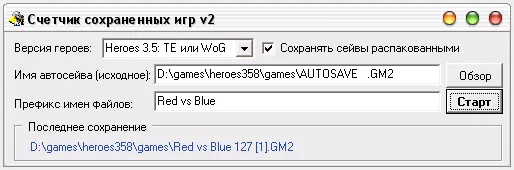
Option 3. Use the Autosave counter program, which automatically saves the game every day.
1. Launch Heroes and start a game. 2. After your first autosave, launch the Autosave counter program. 3. If you want to pack all files into one archive after the game, it is best to check the box "Save saves in unpacked format". 4. Choose the version (3.5 / III). Select the autosave file using "Browse". 5. Click "Start".
Sir_Four
How it works: The program monitors the appearance of files with the selected name, unpacks them, searches for information about the current player and the in-game date in the file, which was used to create the save, then renames either the original or the unpacked file (depending on what you choose). As a result, in the Games folder, after 5-10 seconds from each autosave, a file will appear in the format: Prefix MWD [C].GMx, where M is the month, W is the week, D is the day. GMx - gm2, gm3... depending on which save is selected. [C] - player color. 1-red, 2-blue, etc. You can use the prefix as a list of players, for example, "Red vs Blue".



 Pit for LM