Connection ErrorBad RequestThis page went staleSession ExpiredSign in requiredForbiddenNot FoundToo Many RequestsServer ErrorBad GatewayService UnavailableGateway TimeoutHTTP Version Not Supported
Session Expired
Your session has expired. Please log in to continue.
Sign in required
You need an account to do that. Sign in or create one — it only takes a minute.
This page went stale
Your security token was rejected, usually because the page sat open too long or you signed in elsewhere. Nothing was saved. Reload the page and try again.
Request Failed
We encountered an issue while processing your request.
Please check your internet connection and try again.
Information /creative adaptation of information from the Dreamcatcher website (author - a well-known online player from Barnaul, MaximusX) to this topic with my additions/.
Random Map Generator. Templates.
When creating a custom map, the Random Map Generator (RMG) in Heroes of Might and Magic III is based on information from the rmg.txt file, which is located in one of the game's resource files. This file contains descriptions of all templates. One template represents a set of rules for generating a map, i.e., it contains information about the principles of object placement and territory filling (number of towns, connections between towns, monster strength, types and number of objects on the map, etc.). Maps of one type are generated for each template. Each time a map is generated, a template is selected from this file in a conditionally random manner. "Conditionally" means that only those templates that meet the starting settings established in the game before generating a custom map (number of players, map size) are taken into account. Initially, the rmg.txt file was not entirely balanced because it contained unfair, overly easy, and "asymmetrical" templates. Therefore, a modified version of this file is more common. Those interested can view the attached file - rmgGood.txt. It simply removes the "bad" templates. And it contains almost 40 different templates for any settings. Among these templates are 2SM4d, 2SM4d(2), 2SM4d(3), 8MM6, and others, both known and unknown. In addition to these, amateur theorists have independently developed quite a few other interesting templates with diverse content, implying tactical variety, which are now actively becoming part of our gaming experience. Descriptions of the most common templates are provided and will be added in this topic. To play on your favorite template, you need to copy the text file of the template attached to the description into the Data folder (located in the folder where Heroes is installed). If necessary, rename it to rmg.txt and restart the game so that the changes take effect.
Basic concepts used in templates.
Zone - an area of the map with uniform terrain (grass, snow, swamp, etc.). The size of each zone is limited. For each zone, you can specify the type of terrain (set specific ones or link it to the castle type) and also what neutral towns and monsters may appear in that zone (using the same principle). For each zone in rmg.txt, it indicates which mines will be located in it, the range and density of various objects on the game map (specific objects are not specified, but a group of objects that may appear in this zone is specified).
Value parameter - determines the significance of an object. The higher this value, the better the object is considered. The range of objects in a zone is determined by this value. The Value parameter for an object directly affects the strength of the monsters guarding it. Accordingly, if monsters guard more than one object, their strength will be affected by the total significance of the guarded objects.
Here is information from heroes.ag.ru (author Typucm) about this:Typucm
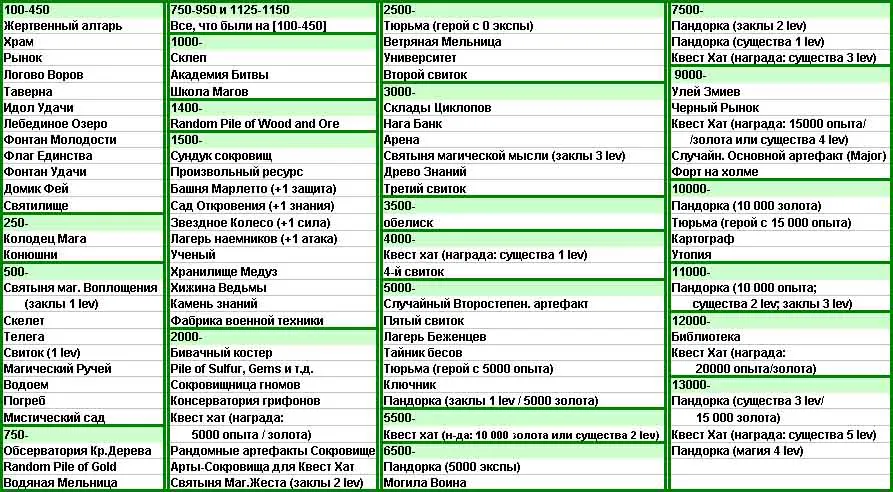
Each object on the map corresponds to a certain interval (and not a value, as was previously thought). If the interval or at least part of it falls within the interval specified in the template, this object can appear on the map. Moreover, the interval corresponding to the object can be open on one side (Value>const). That is, if you make "Value 20000-20000", very "cheap" objects will appear on the map, such as: crypt, battle academy, school of magic. The entry "1000-" corresponds to the interval "from 1000 to infinity" The entry "1000-1500" corresponds to the interval "from 1000 to 1500"
The Value values for some objects, experimentally determined by Tourist, are shown in the table:
Typucm
I also noticed in the presentation the phrase: Some treasure objects have restricted quantities. A second Temple in the same zone is not valuable and can appear repetitive. I decided to check. It turns out that two of the following cannot occur twice in one zone: Temple; Idol of Fortune; Swan Lake; Fountain of Youth; Flag of Unity; Fountain of Luck; Fairy Cottage; Sanctuary; Mage Well; Stables; Market (except for the snowy one); Magic Stream; Pond; Observatory of the Redwoods; Military Factory, i.e., all objects that give a bonus to Luck, Spirit, and/or movement when visited *. I haven't checked anything further yet. I didn't test dwellings (they start appearing at 1000), desert, and water objects. In huts and inns, they give creatures from one of the castles present on the map. The number of monsters of each type is fixed. For example, there are always 45 ogres, 30 magogs.
*however, exceptions to this rule are possible; they happen rarely and seem to be bugs in the generator.
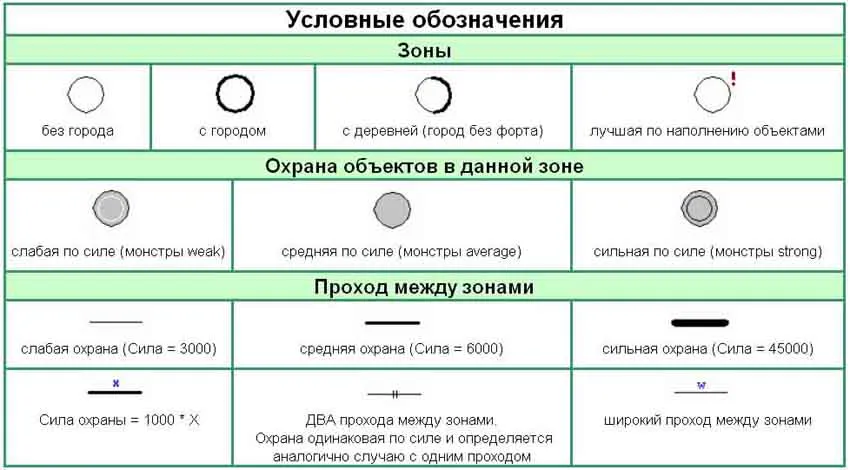
Each zone has connections with other zones; usually, passage between two zones is guarded by neutral monsters, whose strength depends on the importance of this passage.
Monsters. For each zone, the strength of the monsters inhabiting it is indicated. Weak or weak (k=0.5?) Average or average (k=1) Strong or strong (k=1.5?) The difference, for example, between strong and average monsters can be explained with an example. If there are strong monsters in zone A and medium ones in zone B, this means that the same object in zone A will be guarded by monsters that are 1.5 times stronger than in zone B. Note: Do not confuse this with the monster strength chosen when generating the map! The base value of monster strength is given in a table in Lider1's post.
When generating using the same template, the same zones, the same connections between them, and the filling of zones will be produced from the same ranges of objects. But the zone is not tied to the coordinates of the game map, so when re-generating one template, most likely all zones will be in different places on the game map. If you designate zones as vertices and passages between zones as links with certain weights, you get a graph that completely defines the topology of the map generated according to a specific template. This is the graphical scheme of the template. Conventional designations, which are often used when depicting the diagram of the template, are shown in the table:
All zones on the diagram are numbered. The zone where the player starts is colored in the color of that player's flag. Neutral zones are shaded gray. Resource pictures next to the zones mean that there will be a mine of the type depicted resource in this zone. If there is only one mine in the zone, nothing is written; if there are several, then the number of such mines is indicated in the upper right corner of the picture of the resource, and I like to draw all the mines))).



 Pit for LM