


 prime79

Auto-translated
Mods for Heroes of Might and Magic 5. Hammers of Fate.
Download mods via the link: https://disk.yandex.ru/d/Y2j4OY7IBpEUU
A collection of mods for the game Heroes of Might and Magic 5: Hammers of Fate.
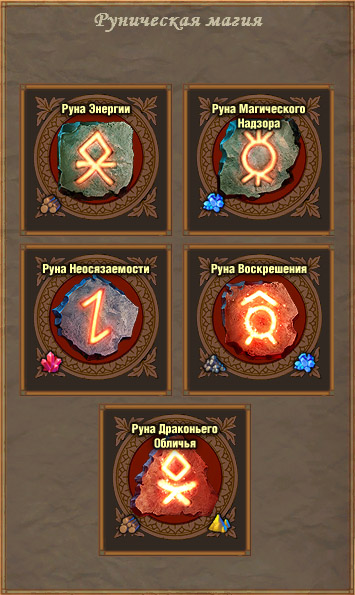
1) runes Icon Mod
The Runes Icon Mod modifies the rune magic icon images in the game. The rune icons now display their names and the images of resources required to use the rune.
Installation:
To install the modification for game version 2.1, copy the file F_RunesIconMod_v1.0rus.h5m to the Maps directory in the game folder. If your game version is 2.0, rename the file F_RunesIconMod_v1.0rus.h5m to F_RunesIconMod_v1.0rus.pak and copy it to the Data directory.
The mod is also functional in the "Tribes of the East" expansion.
2) Alternative "Bow Masters" model
The mod replaces the model and icon of the "Bow Masters".
Works on all game versions, as well as in Multiplayer.
Installation: place "Elves Mod v2.1.h5m" into the "Maps" folder in the game directory.
3) Alternative battle interface
The mod changes the layout and appearance of the control panel in combat.
The mod was "made" for the "Hammers of Fate" expansion, but it will also work in the original game and "Tribes of the East". In Multiplayer, there may be issues with the "collapse/show" chat button. Not compatible with other mods that change the battle interface.
Installation: place "Xazardous_Combat_Mod_2_1_en.h5m" into the "Maps" folder in the game directory. Author - Azard.
4) Skills and Abilities Wheel
Adds a button to the game which, when pressed, displays a "skills/abilities wheel" on the screen. The mod was developed for the "Hammers of Fate" expansion, but in my opinion, the skills in the original are the same, only dwarves were added, so it can be used in the original game as well. The mod will not work in "Tribes of the East".
Installation: place "Doc_Skills_2_1_1_ru.h5m" and "Doc_Skills_2_1_1_HQ.h5m" into the "Maps" folder in the game directory. The file "Doc_Skills_2_1_1_HQ.h5m" is optional... it provides high-resolution textures for the mod. The author of the mod and translation is indicated "in the wheel" in-game.
5) Numerical range in creature count tooltip
Adds a numerical range to the tooltip for the number of "enemy" creatures. Works in all parts of the game and in Multiplayer.
Installation: Move "m30_rus_neutralcounts.h5u" to the "UserMODs" folder in the game directory. Author: spamm
6) Castle screens in the main menu and colored panels
Here we have a whole set of modifications: they are made as one option for each city/race (8 in total) + a video from the main menu of the original game and the "Hammers of Fate" expansion.
Each mod contains the name of the castle, which reflects the essence of the mod. For those not fluent in English, here is a table -
Academy - Academy,
Haven - Haven,
Inferno - Inferno,
Dungeon - Dungeon,
Fortress - Fortress,
Necropolis - Necropolis,
Orcs - Stronghold,
Sylvan - Sylvan,
+
Dwarves - video from the "Hammers of Fate" expansion menu,
Original - video from the original game menu.
Mods can be combined, meaning you can pair any "castle-video" with any panel color, but you cannot set multiple castles or panel colors at once.
The "recolored panels" modifications cause problems when creating a game on the "Ubi" server, where buttons overlap each other; otherwise, no problems have been noticed.
Installation: look at the screenshots => choose the one you like => look at the screenshot name => select the file with the corresponding name from each archive => move it to the "UserMODs" folder in the game directory.
7) modern_heaven
In the "Hammers of Fate" add-on, a "half-race" of rebels appeared, which is essentially an alternative upgrade path for Haven creatures. However, you cannot play as rebels in a "normal way" because they do not have their own castle. This mod replaces the standard upgraded Haven units with their alternative versions (i.e., a Peasant upgrades not to a Militia, but to a Landlord, etc., up to the change of Archangel -> Fallen Angel).
8) NecroButton Adds a button to the top right corner of the adventure screen, which, when pressed, opens a table for raising undead indicating the cost in Turn Energy (TE).
The Runes Icon Mod modifies the rune magic icon images in the game. The rune icons now display their names and the images of resources required to use the rune.
Installation:
To install the modification for game version 2.1, copy the file F_RunesIconMod_v1.0rus.h5m to the Maps directory in the game folder. If your game version is 2.0, rename the file F_RunesIconMod_v1.0rus.h5m to F_RunesIconMod_v1.0rus.pak and copy it to the Data directory.
The mod is also functional in the "Tribes of the East" expansion.
2) Alternative "Bow Masters" model
The mod replaces the model and icon of the "Bow Masters".
Works on all game versions, as well as in Multiplayer.
Installation: place "Elves Mod v2.1.h5m" into the "Maps" folder in the game directory.
3) Alternative battle interface
The mod changes the layout and appearance of the control panel in combat.
The mod was "made" for the "Hammers of Fate" expansion, but it will also work in the original game and "Tribes of the East". In Multiplayer, there may be issues with the "collapse/show" chat button. Not compatible with other mods that change the battle interface.
Installation: place "Xazardous_Combat_Mod_2_1_en.h5m" into the "Maps" folder in the game directory. Author - Azard.
4) Skills and Abilities Wheel
Adds a button to the game which, when pressed, displays a "skills/abilities wheel" on the screen. The mod was developed for the "Hammers of Fate" expansion, but in my opinion, the skills in the original are the same, only dwarves were added, so it can be used in the original game as well. The mod will not work in "Tribes of the East".
Installation: place "Doc_Skills_2_1_1_ru.h5m" and "Doc_Skills_2_1_1_HQ.h5m" into the "Maps" folder in the game directory. The file "Doc_Skills_2_1_1_HQ.h5m" is optional... it provides high-resolution textures for the mod. The author of the mod and translation is indicated "in the wheel" in-game.
5) Numerical range in creature count tooltip
Adds a numerical range to the tooltip for the number of "enemy" creatures. Works in all parts of the game and in Multiplayer.
Installation: Move "m30_rus_neutralcounts.h5u" to the "UserMODs" folder in the game directory. Author: spamm
6) Castle screens in the main menu and colored panels
Here we have a whole set of modifications: they are made as one option for each city/race (8 in total) + a video from the main menu of the original game and the "Hammers of Fate" expansion.
Each mod contains the name of the castle, which reflects the essence of the mod. For those not fluent in English, here is a table -
Academy - Academy,
Haven - Haven,
Inferno - Inferno,
Dungeon - Dungeon,
Fortress - Fortress,
Necropolis - Necropolis,
Orcs - Stronghold,
Sylvan - Sylvan,
+
Dwarves - video from the "Hammers of Fate" expansion menu,
Original - video from the original game menu.
Mods can be combined, meaning you can pair any "castle-video" with any panel color, but you cannot set multiple castles or panel colors at once.
The "recolored panels" modifications cause problems when creating a game on the "Ubi" server, where buttons overlap each other; otherwise, no problems have been noticed.
Installation: look at the screenshots => choose the one you like => look at the screenshot name => select the file with the corresponding name from each archive => move it to the "UserMODs" folder in the game directory.
7) modern_heaven
In the "Hammers of Fate" add-on, a "half-race" of rebels appeared, which is essentially an alternative upgrade path for Haven creatures. However, you cannot play as rebels in a "normal way" because they do not have their own castle. This mod replaces the standard upgraded Haven units with their alternative versions (i.e., a Peasant upgrades not to a Militia, but to a Landlord, etc., up to the change of Archangel -> Fallen Angel).
8) NecroButton Adds a button to the top right corner of the adventure screen, which, when pressed, opens a table for raising undead indicating the cost in Turn Energy (TE).