


 Dirty_Player

Auto-translated
Tournament Information for January 19, 2016:
- Tournament start date – June 1, 2015;
- Tournament end date – January 19, 2016;
- Number of participants – 64;
- Default version – SoD 3.2;
- Templates: Panic, Jebus cross, Mini-Nostalgia, Diamond, 6LM10a, Spider, 8xm8a
GROUP STAGE
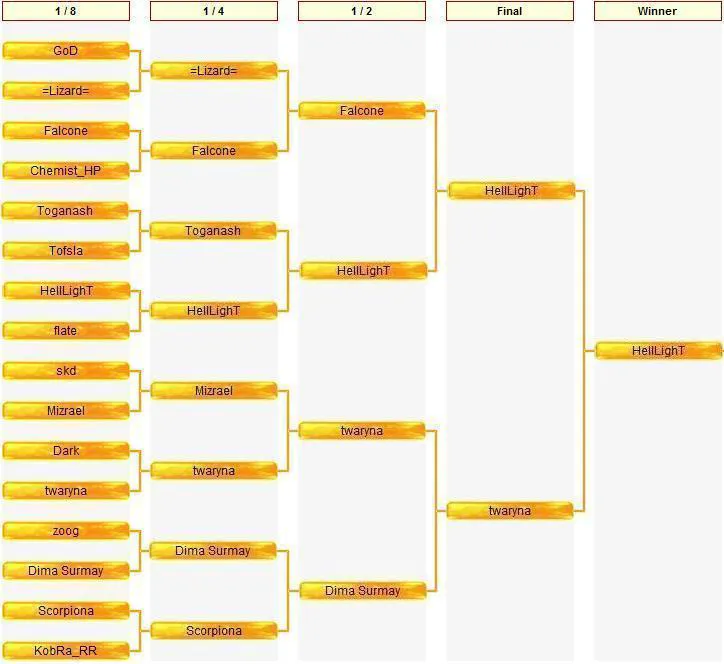
PLAYOFFS
All players need to do the following:
1. Check if your ICQ number is entered in your profile; add it there if it isn't.
If it’s already in your profile, you will see a small green daisy icon under your avatar – this symbolizes ICQ. If it isn’t there, follow the algorithm.
2. Submit an application in this thread. To do this, click the Register for the tournament button located at the beginning of this thread.
3. To create a report, click the New Report button, which is located at the top of each page of the thread, and enter all the required fields according to the template. After that, write detailed comments about the game.
4. To confirm the report, the second player needs to find the game report, click the Confirm Report button, and also write a detailed report.
5. It is considered good etiquette to thank your opponent for the game.
- Tournament start date – June 1, 2015;
- Tournament end date – January 19, 2016;
- Number of participants – 64;
- Default version – SoD 3.2;
- Templates: Panic, Jebus cross, Mini-Nostalgia, Diamond, 6LM10a, Spider, 8xm8a
GROUP STAGE
PLAYOFFS
All players need to do the following:
1. Check if your ICQ number is entered in your profile; add it there if it isn't.
If it’s already in your profile, you will see a small green daisy icon under your avatar – this symbolizes ICQ. If it isn’t there, follow the algorithm.
2. Submit an application in this thread. To do this, click the Register for the tournament button located at the beginning of this thread.
3. To create a report, click the New Report button, which is located at the top of each page of the thread, and enter all the required fields according to the template. After that, write detailed comments about the game.
4. To confirm the report, the second player needs to find the game report, click the Confirm Report button, and also write a detailed report.
5. It is considered good etiquette to thank your opponent for the game.