


 atlant108

Auto-translated
MiRyA, these mods are for a specific taste. Not everyone likes them. Which image are you referring to? What exactly isn't loading for you?
There are already enough mods for visuals. Read the forum threads carefully.
Added after 34 minutes
Instructions for compatibility of EWA 2.6.2 and NHF 0.86 modifications
1) Install EWA according to the installation instructions (see the first page of the discussion).
2) Download the archive NHF_0.86_Russian 26.07.17, and extract the archive.
3) Move the files NHF_0.86_data.pak and NHF_0.86_texts_RUS.pak to the data folder.
4) Run the NHF MS 0.9.exe patcher program.
(It is important to install the patcher in the folder with the EWA mod!)
5) Run the launcher. A sign that you have done everything correctly will be the message:
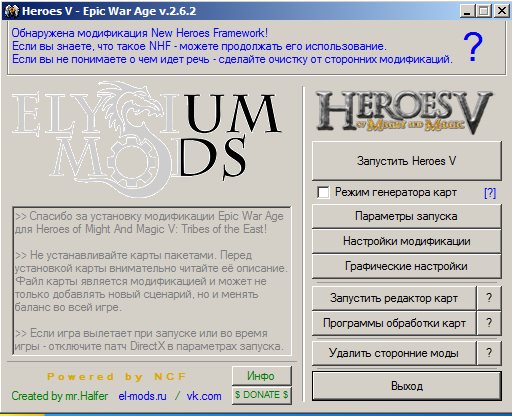
6) Enjoy the gameplay! By default, the game version will be displayed in the lower corner: NHF 0.86. However, all EWA functions are present in the game, except for the balance mods EE and Mega AI.
7) If you want to play a new map that is not in the collection, simply copy the map to the Maps folder. At the same time, the autopatcher built into the launcher will automatically patch this new map
There are already enough mods for visuals. Read the forum threads carefully.
Added after 34 minutes
Instructions for compatibility of EWA 2.6.2 and NHF 0.86 modifications
1) Install EWA according to the installation instructions (see the first page of the discussion).
2) Download the archive NHF_0.86_Russian 26.07.17, and extract the archive.
3) Move the files NHF_0.86_data.pak and NHF_0.86_texts_RUS.pak to the data folder.
4) Run the NHF MS 0.9.exe patcher program.
(It is important to install the patcher in the folder with the EWA mod!)
5) Run the launcher. A sign that you have done everything correctly will be the message:
6) Enjoy the gameplay! By default, the game version will be displayed in the lower corner: NHF 0.86. However, all EWA functions are present in the game, except for the balance mods EE and Mega AI.
7) If you want to play a new map that is not in the collection, simply copy the map to the Maps folder. At the same time, the autopatcher built into the launcher will automatically patch this new map