Skip to content

Posts from Technical issues with Heroes III.

4.5 (4 ratings)
13 years ago
Auto-translated
Playing through Hamachi. When trying to create a game using the TCP/IP protocol, the following happens:
I don't see any connected players, the icons for selecting a map and castle are unavailable, and the "start game" button reacts as if there are not enough players to start the game. If I connect to someone else's game, I can't choose a castle color or hero, the "start" button is inactive, and the chat doesn't work. Although the list of connected players is visible. We tried starting a game, and it doesn't launch with me; if I leave during the launch, everything works normally without me.
I read the forum, and I think I did everything as described in the Hamachi topic; the ping is present.
What should I do? Help!

13 years ago
Auto-translated
I think I did everything as described in the Hamachi topic,
specifically? Did you try different Hamachi versions? [off]It would be good to create an FAQ about these issues in the topic.[/off]
13 years ago
Auto-translated
Problem when playing with three players. Version WoG 3.58f. When passing the turn to the last player, the game freezes during data transfer. /topic/9298/ This topic has already been raised here, but I haven't found an answer yet.
User Avatar
13 years ago
Auto-translated
Problem with online multiplayer in Heroes of Might and Magic III. Windows 7. When attempting to establish a network connection, I receive the message: "Error establishing connection *connection type*. Please try again." This happens for all connection types and for all versions of the game installed on my computer – pure SoD, pure AB, Complete Edition, TE. Running in compatibility mode doesn't help. I initially added an exception for the game in the firewall, and then I completely disabled it, but it didn't help. We searched online and found a possible solution: replacing the dpwsockx.dll file in system32 with an older version. We downloaded it from one source. It helped a friend with the same issue, but not me. I replaced this library in system32 and also put it in the root folder of the game – no effect.

In the end, I had to install Windows XP in a virtual machine, and everything works perfectly there. With the same game, the same internet connection, and the same Hamachi, but it works. However, using a virtual machine is quite a hassle.
12 years ago
Auto-translated
Hey guys, has anyone encountered this? I installed the game, the Platinum edition, applied the HD patch, launch the launcher, launch the game, and then I get the message: "you should run hd3_launcher.exe first after homm3 hd installation." What's going on, and how can I fix it?
12 years ago
Auto-translated
Can anyone help me? I click "start" and the game kicks me out.
12 years ago
Auto-translated
Good evening, everyone.
I encountered the following issue: I was playing as Necropolis, and everything was fine, I was collecting skulls, and at some point, they suddenly disappeared! I know about this bug; it's related to the maximum allowed number. But has it really not been fixed in the HD mod yet?
HD mod, I can't say which version, I updated it in November 2013 to the latest version available at that time.
In reply to Terraniux
12 years ago
Auto-translated
Good day. I have a question regarding autosaves. I have the HD mod installed, but there are no autosaves by day. I tried installing the autosave counter, but it gives an error – something about incompatibility with a 64-bit system.
12 years ago
Auto-translated
Looking for _HD3_Data\_HD3_.ini
in it, check:
Autosave
should be = 1, it used to reset with updates, but it seems to be working fine now.
In reply to Tofsla
User Avatar
12 years ago
Auto-translated
Tofsla
Good day. I have a question about autosaves. I have the HD mod installed, but there are no autosaves by day.
You need to enable this option manually. To do this, when launching the game, click the More Options button (ini file) and find the line EveryDaySaver and change the number 0 to 1 next to it.
12 years ago
Auto-translated
Thank you, it helped.
12 years ago
Auto-translated
Technical issue!
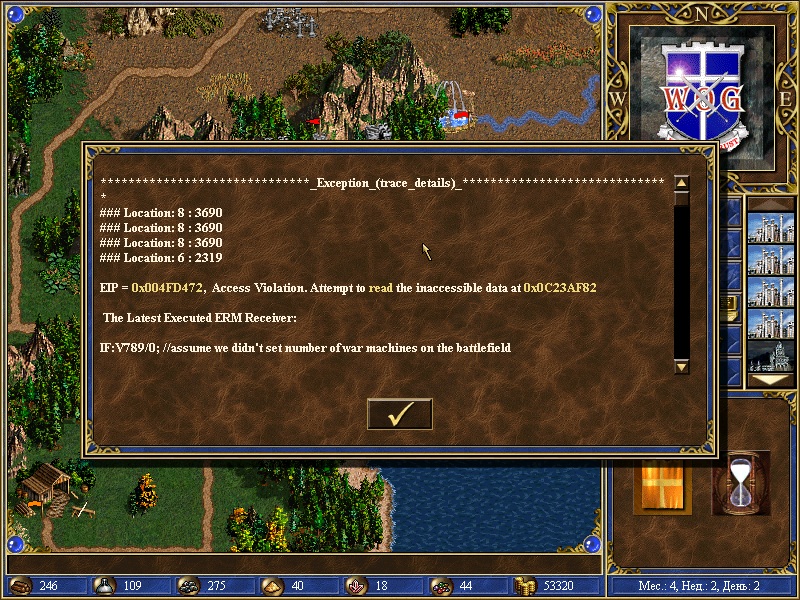
Please help. In the "Forward Vikings" map, sometimes when the computer starts a battle, an error occurs, and I get kicked out of the game. I'm already tired of loading the game for two players (for myself and for the enemy who wants to fight) and fighting for the computer (using quick battle) to avoid the error, saving, and then loading the single-player game again for my color.
Here is a screenshot of the error:

Thank you in advance.
User Avatar
12 years ago
Auto-translated
And why am I not surprised? Because I see WOG in the top right corner. Install normal Heroes SoD (Complete Collection, The Shadow of Death) and put the ND mod on top of it, and it will be fine.
In reply to Lider1
12 years ago
Auto-translated
Lider1
And why am I not surprised? Because I see WOG in the upper right corner. Install normal Heroes SoD (complete collection, The Shadow of Death) and put the ND mod on top of it, and it'll be fine.
WoG works normally for me. But this error occurs on this map! I don't want to play The Shadow of Death. I really like WoG.
In reply to Zoreslav
User Avatar
12 years ago
Auto-translated
Zoreslav
I don't want to play The Shadow of Death. I really like WoG.
Then good luck. Have fun.

Statistics

Welcome our newest member: recijeb