

Skip to content

Posts from Full irintal.

No ratings yet — be the first to rate!
User Avatar
15 years ago
Auto-translated
Ladies and gentlemen, or rather, everyone, this thread is for sharing your maps. Here are mine, and here's how to share them:

The map must be tested by the person submitting it.
The map must have a brief description of the plot.
The map size in squares must be indicated + the designation for Heroes 3 [S, M, L, XL].
The version of Heroes 3 must be indicated. [SoD, RoE, AB]
A small screenshot of the map.
Additional description [/SI:smile33: :smile25: :smile41: :smile32: ZE]
And here are my maps:
1. Pirates of the Caribbean
Plot: Kill everyone.
Size: XL or 90 kb.
Compatible with: Heroes 3 SoD, I'm not sure which version I have.
Screenshot will be below.
Kill Barbossa.
The map is here
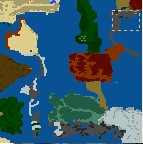
And the screenshot is here

Next map:
2. The Adventures of Zharet Kharet
Plot: Capture the city.
Size: S or 11 kb.
Compatible with: Heroes 3 SoD, I won't repeat myself, it's already clear.
Screenshot and map are here:
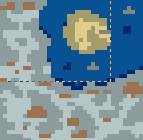


Next, we have:
3. City of Legends
Plot: Capture the city.
Size: XL or 92 kb.
Screenshot and map are here:
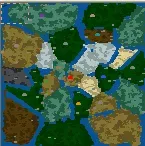


Next, we have Khan Topighyn 2
Plot: Kill everyone.
Size: S or 9.34 kb.
Screenshot and two maps are here:
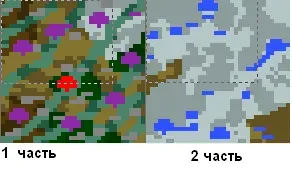


Whew, I'm tired of typing, but here's my last map:
Dragon Hunter
Plot: Defeat the monster.
Size: L or 30 kb.
Screenshot and map are here:

Add your maps, and I'm off:smile13: The smiley above should be like this:) and not like this: (
User Avatar
15 years ago
Auto-translated
Help me, give me a link to the patch, I don't know!!!!!!!!!!!!!!!!!!!!!!!!!!!!!!!!!!!!!!!!!!!!!!!!!!!!!!!!!!!!!!!!!!!!!!!!!!!!!!!!!!!!!!!!!!!!!!!!!!!!!!!!!!!!!!!!!!!!!!!!!!!!!!!!!!!!!!!!!!!!!!!!!!!!!!!!!!!!!!!!!!!!!!!!!!!!!!!!!!!!!!!!!!!!!!!!!!!!!!!!!!!!!!!!!!!!!!!!!!!!!:smile35:
User Avatar
15 years ago
Auto-translated
Let's do it this way: upload the image and check the location of the actions under the numbers 1234; everything is written there.
If you need more help, I'm here.
Attachments 1
1 file attached • Total size: 238.8 KB
User Avatar
15 years ago
Auto-translated
Want to find out how this little program works?
Instructions:

Go to the Map Editor, copy (Ctrl+C) any object, in the Object Editor select the map editor version and click "Paste".

What can be done:
1) The first GroupBox is for the image. Here you can enter the name of a .def file from the .LOD in the "Picture" field, copy the image of another object (copy and paste icons), or select an image of an object of a specific type and subtype ("Type", "Subtype").
2) There is also an "A part of ground" checkbox. Objects with this flag are placed beneath objects without it. For example, pits, silt on water, etc., have this.
3) Next are "Type" and "Subtype" again. This is the actual object type.
4) The list of terrains that this object can be placed on.
5) The object's passability map. Just like in the MapEditor, but with green squares. Now they have a special meaning. If you want to place one object on top of another, make its entrance (only one cell!) green and you will be able to place it anywhere. Then open the map in H3MapTool and click the "Convert Enters" button.

Finally, click "Copy" and Ctrl+V in the map editor.

You can also save and load objects. There are already several interesting objects in the "Objects" folder.

Notes:
1) Do not change the actual type of objects. Many objects have additional properties; if these aren't found, the game crashes. Instead, change the "Appearance".
2) When changing city images, the map editor continues to display them as cities, but in-game they sometimes look correct.
3) In the Data directory lies "Objects.txt", extracted from H3WOG 3.58 .LOD (it was called "ZEOBJCTS.TXT" or "ZOBJCTS.TXT" there) and cleaned of things I didn't need. When updating the WOG version, a new file can be placed in its stead. Objects1.txt contains several interesting objects added by me. You can add more: Objects2.txt, etc.
4) There is also a "Monsters.txt" file there. You can update it using ERM Help. Each line in it must start with the monster number.
Attachments 1
1 file attached • Total size: 350.8 KB
User Avatar
15 years ago
Auto-translated
Are you unable to write messages?
User Avatar
15 years ago
Auto-translated
During gameplay, press the [Tab] key and enter the following codes:
nwcagents - add 10 Black Knights to the squad for each available slot
nwclotsofguns - obtain all combat machines
nwcneo - grant the hero an additional level
nwctrinity - add 5 Archangels to the squad for each available slot
nwcfollowthewhiterabbit - increase luck to the maximum
nwcnebuchadnezzar - unlimited movement
nwcmorpheus - increase morale to the maximum
nwcoracle - reveal the "obelisk map" (mosaic)
nwcwhatisthematrix - reveal the map
nwcignoranceisbliss - remove the map from the screen
nwctheconstruct - obtain 100,000 gold and 100 units of each resource
nwcbluepill - lose
nwcredpill - win
nwcthereisnospoon - grant the hero 999 mana and all spells
nwczion - obtain all buildings
nwcphisherprice - change the color scheme
User Avatar
15 years ago
Auto-translated
How do you award trophies to the winner online?
User Avatar
15 years ago
Auto-translated
I don't know how to participate in contests on the website, so I came up with my own. Here, we will post our maps and vote for them. Please read the rules. Maps must be for Heroes 3 SoD and similar.
1. There will be 25 votes available, meaning 25 maps.
2. Each map creator writes the number of their map in their message, for example:
1 map
with a description, etc., below.
2. You must vote for the map number. At the end of the contest, I will announce the winner, who will receive maximum reputation and honor on the forum, etc.
Rules in the topic:
1. No insults.
2. Maximum 25 messages with maps.
3. Map creator numbers must be higher.
Also, a vote will be given for my map; my number is 1 at the top.
In case of non-compliance with the rules, a complaint will be filed about the violation of the portal's rules and this topic by that visitor.
How to describe maps on the forum, how to post a map, was written by the creator.

:smile16: :smile16: :smile16: :smile16:
The map must be tested by the sender.
The map must have a brief description of the plot.
The map size in squares must be indicated + the Heroes 3 designation [S, M, L, XL].
Indication of the Heroes 3 version [SoD, RoE, AB] is welcome.
A small screenshot of the map is welcome.
Additional description is welcome.
The map must be yours.
And here is mine.
Plot: Kill the Evil Sorcerer.
Size: XL
Heroes version: SoD
Download here
Attachments 1
1 file attached • Total size: 72.3 KB
User Avatar
15 years ago
Auto-translated
Here, we will discuss the latest news about the heroes.
In reply to Полный иринтал
15 years ago
Auto-translated
I downloaded Pirates of the Caribbean. The only positive thing is a couple of beautiful landscapes; otherwise, I haven't seen a worse map.
In reply to Полный иринтал
User Avatar
15 years ago
Auto-translated
Pirates of the Caribbean, Khan Toptygin 1 and 2, and The Adventures of Zharet Kharet – these are not your maps! They are in my collection and were created long before you became acquainted with "Heroes"!
If you continue to behave this way, you will be permanently banned here!
It was still amusing to read your messages, but now it's just disgusting.
In reply to Полный иринтал
15 years ago
Auto-translated
I played the original Pirates map; it was a good map, and Irintal simply reworked it, taking it to the extreme.
In reply to Полный иринтал
User Avatar
15 years ago
Auto-translated
It’s not my thread, but I created it so that people could add maps, regardless of whether they are mine or someone else’s.
User Avatar
15 years ago
Auto-translated
I'll give you a tip: make more sushi, and the maps will look better. Aside from that, the map is actually pretty good.

Statistics

Welcome our newest member: recijeb

Users Online 1 users 1269 guests

