Connection ErrorBad RequestThis page went staleSession ExpiredSign in requiredForbiddenNot FoundToo Many RequestsServer ErrorBad GatewayService UnavailableGateway TimeoutHTTP Version Not Supported
Session Expired
Your session has expired. Please log in to continue.
Sign in required
You need an account to do that. Sign in or create one — it only takes a minute.
This page went stale
Your security token was rejected, usually because the page sat open too long or you signed in elsewhere. Nothing was saved. Reload the page and try again.
Request Failed
We encountered an issue while processing your request.
Please check your internet connection and try again.
Error Details:
Share Link
Heroes of Might and Magic III - Complete Collection + Era2 + VCMI + Utility.Auto-translated
Good afternoon. I installed everything, I launch VCMI, the Forgotten Field mod. It starts to launch, errors appear, and in the end, the game doesn't run. Am I doing something wrong? Error log:
Hello! Does it only crash with this mod, or does VCMI not work at all?
Hello everyone, I downloaded everything, and it all extracted without errors. Then, I launch the main menu, and nothing can be clicked. When selecting a map, it gives an error: P.S.: Windows 10 on a Mac in the Parallels program.
Hello, I wanted to express my gratitude to the author of this compilation. I noticed an unpleasant bug related to portraits. For some reason, when using the era add-on, the large icons of some heroes (e.g., Orrin or Christian) change to others. Using the Dtnmang portraits mod did not solve the problem. I spent a long time searching through the files but couldn't find these images. I would appreciate it if you could fix this. Everything else works, and I haven't made any changes to the folders. I tried disabling plugins in the WOG settings, but it doesn't help. In the classic WOG version, without the era add-on, everything is displayed correctly. The issue seems to be with the era files.
http://prntscr.com/jvo4sb
Good day! It's strange that it shows this when the game is set to "default" on the C drive. And there isn't even such a folder on the D drive. A complete removal and reinstallation doesn't help. Apparently, this is why there are problems with both online and single-player games. What can be done?
Can you tell me how to download everything and what to do next? I just downloaded all the archives and setup, what's next? Should I put everything from the archives into one folder and use the setup? Or should I put the archives in one folder and use the setup? Please help, I really liked this collection (I have Windows 7). Please explain everything in order if it's not too much trouble (thank you in advance).
Added 2 hours 55 minutes later Thank you, I figured it out myself (JUST PUT ALL THE ARCHIVES AND SETUP IN ONE FOLDER AND (without extracting) RUN THE SETUP):smile03: HOPE IT WORKS:confused:
Yay, it works, thank you, and a like to the creator:smile44:
If there is an enemy stack nearby and the hero doesn't have a Sniper Bow, they can only attack in melee. Otherwise, the archers will always shoot, and it's impossible to block them. This applies to the pure SoD or Complete Collection. Mods may have different mechanics.
Воскресайте, камінні душі, Розчиняйте серця і чоло, Щоб не сказали Про вас грядущі: їх на землі не було… (Василь Симоненко. Люди – прекрасні)
I wanted to ask how to solve the following problem. When launching the game from the "Heroes of Might and Magic Online Mods" section, the game window is too small; this doesn't happen with other mods/parts. How can I fix this? I haven't found a solution, or maybe I'm just not thinking clearly.
A problem arose in this latest version when playing Heroes 3: Era 2 + XXL mod over a network. The issue is that when playing with 2 players, everything works fine, but when playing with 3, one person connects to the server without any problems, while the second person receives a message saying that the IP address was not found. However, if the first person exits and rejoins, the second person can connect. After that, the first person can also join, but there's a problem between the first and second players: they can't see the castle selection screen. Also, in the game itself, they can't see each other's chat, and when passing the turn from the first to the second player, it displays an error related to data transfer. This has been tested using Hamachi and Radmin VPN, but the issue persists.
Please help me troubleshoot this build and clarify a few questions.
First, when I run Start.exe, nothing launches from it. I click on, for example, "Complete," and nothing happens.
Second, in the launcher itself and when prompted about updates, the font is distorted, and it displays as hieroglyphs.
In general, I'm launching through HD_Launcher.exe in the Complete folder. It says that all the popular mods are here. I want to play Fresh Mod; how do I enable it? It's not in the plugins list; there's only some SuperPack-Rus.
And most importantly, regarding online play. Does it only work when launching Heroes 3 HD? I launch it, click on the online lobby, and it asks about an update with that distorted font, where nothing is clear. I click "Yes" twice, and it says that the _HD3_Data folder does not exist, even though it does.
[Added 2 minutes later]
Please provide a link to a step-by-step guide on what to install and where, in what order, etc., so that I can end up with exactly the same build that pro players use. As far as I know, there should be a choice between regular SoD, SoD + Fresh Mod, and HotA, and all of this in HD. Does it turn out that only in these versions is there an online lobby, and can you play online? In other versions like WoG, Era, or something else, is it not possible? And how do I update correctly?
My operating system is Windows 10 64-bit in English (in case that matters).
P.S. In HotA, I click "Online Lobby," and it says "Lobby is currently offline," even though it doesn't ask about updating HD.
Please tell me, what is the correct way to update HotA in a HoMM build? In build 1.5.3, I have 1.5.4 installed. If I simply copy it over, will I break everything else?
UPD I ran the 1.5.4 update and specified the Complete folder. HotA updated, other versions of Heroes didn't break; the question is resolved, but there is another one.
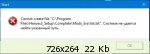
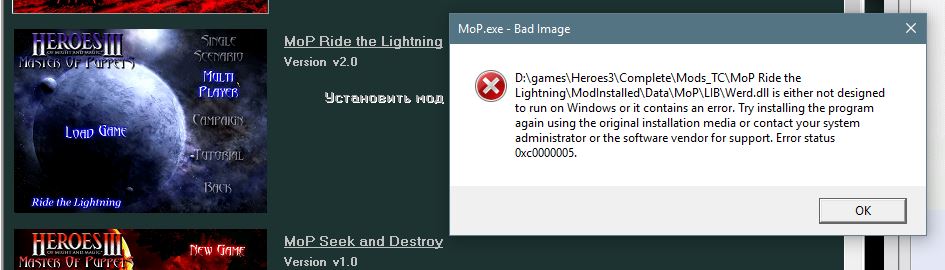
I click "Heroes TC". I select a mod, for example, "MoP Ride the Lighting". I click "Install mod". Something installs for quite a long time, but without errors. I click "Launch mod", and I see the following error: The same happens with other mods in this section.
Please tell me, how do I correctly update HotA in the HoMM build? In build 1.5.3, I have 1.5.4 installed. If I just copy it over, will I break everything else?
UPD I ran the 1.5.4 update and specified the Complete folder. HotA updated, other versions of Heroes didn't break; the question is resolved, but there is another one.
I click "Heroes ТС". I select a mod, for example, "MoP Ride the Lighting". I click "Install mod". Something installs for quite a long time, but without errors. I click "Run mod", and I see an error like this: The same happens with other mods in this section.
Which Windows? I suggest removing all attributes from the game folder. Also try to find the exe file for launching the modification and run it in compatibility mode with another Windows!
Added after 1 hour 34 minutes alpex
Please tell me, how do I correctly update HotA in the HoMM build? In build 1.5.3, I have 1.5.4 installed. If I just copy it over, will I break everything else?
UPD I ran the 1.5.4 update and specified the Complete folder. HotA updated, other versions of Heroes didn't break; the question is resolved, but there is another one.
I click "Heroes ТС". I select a mod, for example, "MoP Ride the Lighting". I click "Install mod". Something installs for quite a long time, but without errors. I click "Run mod", and I see an error like this: The same happens with other mods in this section.
This is a Windows problem! I have the same (I'm currently on Win10)! I'm trying to figure it out! There are plenty of similar problems on the internet! So far without result! In Win7, I didn't have such problems before!



 rruuss